
gridview.count不滚动颤振
gridview.count不滚动颤振
提问于 2020-08-18 08:48:51
在我的应用程序中,我把gridview.count放在列小部件中,但是gridview.count没有滚动并在底部溢出,所以请给出一些建议
这是我的密码
 @override
 Widget build(BuildContext context) {
 return Stack(
  children: <Widget>[
    Image.asset(
      "images/background.png",
      height: MediaQuery.of(context).size.height,
      width: MediaQuery.of(context).size.width,
      fit: BoxFit.fill,
    ),
    Scaffold(
      backgroundColor: Color(0x00000000),
      body: Center(
          child: Column(
            mainAxisAlignment: MainAxisAlignment.start,
            crossAxisAlignment: CrossAxisAlignment.center,
            children: <Widget>[
              Container(
                child: Padding(
                  padding: EdgeInsets.only(top: 50,bottom: 10),
                  child: Row(
                    children: <Widget>[
                      Spacer(flex: 2),
                      Text(
                        'Interests',
                        textAlign: TextAlign.center,
                        overflow: TextOverflow.ellipsis,
                        maxLines: 1,
                        style: TextStyle(
                          color: Color(0xFF0066CB),
                          fontSize: 20.0,
                        ),
                      ),
                      Spacer(),
                      Expanded(
                        child:SvgPicture.asset(
                          "images/vector.svg",
                          height: 30.0,
                          width: 30.0,
                        ),
                      )
                    ],
                  ),
                ),
              ),
              Padding(
                padding: EdgeInsets.only(top: 10,bottom: 90,left: 10,right: 10),
                child: GridView.count(
                     scrollDirection: Axis.vertical,
                     crossAxisCount: 3,
                     crossAxisSpacing: 5.0,
                     mainAxisSpacing: 5.0,
                     shrinkWrap: true,
                     children: List.generate(20, (index) {
                       return Padding(
                         padding: EdgeInsets.all(5.0),
                         child: Container(
                           child: SvgPicture.asset(
                             "images/register_top_logo_new.svg",
                           ),
                           padding: EdgeInsets.all(20.0),
                           height: 135.0,
                           width: 135.0,
                           decoration: BoxDecoration(
                             border: Border.all(
                               width: 1.0,
                               color: Color(0xFFF9AD16),
                             ),
                           ),
                         ),
                       );
                     },
                     ),
                   ),
              ),
            ],
          ),
       ),
     ),
    ],
   );
 }
这是我运行应用程序时得到的日志
I/flutter (16748): The relevant error-causing widget was:
I/flutter (16748):   Column
I/flutter (16748):   file:///C:/Users/mayur/AndroidStudioProjects/flutter/webinar-mobile/lib/activities/interests_activity.dart:30:22
I/flutter (16748):
I/flutter (16748): The overflowing RenderFlex has an orientation of Axis.vertical.
I/flutter (16748): The edge of the RenderFlex that is overflowing has been marked in the rendering with a yellow and
I/flutter (16748): black striped pattern. This is usually caused by the contents being too big for the RenderFlex.
I/flutter (16748): Consider applying a flex factor (e.g. using an Expanded widget) to force the children of the
I/flutter (16748): RenderFlex to fit within the available space instead of being sized to their natural size.
I/flutter (16748): This is considered an error condition because it indicates that there is content that cannot be
I/flutter (16748): seen. If the content is legitimately bigger than the available space, consider clipping it with a
I/flutter (16748): ClipRect widget before putting it in the flex, or using a scrollable container rather than a Flex,
I/flutter (16748): like a ListView.
I/flutter (16748): The specific RenderFlex in question is: RenderFlex#42dda relayoutBoundary=up5 OVERFLOWING:
I/flutter (16748):   needs compositing
I/flutter (16748):   creator: Column ← Center ← _BodyBuilder ← MediaQuery ← LayoutId-[<_ScaffoldSlot.body>] ←
I/flutter (16748):     CustomMultiChildLayout ← AnimatedBuilder ← DefaultTextStyle ← AnimatedDefaultTextStyle ←
I/flutter (16748):     _InkFeatures-[GlobalKey#417d7 ink renderer] ← NotificationListener<LayoutChangedNotification> ←
I/flutter (16748):     PhysicalModel ← ⋯
I/flutter (16748):   parentData: offset=Offset(0.0, 0.0) (can use size)
I/flutter (16748):   constraints: BoxConstraints(0.0<=w<=360.0, 0.0<=h<=640.0)
I/flutter (16748):   size: Size(360.0, 640.0)
I/flutter (16748):   direction: vertical
I/flutter (16748):   mainAxisAlignment: start
I/flutter (16748):   mainAxisSize: max
I/flutter (16748):   crossAxisAlignment: center
I/flutter (16748):   verticalDirection: down
I/flutter (16748): ◢◤◢◤◢◤◢◤◢◤◢◤◢◤◢◤◢◤◢◤◢◤◢◤◢◤◢◤◢◤◢◤◢◤◢◤◢◤◢◤◢◤◢◤◢◤◢◤◢◤◢◤◢◤◢◤◢◤◢◤◢◤◢◤◢◤◢◤◢◤◢◤◢◤◢◤◢◤◢◤◢◤◢◤◢◤◢◤◢◤◢◤◢◤◢◤◢◤◢◤
I/flutter (16748): ════════════════════════════════════════════════════════════════════════════════════════════════════
I/flutter (16748): unhandled element metadata; Picture key: AssetBundlePictureKey(bundle: PlatformAssetBundle#bcd18(), name: "images/register_top_logo_new.svg", colorFilter: null)
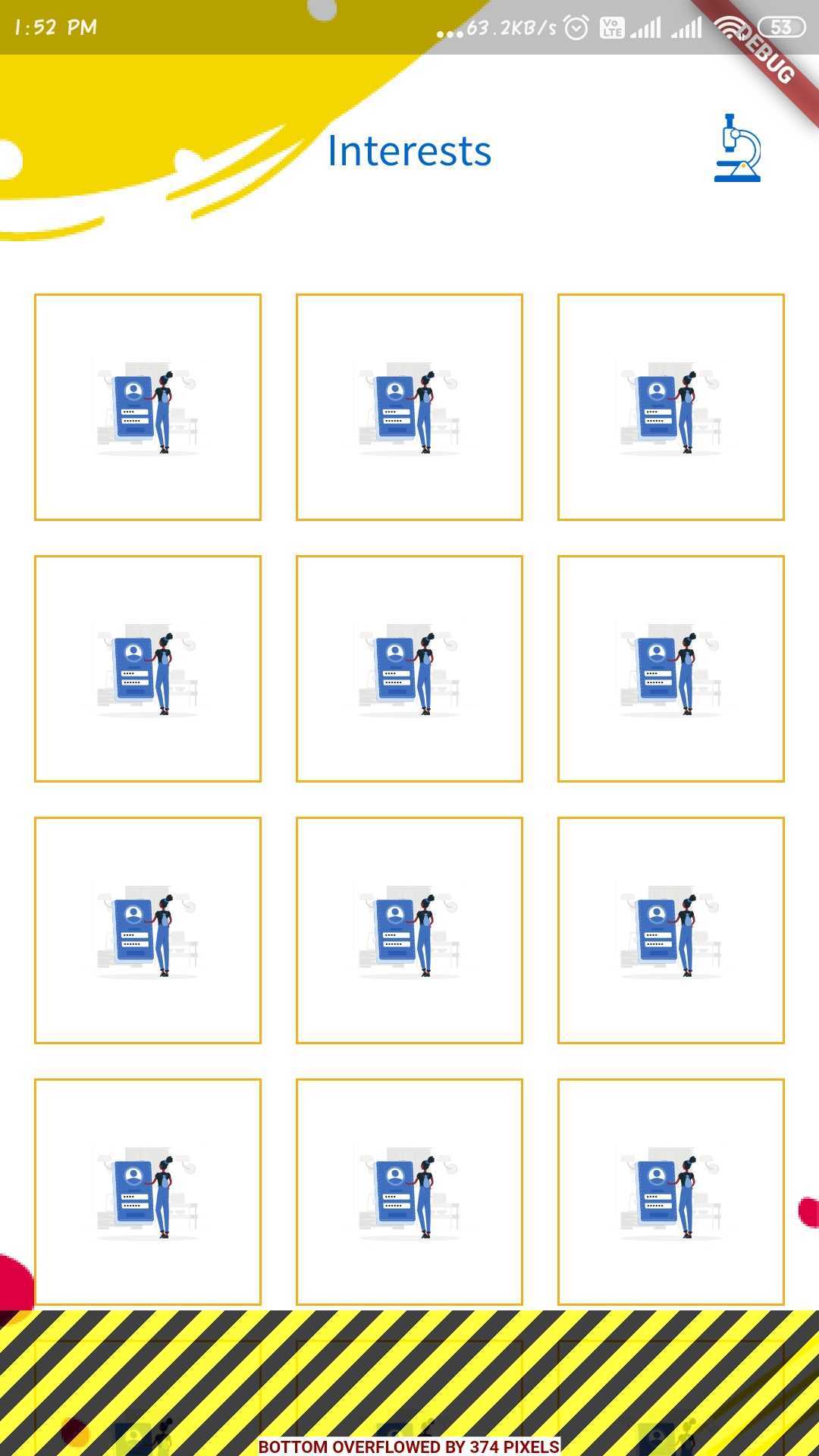
所以这里gridview.count没有滚动,我试着使用gridview.builder,但是它会产生同样的错误,所以告诉我在这里我犯了什么错误。
Stack Overflow用户
发布于 2020-08-18 08:57:04
将SingleChildScrollView添加到Column上面,它将滚动内部GridView并添加
物理学:NeverScrollableScrollPhysics(),内部
GridView.count(
//.... existing code
physics: NeverScrollableScrollPhysics(),
)
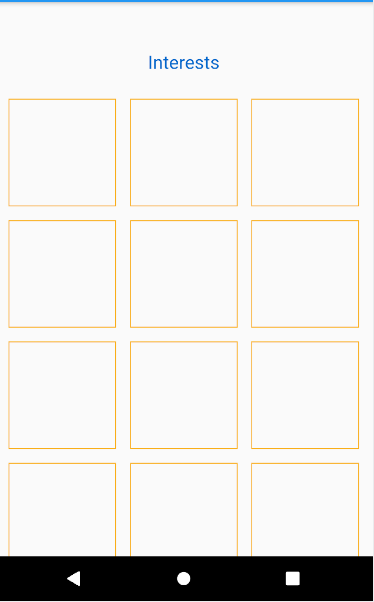
这是因为列和Gridview都在屏幕上占据了全部高度,所以这里应该停止滚动。因此,对于NeverScrollableScrollPhysics,我们告诉GridView不要滚动,这样父部件就可以滚动。
代码:
  @override
  Widget build(BuildContext context) {
    return Scaffold(
      appBar: AppBar(
        title: Text("ListView Sample"),
      ),
      body: Stack(
        children: <Widget>[
          Image.asset(
            "images/background.png",
            height: MediaQuery.of(context).size.height,
            width: MediaQuery.of(context).size.width,
            fit: BoxFit.fill,
          ),
          Scaffold(
            backgroundColor: Color(0x00000000),
            body: Center(
              child: SingleChildScrollView(
                child: Column(
                  mainAxisAlignment: MainAxisAlignment.start,
                  crossAxisAlignment: CrossAxisAlignment.center,
                  children: <Widget>[
                    Container(
                      child: Padding(
                        padding: EdgeInsets.only(top: 50, bottom: 10),
                        child: Row(
                          children: <Widget>[
                            Spacer(flex: 2),
                            Text(
                              'Interests',
                              textAlign: TextAlign.center,
                              overflow: TextOverflow.ellipsis,
                              maxLines: 1,
                              style: TextStyle(
                                color: Color(0xFF0066CB),
                                fontSize: 20.0,
                              ),
                            ),
                            Spacer(),
                            Expanded(
                              child: Container(
                                height: 30.0,
                                width: 30.0,
                              ),
                            )
                          ],
                        ),
                      ),
                    ),
                    Padding(
                      padding: EdgeInsets.only(
                          top: 10, bottom: 90, left: 10, right: 10),
                      child: GridView.count(
                        scrollDirection: Axis.vertical,
                        crossAxisCount: 3,
                        crossAxisSpacing: 5.0,
                        mainAxisSpacing: 5.0,
                        shrinkWrap: true,
                        physics: NeverScrollableScrollPhysics(),
                        children: List.generate(
                          20,
                          (index) {
                            return Padding(
                              padding: EdgeInsets.all(5.0),
                              child: Container(
                                padding: EdgeInsets.all(20.0),
                                height: 135.0,
                                width: 135.0,
                                decoration: BoxDecoration(
                                  border: Border.all(
                                    width: 1.0,
                                    color: Color(0xFFF9AD16),
                                  ),
                                ),
                              ),
                            );
                          },
                        ),
                      ),
                    ),
                  ],
                ),
              ),
            ),
          ),
        ],
      ),
    );
}注意:我已经用container替换了图像资产,因为我没有图像
输出:
页面原文内容由Stack Overflow提供。腾讯云小微IT领域专用引擎提供翻译支持
原文链接:
https://stackoverflow.com/questions/63465036
复制相关文章
相似问题
腾讯云开发者

Copyright © 2013 - 2026 Tencent Cloud. All Rights Reserved. 腾讯云 版权所有
深圳市腾讯计算机系统有限公司 ICP备案/许可证号:粤B2-20090059  粤公网安备44030502008569号
腾讯云计算(北京)有限责任公司 京ICP证150476号 | 京ICP备11018762号