
如何在android中创建左上角和右下角的半径?
如何在android中创建左上角和右下角的半径?
提问于 2020-07-07 09:26:10
如何在android中的左上角和右下角创建一个角半径?像这样
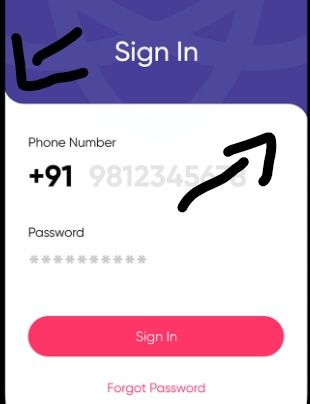
我的代码是
<?xml version="1.0" encoding="utf-8"?>
<ScrollView xmlns:android="http://schemas.android.com/apk/res/android"
    xmlns:tools="http://schemas.android.com/tools"
    android:layout_width="match_parent"
    android:layout_height="match_parent"
    android:orientation="vertical"
    tools:context=".MainActivity">

    <LinearLayout
        android:layout_width="match_parent"
        android:layout_height="match_parent"
        android:orientation="vertical"
        tools:context=".MainActivity">

        <RelativeLayout
            android:layout_width="match_parent"
            android:layout_height="300dp"
            android:background="@drawable/bg_layout">

            <TextView
                android:layout_width="wrap_content"
                android:layout_height="wrap_content"
                android:layout_alignParentBottom="true"
                android:layout_centerInParent="true"
                android:layout_margin="@dimen/twenty_sp"
                android:text="@string/sign_in"
                android:textColor="@color/colorWhite"
                android:textSize="@dimen/thirty_sp" />
        </RelativeLayout>

        <LinearLayout
            android:layout_width="match_parent"
            android:layout_height="wrap_content"
            android:background="@drawable/bg_layout_white"
            android:orientation="vertical">

            <LinearLayout
                android:layout_width="match_parent"
                android:layout_height="wrap_content"
                android:orientation="vertical">

                <LinearLayout
                    android:layout_width="match_parent"
                    android:layout_height="wrap_content"
                    android:layout_margin="@dimen/ten_sp"
                    android:orientation="vertical"
                    android:padding="@dimen/ten_sp">

                    <TextView
                        android:layout_width="match_parent"
                        android:layout_height="wrap_content"
                        android:gravity="left"
                        android:text="@string/phone_number"
                        android:textColor="@color/colorBlack" />

                    <LinearLayout
                        android:layout_width="match_parent"
                        android:layout_height="wrap_content"
                        android:layout_margin="@dimen/five_sp"
                        android:orientation="horizontal">

                        <Spinner
                            android:id="@+id/main_spinner_coutry"
                            android:layout_width="wrap_content"
                            android:layout_height="@dimen/fifty_sp"
                            android:entries="@array/country_code"
                            android:prompt="@array/country_code"
                            android:spinnerMode="dropdown" />

                        <AutoCompleteTextView
                            android:layout_width="match_parent"
                            android:layout_height="@dimen/fifty_sp"
                            android:background="@drawable/bg_edt"
                            android:digits="0123456789"
                            android:ems="10"
                            android:hint="@string/_9876543210"
                            android:imeOptions="actionGo"
                            android:inputType="phone"
                            android:maxLength="10" />
                    </LinearLayout>

                </LinearLayout>

                <LinearLayout
                    android:layout_width="match_parent"
                    android:layout_height="wrap_content"
                    android:layout_margin="@dimen/ten_sp"
                    android:orientation="vertical"
                    android:padding="@dimen/ten_sp">

                    <TextView
                        android:layout_width="match_parent"
                        android:layout_height="wrap_content"
                        android:gravity="left"
                        android:text="@string/password"
                        android:textColor="@color/colorBlack" />

                    <EditText
                        android:layout_width="match_parent"
                        android:layout_height="@dimen/fifty_sp"
                        android:layout_margin="@dimen/five_sp"
                        android:background="@drawable/bg_edt"
                        android:hint="@string/_9876543210"
                        android:inputType="textPassword" />

                </LinearLayout>


            </LinearLayout>

            <LinearLayout
                android:layout_width="match_parent"
                android:layout_height="wrap_content"
                android:layout_margin="@dimen/ten_sp"
                android:orientation="vertical"
                android:padding="@dimen/ten_sp">

                <Button
                    android:id="@+id/main_btn_signin"
                    android:layout_width="match_parent"
                    android:layout_height="wrap_content"
                    android:background="@drawable/bg_btn"
                    android:padding="@dimen/ten_sp"
                    android:text="@string/sign_in"
                    android:textAllCaps="false"
                    android:textColor="@color/colorWhite"
                    android:layout_margin="@dimen/ten_sp"/>

                <TextView
                    android:layout_margin="@dimen/ten_sp"
                    android:layout_width="match_parent"
                    android:layout_height="wrap_content"
                    android:gravity="center"
                    android:padding="@dimen/ten_sp"
                    android:text="@string/forgot_password"
                    android:textColor="@color/colorAccent" />

            </LinearLayout>
        </LinearLayout>
    </LinearLayout>
</ScrollView>
背景可绘制
<?xml version="1.0" encoding="utf-8"?>
<shape xmlns:android="http://schemas.android.com/apk/res/android"
    android:padding="10dp"
    android:shape="rectangle">
    <solid android:color="@color/colorWhite" />
    <corners
        android:topRightRadius="30dp"
         />

</shape>
显示为我想要的图片左上角和右下角以上的代码工作,但它只显示一个角落与背景色,我试图创建上面的图片,但它不能工作.
Stack Overflow用户
回答已采纳
发布于 2020-07-07 10:38:57
使用“材料组件库”,您可以定义自定义CornerTreatment。
例如,您可以使用一个ShapeAppearanceModel.并向它应用一个CardView
<LinearLayout
    android:background="@color/colorPrimaryLight"
    android:clipChildren="false"
    android:clipToPadding="false"
    ..>

   <com.google.android.material.card.MaterialCardView
       android:id="@+id/card"
       app:cardCornerRadius="32dp"
       app:cardBackgroundColor="@color/colorPrimaryDark"
       ../>

</LinearLayout>
然后:
MaterialCardView cardView = findViewById(R.id.card);

cardView.setShapeAppearanceModel(cardView.getShapeAppearanceModel().toBuilder()
                .setTopLeftCorner(new CrazyCornerTreatment())
                .setBottomLeftCorner(CornerFamily.ROUNDED,0f)
                .setBottomRightCorner(CornerFamily.ROUNDED,0f)
                .build());
左上角可以用以下方式定义:
class CrazyCornerTreatment : CornerTreatment() {

    override fun getCornerPath(
            shapePath: ShapePath,
            angle: Float,
            interpolation: Float,
            radius: Float
    ) {

        val interpolatedRadius = radius * interpolation
        shapePath.reset(0f, -radius * interpolation, 270f,270 -angle)
        shapePath.addArc(
                0f,
                -2*interpolatedRadius,
                2*interpolatedRadius,
                0f,
                180f,
                 - angle)

    }
}

页面原文内容由Stack Overflow提供。腾讯云小微IT领域专用引擎提供翻译支持
原文链接:
https://stackoverflow.com/questions/62772088
复制相关文章
相似问题
腾讯云开发者

Copyright © 2013 - 2026 Tencent Cloud. All Rights Reserved. 腾讯云 版权所有
深圳市腾讯计算机系统有限公司 ICP备案/许可证号:粤B2-20090059  粤公网安备44030502008569号
腾讯云计算(北京)有限责任公司 京ICP证150476号 | 京ICP备11018762号