
OxyPlot:自定义工具提示
OxyPlot:自定义工具提示
提问于 2020-07-06 16:49:22
我在工作中使用OxyPlot来显示一些信息。我需要更改默认的工具提示,在单击图形中的某个点后可以看到。
目前,我有一个简单的线性系列测试WPF窗口。我已经更改了工具提示的模板,以显示一些文本和按钮。
我的控制员:
public class PlotViewTest : PlotView
{ }

public class TestTracker : TrackerControl
{
    public TestTracker()
    {
        CanCenterHorizontally = false;
        CanCenterVertically = false;
    }
}
我的WPF窗口代码:
<controlers:PlotViewTest Model="{Binding MyModel}">
    <controlers:PlotViewTest.DefaultTrackerTemplate>
        <ControlTemplate>
            <controlers:TestTracker Position="{Binding Position}">
                <Grid Margin="15">
                    <Grid.RowDefinitions>
                        <RowDefinition/>
                        <RowDefinition/>
                    </Grid.RowDefinitions>
                    <TextBlock Margin="5" Text="Hello world!"/>
                    <Button Grid.Row="1" Margin="5" Content="Start"/>
                </Grid>
            </controlers:TestTracker>
        </ControlTemplate>
    </controlers:PlotViewTest.DefaultTrackerTemplate>
</controlers:PlotViewTest>
我的WPF窗口:
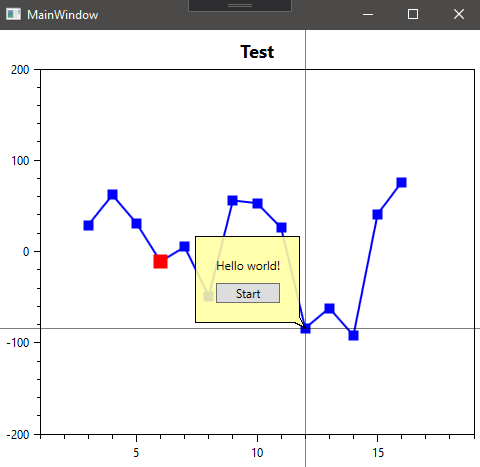
但是有一些行为我想要改变。
- 我只能在按住鼠标左键时才能看到工具提示。当我打开它时,工具提示就会被隐藏起来。但我需要显示工具提示后,每次点击鼠标左键在红色点。当我单击第二个红色点时,将显示另一个工具提示。但是当我点击一些空空间时,工具提示应该是隐藏的。
,
- ,当我按住蓝线上的鼠标左键时,也可以显示工具提示。但我想阻止它。只有当我点击红点时才会显示它。
如何改变这两种行为?
回答 1
Stack Overflow用户
发布于 2020-07-17 00:20:32
您可以通过编写一个自定义TrackerManipulator来实现这些目标,它覆盖了跟踪器的Completed操作。例如
public class StaysOpenTrackerManipulator : TrackerManipulator
{
        public StaysOpenTrackerManipulator(IPlotView plotView) : base(plotView)
        {
            Snap = true;
            PointsOnly = true;
        }
        public override void Completed(OxyMouseEventArgs e)
        {
            // Do nothing
        }
}通过将Snap和PointsOnly属性设置为true,可以确保只在选择点时才打开跟踪器,而不是在其他地方(行/外)打开跟踪器。
可以使用TrackerManipulator将自定义PlotView绑定到PlotController。
// Property
public PlotController CustomPlotController { get; set; }

// Assign Value for CustomPlotController
var customController = new PlotController();
customController.UnbindAll();
customController.BindMouseDown(OxyMouseButton.Left, new DelegatePlotCommand<OxyMouseDownEventArgs>((view, controller, args) =>
                controller.AddMouseManipulator(view, new StaysOpenTrackerManipulator(view), args)));
CustomPlotController = customController;
在Xaml中
<controlers:PlotViewTest Model="{Binding MyModel}" Controller="{Binding CustomPlotController}">页面原文内容由Stack Overflow提供。腾讯云小微IT领域专用引擎提供翻译支持
原文链接:
https://stackoverflow.com/questions/62760757
复制相关文章
相似问题
腾讯云开发者

Copyright © 2013 - 2026 Tencent Cloud. All Rights Reserved. 腾讯云 版权所有
深圳市腾讯计算机系统有限公司 ICP备案/许可证号:粤B2-20090059  粤公网安备44030502008569号
腾讯云计算(北京)有限责任公司 京ICP证150476号 | 京ICP备11018762号