
如何获得组件附带的主题
如何获得Flutter中组件的主题,如TextFormField,如何获得他的默认decoration的样式
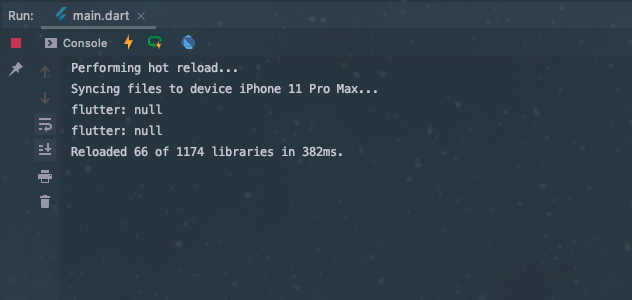
我尝试了以下方法,但获得的主题属性是null
class MyApp extends StatelessWidget {
  @override
  Widget build(BuildContext context) {
    return MaterialApp(
      title: 'Test',
      theme: ThemeData(primarySwatch: Colors.blue),
      home: TestPage(),
    );
  }
}

class TestPage extends StatefulWidget {
  @override
  _TestPageState createState() => _TestPageState();
}

class _TestPageState extends State<TestPage> {
  @override
  Widget build(BuildContext context) {
    var inputTheme = Theme.of(context).inputDecorationTheme;
    print(inputTheme.labelStyle); // is null
    print(inputTheme.fillColor); // is null

    return Scaffold(
      appBar: AppBar(
        title: const Text('Test'),
      ),
      body: TextFormField(),
    );
  }
}
回答 3
Stack Overflow用户
发布于 2020-06-30 05:23:37
Theme.of(context).inputDecorationTheme
将为您提供与InputField一起使用的主题
Theme.of(context)
将为您提供与应用程序主题相关的所有内容。
尝试使用copyWith()和apply(),或将主题应用于组件
Theme.of(context).inputDecorationTheme.copyWith();
Stack Overflow用户
发布于 2021-03-26 17:34:10
有些主题取决于小部件本身的状态。这就是InputDecoration的情况。
要获取小部件的内部主题,您需要的是,如果小部件公开了这个属性(这是很少见的),或者通过重写类和方法来拦截它,并在创建之后获取主题。这很困难,因为通常它是在构建之后运行的。
一种选择是查看小部件的源代码,并将构建主题的代码复制到您自己的代码中。
例如,对于InputDecoration.:
TextStyle _getHelperStyle(ThemeData themeData) {
    final Color color = decoration!.enabled ? themeData.hintColor : Colors.transparent;
    return themeData.textTheme.caption!.copyWith(color: color).merge(decoration!.helperStyle);
  }
另一种选择是创建您自己的主题,设置您需要的属性并在它们之后获得它们。
Stack Overflow用户
发布于 2020-06-30 07:17:08
TestPage的父部件是MaterialApp小部件吗?它应该是这样的:
class MyApp extends StatelessWidget {
  @override
  Widget build(BuildContext context) {
    return MaterialApp(
      title: 'YOUR APP NAME',
      theme: ThemeData( //can be omitted if you want the default theme
        primarySwatch: Colors.blue,
      ),
      home: TestPage(),
    );
  }
}
编辑:
如果没有InputDecorationTheme传递给您的ThemeData,颤振将传递一个“空”InputDecorationTheme。通过创建ThemeData对象并将其传递给您自己的InputDecorationTheme,您可以对整个应用程序进行更改。
例如:
class MyApp extends StatelessWidget {
  @override
  Widget build(BuildContext context) {
    return MaterialApp(
      title: 'YOUR APP NAME',
      theme: ThemeData.light().copyWith(
        inputDecorationTheme: InputDecorationTheme(
          labelStyle: TextStyle(), //your custom label style
          fillColor: Colors.orange  //your colour of preference
        ),
      ),
      home: TestPage(),
    );
  }
}或者直接将InputDecoration对象传递给TextFormField。
TextFormField(
  decoration: InputDecoration(
    //change what you want in here
  )
)https://stackoverflow.com/questions/62649800
复制相似问题
腾讯云开发者

Copyright © 2013 - 2026 Tencent Cloud. All Rights Reserved. 腾讯云 版权所有
深圳市腾讯计算机系统有限公司 ICP备案/许可证号:粤B2-20090059  粤公网安备44030502008569号
腾讯云计算(北京)有限责任公司 京ICP证150476号 | 京ICP备11018762号