
为什么我的测验结果显示不正确?
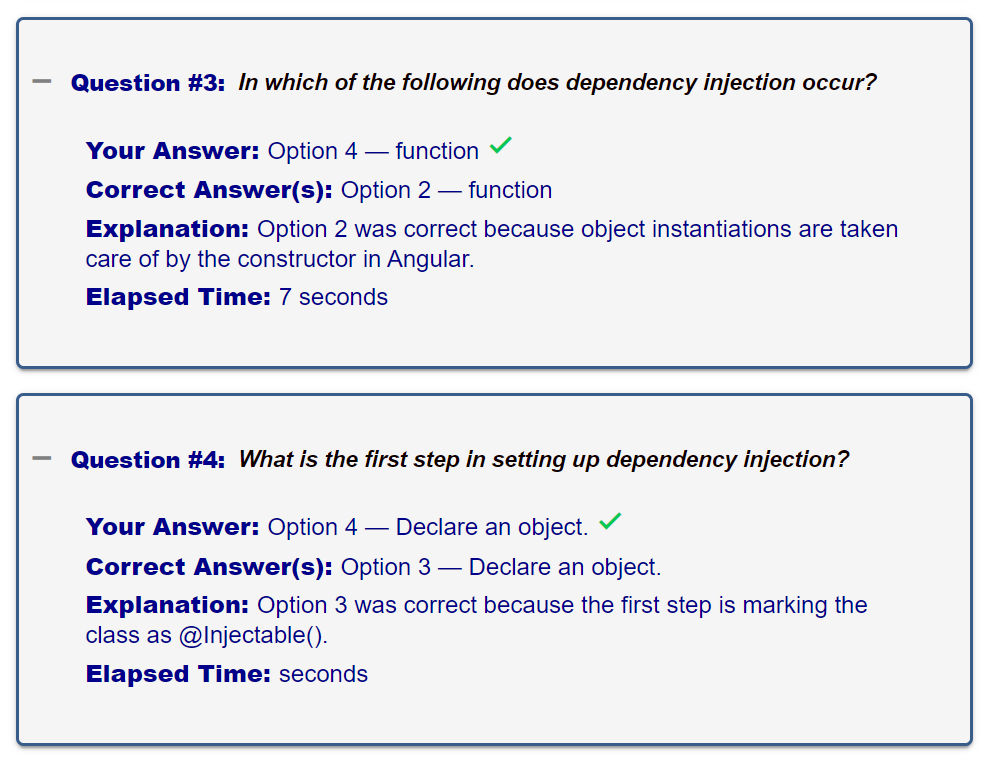
我正在使用角度9做一个测试ResultsComponent,但是很难得到正确显示在垫子上的结果-手风琴与数据。我有一个userAnswers数组、correctAnswers数组和一个包含quizData数组对象的quizData.ts外部文件,我正在向用户显示结果摘要,特别是“您的答案”、“正确答案”、“解释”和“经过的时间”。
在测试应用程序时,用户的答案选项数有时似乎与正确的选项文本不一致;对于正确的答案也是如此。在选择题中,在正确的答案和解释中,选项应该显示为"1和2",而不是"1,2“。我已经将正确的选项字符串(带有"1和2")传递给ResultsComponent,但在遇到一些M/C问题时,它可能应该是一组正确的选项。在测试中,有时当用户的答案和正确的答案不同时,即使用户的答案不正确,也会显示正确的复选标记。
我正在分享下面的代码片段,但是您可以在这里查看整个测试:http://stackblitz.com/edit/angular-9-quiz-app。我希望你能在这些问题上提供帮助。谢谢。
编辑:我需要使用结果模型,这样我就可以拥有:
{
answer: [1,2],
time: 18
},
{
answer: [4],
time: 2
},
...
在模板中使用结果,而不是使用userAnswers和elapsedTimes
<section class="quizSummary">
<details>
<summary i18n>Click to view a more detailed summary of your quiz</summary>
<mat-accordion [multi]="true" #accordion="matAccordion">
<mat-expansion-panel
class="quiz-summary-question"
*ngFor="let question of quizData.questions; let i = index"
(opened)="panelOpenState = true" (closed)="panelOpenState = false" hideToggle="true">
<mat-expansion-panel-header>
<mat-panel-description>
<mat-icon class="accordion-icon" *ngIf="!panelOpenState">add</mat-icon>
<mat-icon class="accordion-icon" *ngIf="panelOpenState">remove</mat-icon>
</mat-panel-description>
<mat-panel-title>
<span class="question-leader" i18n>Question #{{ i + 1 }}: </span>
<span class="question-text" i18n>{{ question?.questionText }}</span>
</mat-panel-title>
<ng-template
matExpansionPanelContent>
<ul class="quiz-summary-fields" *ngIf="correctAnswers[i].length > 1">
<li i18n>
<span class="leader">Your Answer: </span>
Option {{ userAnswers[i] }} — {{ question?.options[i].text }}
<mat-icon class="correct"
*ngIf="checkIfAnswersAreCorrect(correctAnswers, userAnswers)">done</mat-icon>
<mat-icon class="incorrect"
*ngIf="!checkIfAnswersAreCorrect(correctAnswers, userAnswers)">clear</mat-icon>
<span *ngIf="userAnswers[i] === null"> (no answer provided)</span>
</li>
<li i18n>
<span class="leader">Correct Answer(s): </span>
<span *ngIf="correctAnswers[i].length === 1">
Option {{ correctAnswers[i] }} — {{ question?.options[i].text }}
</span>
<span *ngIf="correctAnswers[i].length > 1">
Options {{ correctAnswers[i] }} — {{ question?.options[i].text }}
</span>
</li>
<li i18n>
<span class="leader">Explanation: </span>
<span *ngIf="correctAnswers[i].length === 1">
Option {{ correctAnswers[i] }} was correct because {{ question?.explanation }}.
</span>
<span *ngIf="correctAnswers[i].length > 1">
Options {{ correctAnswers[i] }} were correct because {{ question?.explanation }}.
</span>
</li>
<li i18n>
<span class="leader">Elapsed Time: </span>
<span>{{ elapsedTimes[i] }} second</span>
</li>
</ul>
<ul class="quiz-summary-fields" *ngIf="correctAnswers[i].length === 1">
<li i18n>
<span class="leader">Your Answer: </span>
Option {{ userAnswers[i] }} — {{ question?.options[i].text }}
<mat-icon class="correct"
*ngIf="checkIfAnswersAreCorrect(correctAnswers, userAnswers)">done</mat-icon>
<mat-icon class="incorrect"
*ngIf="!checkIfAnswersAreCorrect(correctAnswers, userAnswers)">clear</mat-icon>
<span *ngIf="userAnswers[i] === null"> (no answer provided)</span>
</li>
<li i18n>
<span class="leader">Correct Answer(s): </span>
<span *ngIf="correctAnswers[i].length === 1">
Option {{ correctAnswers[i] }} — {{ question?.options[i].text }}
</span>
<span *ngIf="correctAnswers[i].length > 1">
Options {{ correctAnswers[i] }} — {{ question?.options[i].text }}
</span>
</li>
<li i18n>
<span class="leader">Explanation: </span>
<span *ngIf="correctAnswers[i].length === 1">
Option {{ correctAnswers[i] }} was correct because {{ question?.explanation }}.
</span>
<span *ngIf="correctAnswers[i].length > 1">
Options {{ correctAnswers[i] }} were correct because {{ question?.explanation }}.
</span>
</li>
<li i18n>
<span class="leader">Elapsed Time: </span>
<span>{{ elapsedTimes[i] }} seconds</span>
</li>
</ul>
</ng-template>
</mat-expansion-panel-header>
</mat-expansion-panel>
</mat-accordion>
...在results.component.ts中:
checkIfAnswersAreCorrect(correctAnswers: [], userAnswers: []) {
  const resultsComparisonArray = new Array();

  for (let i = 0; i < correctAnswers.length; i++) {
    resultsComparisonArray.push(correctAnswers[i] === userAnswers[i] ? true : false);
  }

  return resultsComparisonArray;
}
测试1:如果我为问题1输入2,4,2,3,3
在问题3中,选项2-函数应该是构造函数。
在问题4中,选项3--声明一个对象,应该标记为可注入的()
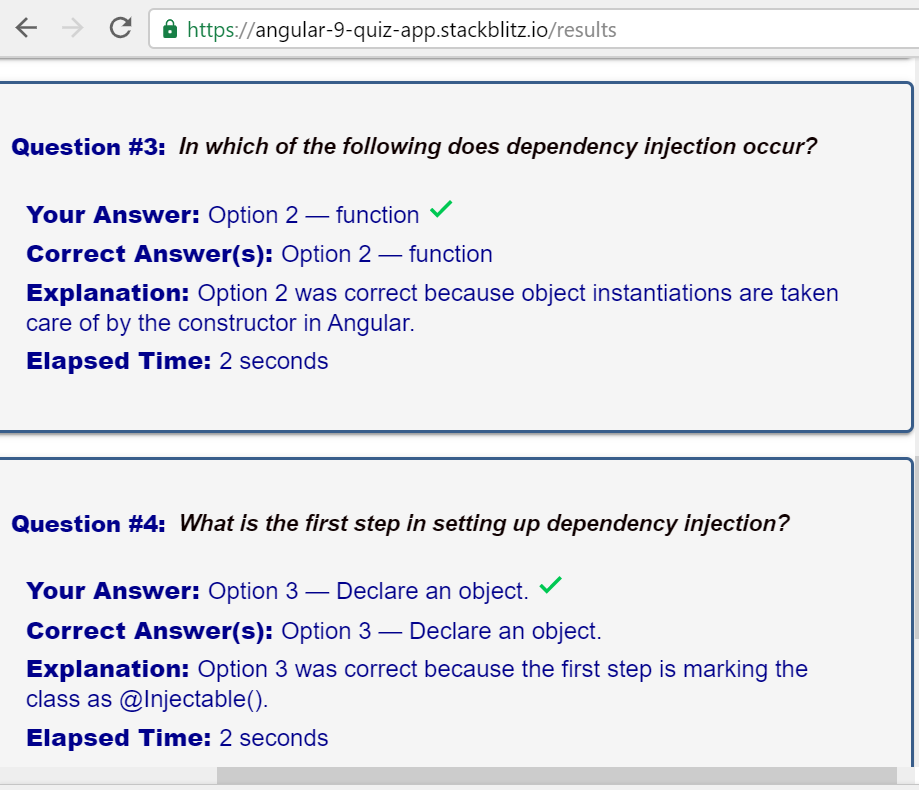
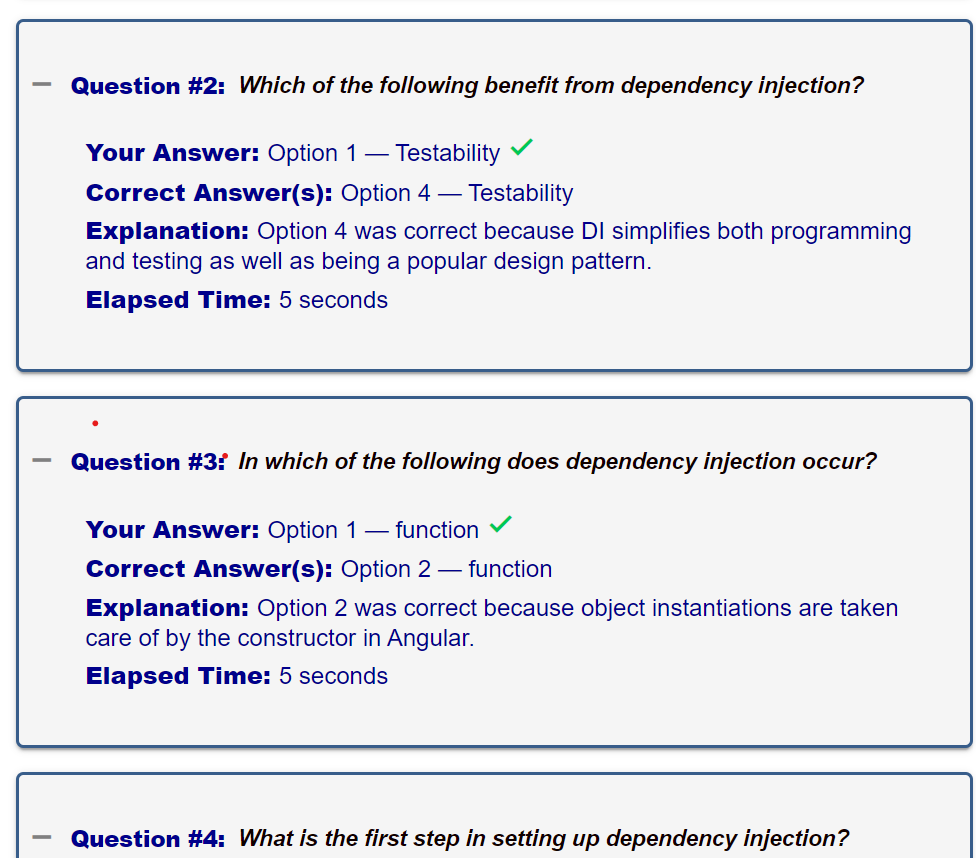
测试2:输入1,1,1,1
在问题2中-应该有x而不是复选标记,说明应该显示"1和2“。
           Option 1 - Testability, should be Programming

           Option 4 - Testabliity, should be All of the above
在问题3中,备选案文1-应该是可注入的()
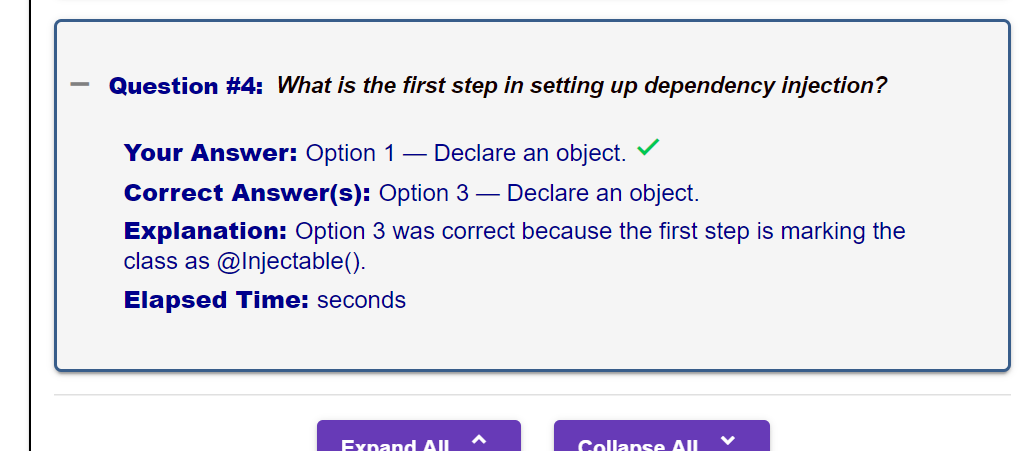
Option 2 - should be constructor在问题4中,选项1-声明一个对象,应该在组件中被要求。
Option 3 - Declare an object, should be Mark as Injectable()和未显示的经过的秒数。
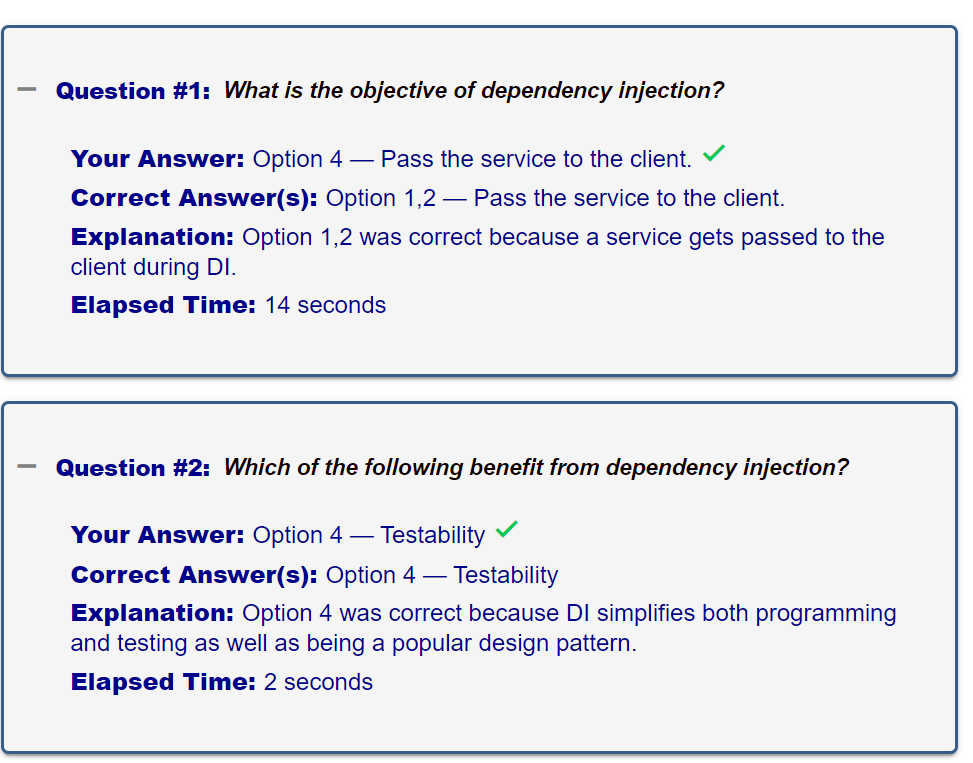
测试3:输入4,4,4,4
在问题1-选项1-将服务传递给客户端时,应该给予客户端部分服务,应该有x而不是复选标记。
在问题2-备选案文4-可测试性中,应具备上述所有内容
在问题3-选项4-函数中,应该是NgModule,应该有x而不是复选标记。
在问题4-选项3-声明一个对象时,应该将依赖标记为可注入的()
未显示的经过的秒数
回答 2
Stack Overflow用户
发布于 2020-06-22 10:19:13
您的results.html使用了错误的索引。应该是:-
<section class="quizSummary">
<details>
<summary i18n>Click to view a more detailed summary of your quiz…</summary>
<mat-accordion [multi]="true" #accordion="matAccordion">
<mat-expansion-panel
class="quiz-summary-question"
*ngFor="let question of quizData.questions; let i = index"
(opened)="panelOpenState = true" (closed)="panelOpenState = false" hideToggle="true">
<mat-expansion-panel-header>
<mat-panel-description>
<mat-icon class="accordion-icon" *ngIf="!panelOpenState">add</mat-icon>
<mat-icon class="accordion-icon" *ngIf="panelOpenState">remove</mat-icon>
</mat-panel-description>
<mat-panel-title>
<span class="question-leader" i18n>Question #{{ i + 1 }}: </span>
<span class="question-text" i18n>{{ question?.questionText }}</span>
</mat-panel-title>
<ng-template
matExpansionPanelContent>
<ul class="quiz-summary-fields" *ngIf="correctAnswers.length >= 1">
<li i18n>
<span class="leader">Your Answer(s):</span>
<ng-container *ngIf="results?.userAnswers[i]">
Option {{ results.userAnswers[i] | join }} —
<ng-container *ngFor="let item of results?.userAnswers[i]; let isLast = last">
{{ question?.options[item - 1].text }} <span *ngIf="!isLast"> AND </span>
</ng-container>
<mat-icon class="correct"
*ngIf="checkIfAnswersAreCorrect(correctAnswers, results?.userAnswers, i)">done</mat-icon>
<mat-icon class="incorrect"
*ngIf="!checkIfAnswersAreCorrect(correctAnswers, results?.userAnswers, i)">clear</mat-icon>
</ng-container>
<span *ngIf="!results?.userAnswers[i] || results?.userAnswers.length === 0">
(no answer provided)
</span>
</li>
<li i18n>
<span class="leader">Correct Answer(s):</span>
<span *ngIf="correctAnswers.length === 1">
Option {{ correctAnswers[i] }} — {{ question?.options[i].text }}
</span>
<span *ngIf="correctAnswers.length > 1">
Options {{ correctAnswers[i][0] | join }} —
<ng-container *ngFor="let item of correctAnswers[i][0]; let isLast = last">
{{ question?.options[item - 1].text }} <span *ngIf="!isLast"> AND </span>
</ng-container>
</span>
</li>
<li i18n>
<span class="leader">Explanation:</span>
<span *ngIf="correctAnswers[i][0].length === 1">
Option {{ correctAnswers[i] }} was correct because {{ question?.explanation }}.
</span>
<span *ngIf="correctAnswers[i][0].length > 1">
Options {{ correctAnswers[i][0] | join }} were correct because {{ question?.explanation }}.
</span>
</li>
<li i18n>
<span class="leader">Elapsed Time:</span>
<span>{{ results.elapsedTimes[i] }} seconds</span>
</li>
</ul>
</ng-template>
</mat-expansion-panel-header>
</mat-expansion-panel>
</mat-accordion>
<mat-action-row class="mat-accordion-buttons">
<button mat-raised-button color="primary" (click)="openAllPanels()">
<strong>Expand All</strong> <mat-icon>unfold_more</mat-icon>
</button>
<button mat-raised-button color="primary" (click)="closeAllPanels()">
<strong>Collapse All</strong> <mat-icon>unfold_less</mat-icon>
</button>
</mat-action-row>
</details>
</section>在选项中,我创建了一个连接管道,如下所示:-
从“@角/芯”导入{管道,PipeTransform };
@Pipe({
  name: 'join'
})
export class JoinPipe implements PipeTransform {

  transform(value: any, args?: any): any {
    console.log(value);
    return value.join(" and ")
  }

}
如果没有提供答案,则问题和选项是问题:-我更新了上面的模板,并使用依赖项注入-Quiz.Component.ts checkIfAnswersCorrectly()方法更新了模板:-
this.quizService.userAnswers.push(this.answer + 1);至
this.quizService.userAnswers.push(this.answer ? this.answer + 1 : this.answer);在问题4中,在某些情况下,在依赖注入-Quiz.Component.ts结果()方法中,我添加了:-
this.quizService.resetAll();对于QuizMetaData问题,您希望使所有字段都是可选的。所以我把它初始化为:
quizMetadata: Partial<QuizMetadata> = {};要了解分部,您可以检查:- https://medium.com/dev-genius/crafting-perfect-interface-for-a-crud-in-angular-with-utility-types-44873e516a1e
当选择正确的答案时,我移动:-
this.correctMessage = this.quizService.correctMessage;从ngOnInit到setSelected方法。
对于result.component.css中同一行的领导者文本,我将您的领导类更改为:-
.leader {
              font-weight: $font-weight-max;

            }
至
.leader {
              font-weight: $font-weight-max;
              display: inline;
            }
关于重置问题,在测试服务中添加了resetQuestions方法:-
  resetQuestions() {
    this.quizData = JSON.parse(JSON.stringify(QUIZ_DATA));
  }
并在重新启动方法中调用它:-
  restart() {
    this.quizService.resetAll();
    this.quizService.resetQuestions();
    this.timerService.elapsedTimes = [];
    this.timerService.completionTime = 0;
    this.router.navigate(['/intro']);
  }
并将查询数据的初始化更改为:
quizData: Quiz = JSON.parse(JSON.stringify(QUIZ_DATA));如果声音不正确且无法选择多个答案,请将setSelected方法在question.component.ts中更改为:-
setSelected(optionIndex: number): void {
    this.quizStarted = true;
    this.correctMessage = this.quizService.correctMessage;
    this.isCorrectAnswerSelected = this.isCorrect(this.currentQuestion.options[optionIndex].correct, optionIndex);
    this.answer.emit(optionIndex);
    if(this.correctAnswers.length == 1) {
        this.currentQuestion.options.forEach(o => o.selected = false);
    }
    this.currentQuestion.options[optionIndex].selected = true;
    if (
      optionIndex >= 0 &&
      this.currentQuestion &&
      this.currentQuestion.options &&
      this.currentQuestion.options[optionIndex]['correct']
    ) {
      this.timerService.stopTimer();
      this.quizService.correctSound.play();
      optionIndex = null;
    } else {
      console.log('In else');
      this.quizService.incorrectSound.play();
    }

    this.alreadyAnswered = true;
  }
为了推送多个答案,以下内容变成了依赖-注入-问答.组件. For :-
answer: number[] = [];
nextQuestion() {
    this.checkIfAnsweredCorrectly();
    this.answer = [];
    this.animationState$.next('animationStarted');
    this.quizService.nextQuestion();
  }


selectedAnswer(data) {
    const correctAnswers = this.question.options.filter((options) => options.correct);
    if(correctAnswers.length > 1 && this.answer.indexOf(data) === -1) {
         this.answer.push(data);
    } else {
      this.answer[0] = data;
    }
  }
在result.component.ts中:-
checkIfAnswersAreCorrect(correctAnswers, userAnswers,index:number): boolean {
    return !(!userAnswers[index] || userAnswers[index].length ===0 || userAnswers[index].find((ans) => correctAnswers[index][0].indexOf(ans) === -1));
  }
不正确的声音
对于在dependency injection-Quiz.Component.html中显示的无问题:-
来自:-
<section id="question" [class.answered]="answer">
<span *ngIf="!answer" i18n>{{ question?.questionText }}
<span *ngIf="numberOfCorrectOptions > 1">
<em>({{ numberOfCorrectOptions }} options are correct.)</em>
</span>
</span>
<span *ngIf="answer" i18n>{{ explanationText }}</span>
</section>至
<section id="question" [class.answered]="answer">
<span *ngIf="!answer || answer.length === 0" i18n>{{ question?.questionText }}
<span *ngIf="numberOfCorrectOptions > 1">
<em>({{ numberOfCorrectOptions }} options are correct.)</em>
</span>
</span>
<span *ngIf="answer && answer.length > 0" i18n>{{ explanationText }}</span>
</section>工作Stackblitz :- https://stackblitz.com/edit/angular-9-quiz-app-tmgqor
Stack Overflow用户
发布于 2020-06-16 09:31:56
您还应该在函数中发送索引以避免循环,然后先将数组包含两个嵌套数组,然后在函数中对标记正确工作。
checkIfAnswersAreCorrect(correctAnswers, userAnswers,index:number): boolean {
    return  correctAnswers[index][0].indexOf(userAnswers[index])>-1 ? true : false;
}
在html中
<mat-icon class="correct" *ngIf="checkIfAnswersAreCorrect(correctAnswers, userAnswers,i)">done</mat-icon>你不需要正确答案标签的条件,两个标签在这两个条件下是相同的。你的缺失是你应该选择正确答案的选项,而不是直接提问的选项
<li i18n>
<span class="leader">Correct Answer(s): </span>
<span> Options {{ correctAnswers[i] }} — {{question?.options[correctAnswers[i][0][0]-1].text }} </span>
</li>带正确标签的演示
https://stackoverflow.com/questions/62314855
复制相似问题
腾讯云开发者

Copyright © 2013 - 2026 Tencent Cloud. All Rights Reserved. 腾讯云 版权所有
深圳市腾讯计算机系统有限公司 ICP备案/许可证号:粤B2-20090059  粤公网安备44030502008569号
腾讯云计算(北京)有限责任公司 京ICP证150476号 | 京ICP备11018762号