
如何在新的统一输入系统中映射到KeyCode.JoystickButton0?
我正在为Android和Fire TV开发一个统一项目,该项目利用了在v2019.3中发布的新的输入系统。
旧系统中的Fire的按钮映射如下:
Back                    KeyCode.Escape
Select (D-Pad Center)   KeyCode.JoystickButton0
Left (D-Pad)            KeyCode.LeftArrow
Right (D-Pad)           KeyCode.RightArrow
Up (D-Pad)              KeyCode.UpArrow
Down (D-Pad)            KeyCode.DownArrow
我已经成功地映射了所有东西,但Select在新系统中使用了以下绑定路径:
Escape [Keyboard]
Right Arrow [Keyboard]
Left Arrow [Keyboard]
Up Arrow [Keyboard]
Down Arrow [Keyboard]如果我映射到Any Key [Keyboard]并将以下代码实现为回调,它将显示为key: JoystickButton0,它与亚马逊的文档相匹配,但在新系统中的键盘绑定路径下不作为选项存在:
public void DebugKey(InputAction.CallbackContext context)
{
    foreach(KeyCode vKey in System.Enum.GetValues(typeof(KeyCode))){
         if(Input.GetKey(vKey)){
             Debug.Log ("key: " + vKey);
         }
    }
}
我尝试过在Gamepad、Android Gamepad、Joystick和Android下的各种按钮,但都没有成功。另一件奇怪的事情是,Center/D可以很好地工作在UI按钮上,不需要任何绑定。
用新的输入系统映射到遗留的KeyCode.JoystickButtonX命名约定的正确方法是什么?
谢谢!
回答 2
Stack Overflow用户
发布于 2020-05-22 18:56:45
在新系统中,设备被读取为HID,KeyCode并不有用,所以如果您想读取操纵杆按钮的状态,可以这样做:
using UnityEngine.InputSystem;


public Joystick joy;

void Start()
{
     joy = Joystick.current;
}

void FixedUpdate()
{
    var button2 = joy.allControls[2].IsPressed();
    if (button2)
    {
        Debug.Log("Button2 of current joystick is pushed");
    }
}
如果您想映射button0 (在旧的输入系统中),它现在是button1或触发器。
var button1 = joy.allControls[1].IsPressed();或
var button1 = joy.trigger.IsPressed();你可以测试更多的棍子按钮。
void Start()
{
    var ListOfJoys = Joystick.all;
     joy = Joystick.current;//here current joy is ListOfJoys[1]
     otherjoy = ListOfJoys[0];
}


    var Buttons = joy.allControls;


    if ((Buttons[2] as ButtonControl).wasPressedThisFrame)
    {
        Debug.Log("b2 pressed during this frame");
    }
    if ((Buttons[2] as ButtonControl).wasReleasedThisFrame)
    {
        Debug.Log("b2 released during this frame");
    }
    if (joy.trigger.wasPressedThisFrame)
    {
        Debug.Log("trig or button1 pressed during this frame");
    }
    if (joy.trigger.wasReleasedThisFrame)
    {
        Debug.Log("trig or button1 released during this fram");
    }
    if (otherjoy.trigger.wasPressedThisFrame)
    {
        Debug.Log("otherjoy trigger");
    }
另一种方法是使用新系统的映射,我已经将action press Only Test1映射为button3 of button3。
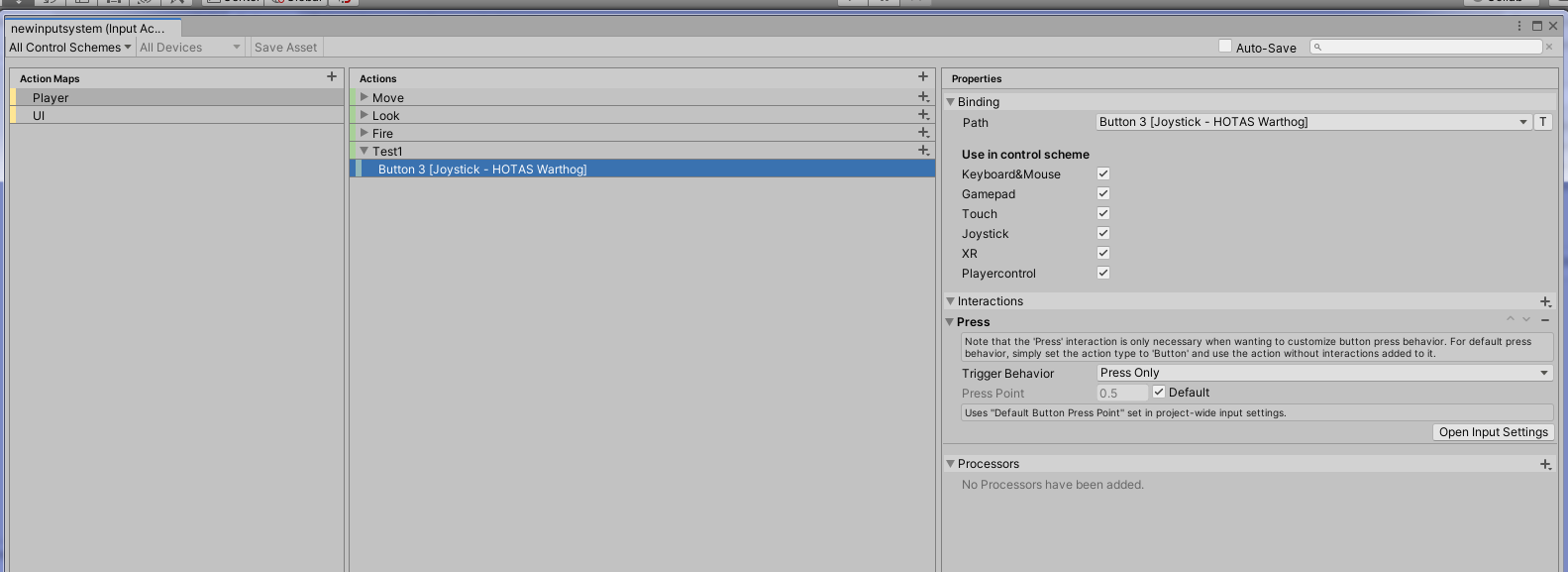
这简化了代码,您可以混合事件和直接测试:
//Newinputsystem is a name of class generated
private Newinputsystem playerAction;

void Awake()
{
    playerAction = new Newinputsystem();
    playerAction.Player.Test1.performed += ctx => FireTest();
}

void FixedUpdate()
{
    if (playerAction.Player.Test1.triggered)
    {
        Debug.Log("fire!!!");
    }
}

public void FireTest()
{
    Debug.Log("i am in firetest");
}

private void OnEnable()
{
    playerAction.Enable();
}
private void OnDisable()
{
    playerAction.Disable();
}因此,您可以添加新的动作test2,这将由动作release only为button3触发.
若要显示HID设备,请转到菜单窗口/分析/输入解题器。
你必须看看你的设备(这里我的是热的)
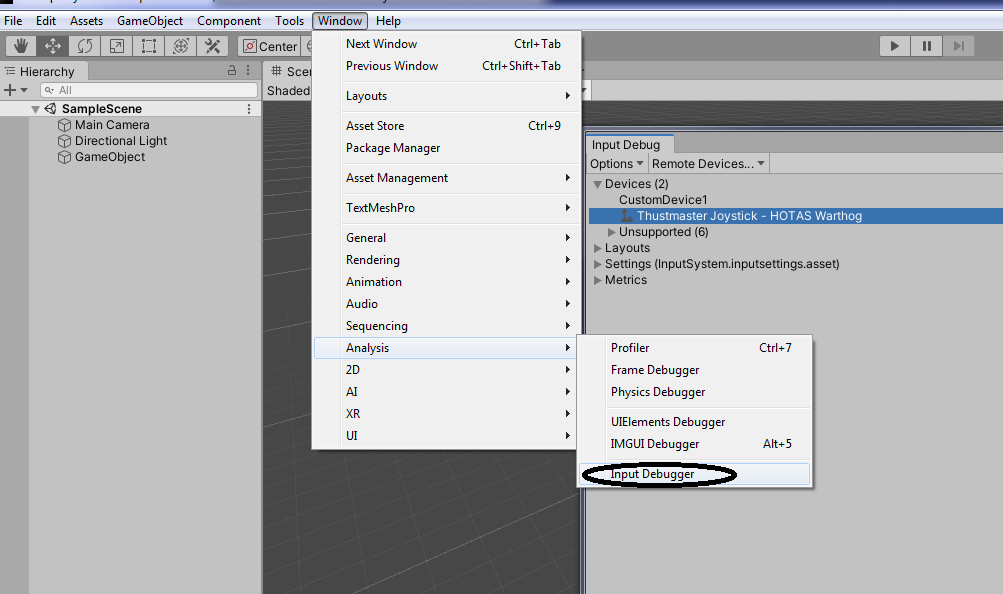
然后单击它和选项卡项HID描述符。
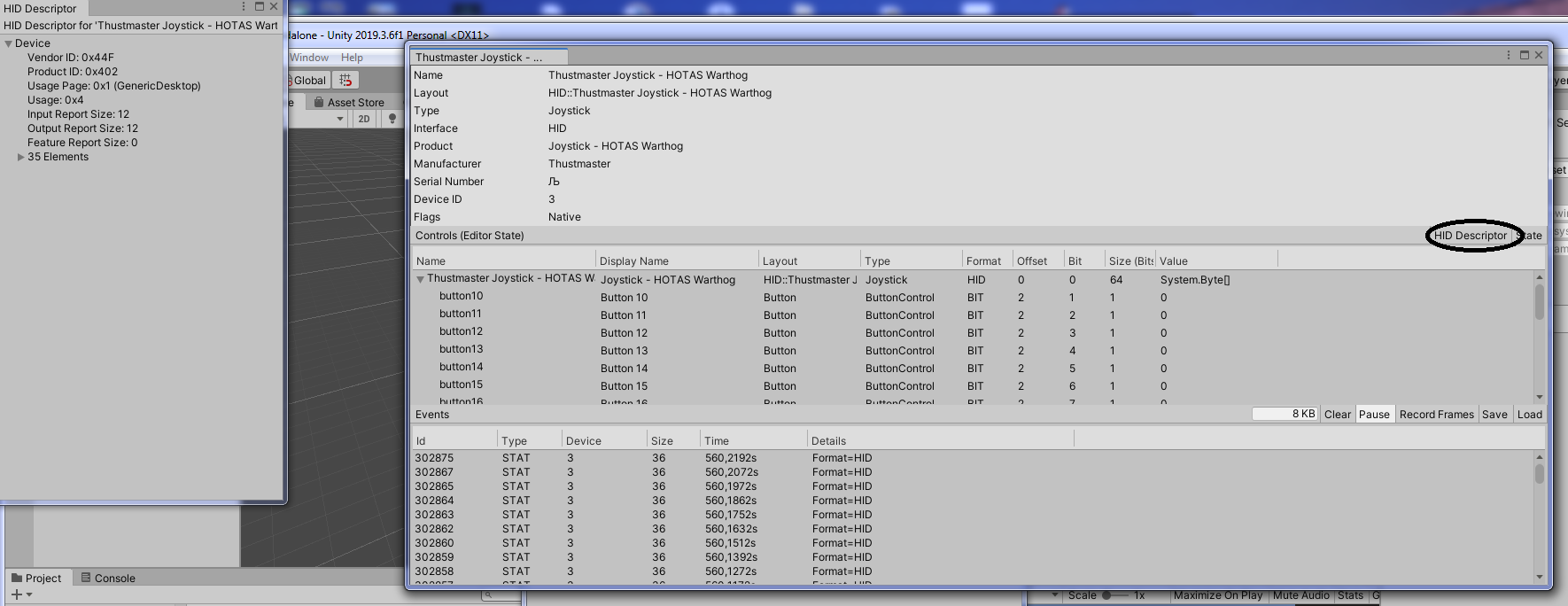
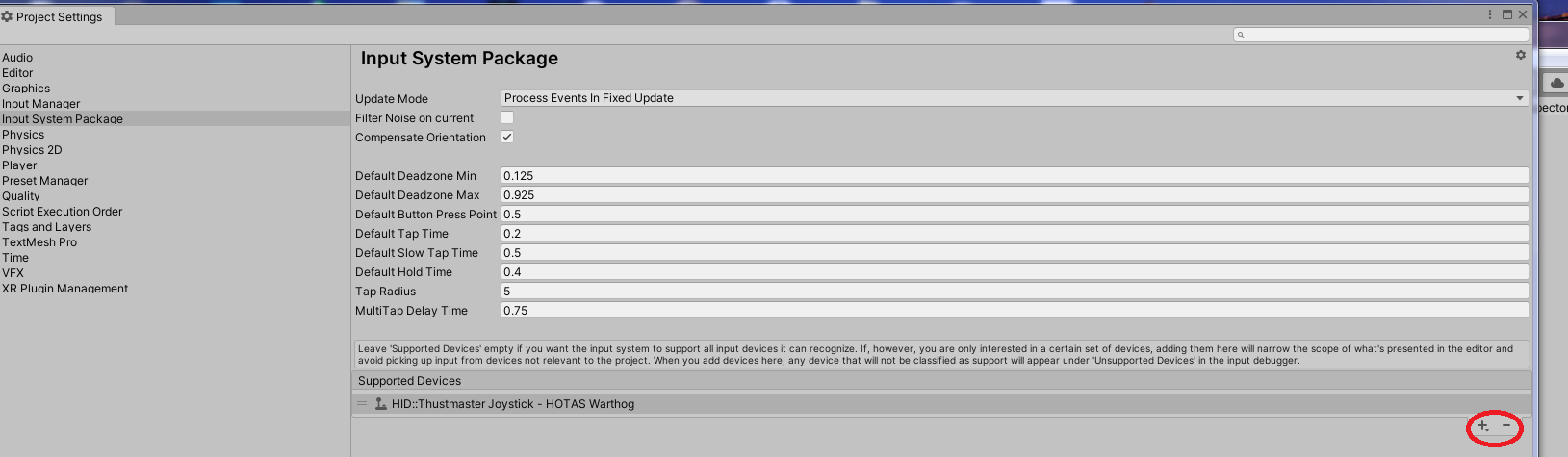
因此,我想您已经在项目设置中选择了您的设备:
Stack Overflow用户
发布于 2021-10-16 19:35:14
为了将Amazon电视控制器与新的输入系统进行完全映射,您需要一个自定义设备。
有了这个脚本,您可以让所有的按钮工作。这也是有可能使音量上升,音量降低和穆特。但我不认为这是个好主意。
using System.Linq;
using UnityEngine;
using UnityEngine.InputSystem;
using UnityEngine.InputSystem.Controls;
using UnityEngine.InputSystem.Layouts;
using UnityEngine.InputSystem.LowLevel;
using UnityEngine.InputSystem.Utilities;
using UnityEngine.Scripting;

#if UNITY_EDITOR
using UnityEditor;
#endif

[Preserve]
public struct AftvRemoteDeviceState : IInputStateTypeInfo
{
    public FourCC format => new FourCC('A', 'G', 'C');

    //Mapped Here
    [InputControl(name = "dPadUpButton", layout = "Button", bit = 19, displayName = "Dpad Up")]
    [InputControl(name = "dPadRightButton", layout = "Button", bit = 22, displayName = "Dpad Right")]
    [InputControl(name = "dPadDownButton", layout = "Button", bit = 20, displayName = "Dpad Down")]
    [InputControl(name = "dPadLeftButton", layout = "Button", bit = 21, displayName = "Dpad Left")]
    //[InputControl(name = "backButton", layout = "Button", bit = 4, displayName = "Back Button")]
    [InputControl(name = "menuButton", layout = "Button", bit = 82, displayName = "Menu Button")]
    //Non Maped
    [InputControl(name = "selectButton", layout = "Button", bit = 23, displayName = "Select Button")]
    [InputControl(name = "rewindButton", layout = "Button", bit = 89, displayName = "Rewind Button")]
    [InputControl(name = "playPauseButton", layout = "Button", bit = 85, displayName = "Play Pause Button")]
    [InputControl(name = "fastForwardButton", layout = "Button", bit = 90, displayName = "Fast Forward Button")]
    public uint buttons;
}

#if UNITY_EDITOR
[InitializeOnLoad] // Call static class constructor in editor.
#endif
[Preserve]
[InputControlLayout(displayName = "Aftv Remote", stateType = typeof(AftvRemoteDeviceState))]
public class AftvRemoteDevice : InputDevice
{
#if UNITY_EDITOR
    static AftvRemoteDevice()
    {
        Initialize();
    }
#endif

    [RuntimeInitializeOnLoadMethod]
    private static void Initialize()
    {
        InputSystem.RegisterLayout<AftvRemoteDevice>
            (
                matches: new InputDeviceMatcher()
                .WithInterface("Android")
                .WithDeviceClass("AndroidGameController")
                .WithProduct("Amazon Fire TV Remote")
            );
    }

    public ButtonControl dPadUpButton { get; private set; }
    public ButtonControl dPadRightButton { get; private set; }
    public ButtonControl dPadDownButton { get; private set; }
    public ButtonControl dPadLeftButton { get; private set; }
    public ButtonControl selectButton { get; private set; }
    public ButtonControl rewindButton { get; private set; }
    public ButtonControl playPauseButton { get; private set; }
    public ButtonControl fastForwardButton { get; private set; }
    //public ButtonControl backButton { get; private set; }
    public ButtonControl menuButton { get; private set; }
    public bool SelectButtonDown { get; set; }
    public bool RewindButtonDown { get; set; }
    public bool PlayPauseButtonDown { get; set; }
    public bool FastForwardButtonDown { get; set; }

    protected override void FinishSetup()
    {
        base.FinishSetup();
        dPadUpButton = GetChildControl<ButtonControl>("dPadUpButton");
        dPadRightButton = GetChildControl<ButtonControl>("dPadRightButton");
        dPadDownButton = GetChildControl<ButtonControl>("dPadDownButton");
        dPadLeftButton = GetChildControl<ButtonControl>("dPadLeftButton");

        rewindButton = GetChildControl<ButtonControl>("rewindButton");
        playPauseButton = GetChildControl<ButtonControl>("playPauseButton");
        fastForwardButton = GetChildControl<ButtonControl>("fastForwardButton");

        //backButton = GetChildControl<ButtonControl>("backButton");
        menuButton = GetChildControl<ButtonControl>("menuButton");
        selectButton = GetChildControl<ButtonControl>("selectButton");
    }

    public static AftvRemoteDevice current { get; private set; }

    public override void MakeCurrent()
    {
        base.MakeCurrent();
        current = this;
    }

    protected override void OnRemoved()
    {
        base.OnRemoved();
        if (current == this)
            current = null;
    }

    #region Editor
#if UNITY_EDITOR
    [MenuItem("Tools/AftvRemote/Create Device")]
    private static void CreateDevice()
    {
        InputSystem.AddDevice<AftvRemoteDevice>();
    }
    [MenuItem("Tools/AftvRemote/Remove Device")]
    private static void RemoveDevice()
    {
        var customDevice = InputSystem.devices.FirstOrDefault(x => x is AftvRemoteDevice);
        if (customDevice != null)
            InputSystem.RemoveDevice(customDevice);
    }
#endif
    #endregion
}
位值是来自Android 的相同的常量值。您可以检查列表这里,您只需要将此脚本包含在项目中,设置您的输入操作和输入操作映射。
由于某些原因,播放机输入组件有问题。但是对于UI导航,这也是很好的工作,它与输入调试器工作良好。
https://stackoverflow.com/questions/61782490
复制相似问题
腾讯云开发者

Copyright © 2013 - 2026 Tencent Cloud. All Rights Reserved. 腾讯云 版权所有
深圳市腾讯计算机系统有限公司 ICP备案/许可证号:粤B2-20090059  粤公网安备44030502008569号
腾讯云计算(北京)有限责任公司 京ICP证150476号 | 京ICP备11018762号