
VueJs自动对焦新行
VueJs自动对焦新行
提问于 2020-04-29 02:35:17
我有动态行,它通过单击按钮或扫描输入成功来添加新行,现在的问题是我无法将注意力集中在新行上。
演示
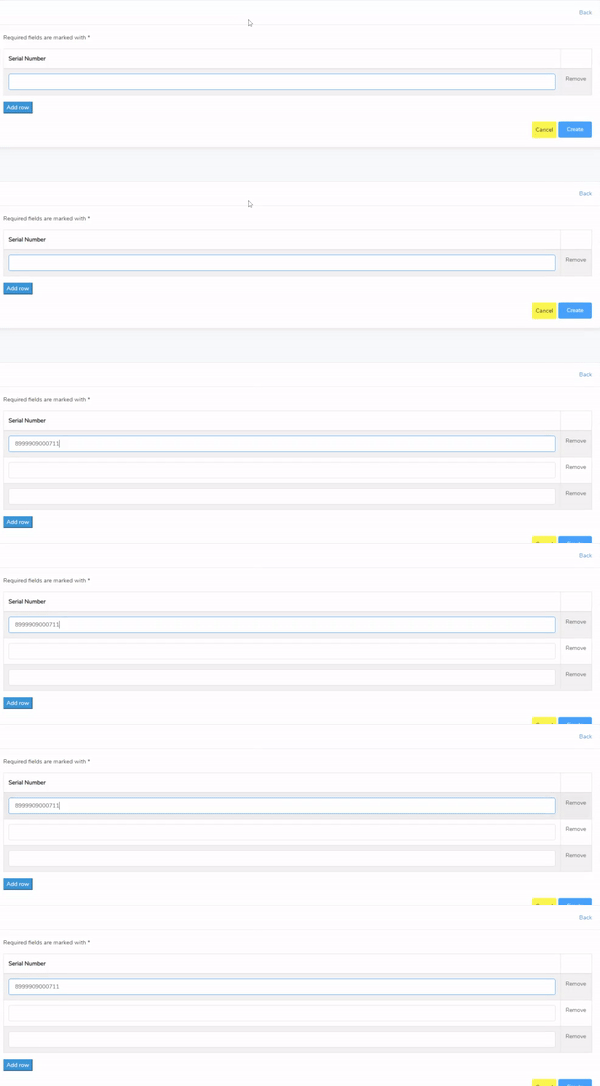
代码
为了避免混淆,我注释了代码中的所有行。
Template
<table class="table table-bordered table-striped table-hover">
    <thead>
        <tr>
            <td><strong>Serial Number</strong></td>
            <td width="50"></td>
        </tr>
    </thead>
    <tbody>
        <tr v-for="(row, index) in form.barcode_serial_number" :key="index">
            <td>
                <el-input ref="barcode" v-model="row.barcode_serial_number"></el-input>
            </td>
            <td>
                <el-link v-on:click="removeElement(index);" style="cursor: pointer">Remove</el-link>
            </td>
        </tr>
    </tbody>
</table>
<div>
    <button type="button" class="button btn-primary" @click="addRow">Add row</button>
</div>
Script
data() {
    return {
        form: {
            barcode_serial_number: [], //get data of all rows
        },
    }
},
created() {
    //scanner
    const eventBus = this.$barcodeScanner.init(this.onBarcodeScanned, { eventBus: true })
    if (eventBus) {
        eventBus.$on('start', () => {
            this.loading = true;
            console.log('start')
        })
        eventBus.$on('finish', () => {
            this.loading = false;
            console.log('finished')

            // add new row when scan succeed
            this.$nextTick(function () {
                this.form.barcode_serial_number.push({
                    barcode_serial_number: ''
                });
            })
        })
    }
},
methods: {
    // add autofocus to new row
    focusInput() {
        this.$refs.barcode.focus();
    },
    // add new row by clicking button
    addRow: function() {
        var barcodes = document.createElement('tr');
        this.form.barcode_serial_number.push({
            barcode_serial_number: ''
        });
    },
    // remove row by clicking button
    removeElement: function(index) {
        this.form.barcode_serial_number.splice(index, 1);
    },
}
问题
- 如何设置新添加的行的自动焦点?
回答 1
Stack Overflow用户
回答已采纳
发布于 2020-04-29 02:49:10
目前,插入了新的serial_number,DOM没有更新,所以我们无法聚焦它。
当DOM被更新时,我们需要使用nextTick来运行函数。
Vue.config.devtools = false;
Vue.config.productionTip = false;

var app = new Vue({
  el: '#app',
  data: {
    form: {
      barcode_serial_number: []
    }
  },
  methods: {
    addRow() {
      this.form.barcode_serial_number.push({
        barcode_serial_number: ''
      });
      this.$nextTick(() => {
      const nbBarcodes = this.$refs.barcode.length;
        this.$refs.barcode[nbBarcodes - 1].focus();
      });
    },
    removeElement(index) {
      this.form.barcode_serial_number.splice(index, 1);
    },
  }
})<script src="https://cdnjs.cloudflare.com/ajax/libs/vue/2.5.17/vue.js"></script>
<div id="app">
<table>
<thead>
<tr>
<td><strong>Serial Number</strong></td>
<td width="50"></td>
</tr>
</thead>
<tbody>
<tr v-for="(row, index) in form.barcode_serial_number" :key="index">
<td>
<input ref="barcode" v-model="row.barcode_serial_number"></input>
</td>
<td>
<button v-on:click="removeElement(index);">Remove</button>
</td>
</tr>
</tbody>
</table>
<div>
<button @click="addRow">Add row</button>
</div>
</div>
页面原文内容由Stack Overflow提供。腾讯云小微IT领域专用引擎提供翻译支持
原文链接:
https://stackoverflow.com/questions/61493285
复制相关文章
相似问题
腾讯云开发者

Copyright © 2013 - 2026 Tencent Cloud. All Rights Reserved. 腾讯云 版权所有
深圳市腾讯计算机系统有限公司 ICP备案/许可证号:粤B2-20090059  粤公网安备44030502008569号
腾讯云计算(北京)有限责任公司 京ICP证150476号 | 京ICP备11018762号