
未能为范围('https://.xxx.net/firebase-cloud-messaging-push-scope')注册ServiceWorker
我想发送Firebase网络通知从FCM到PWA应用程序。我试过这样做,最后出现了下面的错误。
我已经通过了StackOverflow的服务器链接,但没有运气。
- Firebase web push notification Service worker issue
- FirebaseError: Messaging: We are unable to register the default service worker
A bad HTTP response code (404) was received when fetching the script.

An error occurred while retrieving token. FirebaseError: Messaging: We are unable to register the default service worker. Failed to register a ServiceWorker for scope ('https://dms-uat.xxxxxx.net/firebase-cloud-messaging-push-scope') with script ('https://dms-uat.xxxxxx.net/firebase-messaging-sw.js'): A bad HTTP response code (404) was received when fetching the script. (messaging/failed-service-worker-registration).
at rt. (https://www.gstatic.com/firebasejs/7.14.0/firebase-messaging.js:1:31316)
at https://www.gstatic.com/firebasejs/7.14.0/firebase-messaging.js:1:1935
at Object.throw (https://www.gstatic.com/firebasejs/7.14.0/firebase-messaging.js:1:2040)
at i (https://www.gstatic.com/firebasejs/7.14.0/firebase-messaging.js:1:834)index.html和firebase-messaging-sw.js文件当前都在domain/messaging文件夹中。
我被告知firebase-messaging-sw.js文件应该在根文件夹中,这意味着domain/firebase-messaging-sw.js,这是正确的吗?如果是的话,我怎样才能做到呢?
浏览器中的服务人员:
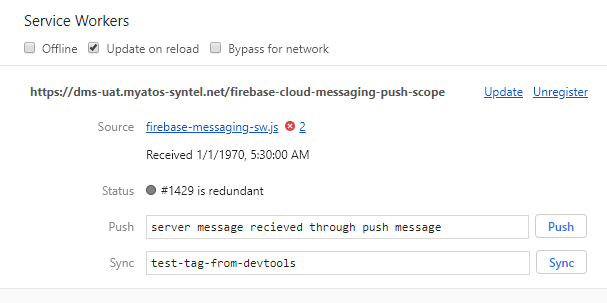
这是我的firebase-messaging sw.js文件。
// These scripts are made available when the app is served or deployed on Firebase Hosting
// If you do not serve/host your project using Firebase Hosting see https://firebase.google.com/docs/web/setup
importScripts('https://www.gstatic.com/firebasejs/7.14.0/firebase-app.js');
importScripts('https://www.gstatic.com/firebasejs/7.14.0/firebase-messaging.js');
importScripts('https://www.gstatic.com/firebasejs/7.14.0/init.js');

const messaging = firebase.messaging();

var firebaseConfig = {
            apiKey: "xxxxxxxx-l7lKJ6nAtsmyfXRX5gXcl2_0a3Y",
            authDomain: "xxxxxx-9fa59.firebaseapp.com",
            databaseURL: "https://xxxxxx-9fa59.firebaseio.com",
            projectId: "xxxxx-9fa59",
            storageBucket: "xxxxxx-9fa59.appspot.com",
            messagingSenderId: "123456789",
            appId: "1:215883024305:web:f1b6b2148bd185584d1f90",
            measurementId: "G-MP1GQDZ18D"
        };
        // Initialize Firebase
        firebase.initializeApp(firebaseConfig);
        //firebase.analytics();


/**
 * Here is is the code snippet to initialize Firebase Messaging in the Service
 * Worker when your app is not hosted on Firebase Hosting.

 // [START initialize_firebase_in_sw]
 // Give the service worker access to Firebase Messaging.
 // Note that you can only use Firebase Messaging here, other Firebase libraries
 // are not available in the service worker.
 importScripts('https://www.gstatic.com/firebasejs/7.14.0/firebase-app.js');
 importScripts('https://www.gstatic.com/firebasejs/7.14.0/firebase-messaging.js');

 // Initialize the Firebase app in the service worker by passing in
 // your app's Firebase config object.
 // https://firebase.google.com/docs/web/setup#config-object
 firebase.initializeApp({
   apiKey: 'api-key',
   authDomain: 'project-id.firebaseapp.com',
   databaseURL: 'https://project-id.firebaseio.com',
   projectId: 'project-id',
   storageBucket: 'project-id.appspot.com',
   messagingSenderId: 'sender-id',
   appId: 'app-id',
   measurementId: 'G-measurement-id',
 });

 // Retrieve an instance of Firebase Messaging so that it can handle background
 // messages.
 const messaging = firebase.messaging();
 // [END initialize_firebase_in_sw]
 **/


// If you would like to customize notifications that are received in the
// background (Web app is closed or not in browser focus) then you should
// implement this optional method.
// [START background_handler]
messaging.setBackgroundMessageHandler(function(payload) {
  console.log('[firebase-messaging-sw.js] Received background message ', payload);
  // Customize notification here
  const notificationTitle = 'Background Message Title';
  const notificationOptions = {
    body: 'Background Message body.',
    icon: './firebase-logo.png'
  };

  return self.registration.showNotification(notificationTitle,
    notificationOptions);
});
// [END background_handler]
这是我的index.html
<!--
Copyright (c) 2016 Google Inc.

Licensed under the Apache License, Version 2.0 (the "License");
you may not use this file except in compliance with the License.
You may obtain a copy of the License at

http://www.apache.org/licenses/LICENSE-2.0

Unless required by applicable law or agreed to in writing, software
distributed under the License is distributed on an "AS IS" BASIS,
WITHOUT WARRANTIES OR CONDITIONS OF ANY KIND, either express or implied.
See the License for the specific language governing permissions and
limitations under the License.
-->
<html>
<head>
<meta charset=utf-8 />
<meta name="viewport" content="width=device-width, initial-scale=1.0">
<title>Firebase Cloud Messaging Example</title>

<!-- Material Design Theming -->
<link rel="stylesheet" href="https://code.getmdl.io/1.1.3/material.orange-indigo.min.css">
<link rel="stylesheet" href="https://fonts.googleapis.com/icon?family=Material+Icons">
<script defer src="https://code.getmdl.io/1.1.3/material.min.js"></script>

<link rel="stylesheet" href="./main.css">

<link rel="manifest" href="./manifest.json">
</head>
<body>
  <div class="demo-layout mdl-layout mdl-js-layout mdl-layout--fixed-header">

      <!-- Header section containing title -->
      <header class="mdl-layout__header mdl-color-text--white mdl-color--light-blue-700">
          <div class="mdl-cell mdl-cell--12-col mdl-cell--12-col-tablet mdl-grid">
              <div class="mdl-layout__header-row mdl-cell mdl-cell--12-col mdl-cell--12-col-tablet mdl-cell--8-col-desktop">
                  <h3>Firebase Cloud Messaging</h3>
              </div>
          </div>
      </header>

      <main class="mdl-layout__content mdl-color--grey-100">
          <div class="mdl-cell mdl-cell--12-col mdl-cell--12-col-tablet mdl-grid">

              <!-- Container for the Table of content -->
              <div class="mdl-card mdl-shadow--2dp mdl-cell mdl-cell--12-col mdl-cell--12-col-tablet mdl-cell--12-col-desktop">
                  <div class="mdl-card__supporting-text mdl-color-text--grey-600">
                      <!-- div to display the generated Instance ID token -->
                      <div id="token_div" style="display: none;">
                          <h4>Instance ID Token</h4>
                          <p id="token" style="word-break: break-all;"></p>
                          <button class="mdl-button mdl-js-button mdl-button--raised mdl-button--colored"
                                  onclick="deleteToken()">
                              Delete Token
                          </button>
                      </div>
                      <!-- div to display the UI to allow the request for permission to
                           notify the user. This is shown if the app has not yet been
                           granted permission to notify. -->
                      <div id="permission_div" style="display: none;">
                          <h4>Needs Permission</h4>
                          <p id="token"></p>
                          <button class="mdl-button mdl-js-button mdl-button--raised mdl-button--colored"
                                  onclick="requestPermission()">
                              Request Permission
                          </button>
                      </div>
                      <!-- div to display messages received by this app. -->
                      <div id="messages"></div>
                  </div>
              </div>

          </div>
      </main>
  </div>

  <!-- Import and configure the Firebase SDK -->
  <!-- These scripts are made available when the app is served or deployed on Firebase Hosting -->
  <!-- If you do not serve/host your project using Firebase Hosting see https://firebase.google.com/docs/web/setup -->

<!-- Insert these scripts at the bottom of the HTML, but before you use any Firebase services -->

<!-- Firebase App (the core Firebase SDK) is always required and must be listed first -->
<script src="https://www.gstatic.com/firebasejs/7.14.0/firebase-app.js"></script>
<!-- Add Firebase products that you want to use -->
<script src="https://www.gstatic.com/firebasejs/7.14.0/firebase-auth.js"></script>
<!--   <script src="https://www.gstatic.com/firebasejs/7.14.0/firebase-firestore.js"></script>-->
  <script src="https://www.gstatic.com/firebasejs/7.14.0/firebase-messaging.js"></script>
  <!-- <script src='https://cdn.firebase.com/js/client/2.2.1/firebase.js'></script> -->
  <script>

  var firebaseConfig = {
          apiKey: "xxxxxxxx-l7lKJ6nAtsmyfXRX5gXcl2_0a3Y",
          authDomain: "xxxxx-9fa59.firebaseapp.com",
          databaseURL: "https://xxxxx-9fa59.firebaseio.com",
          projectId: "xxxxx-9fa59",
          storageBucket: "xxxxx-9fa59.appspot.com",
          messagingSenderId: "123456789",
          appId: "1:215883024305:web:f1b6b2148bd185584d1f90",
          measurementId: "G-MP1GQDZ18D"
      };
      // Initialize Firebase
      firebase.initializeApp(firebaseConfig);
      //firebase.analytics();

    // [START get_messaging_object]
    // Retrieve Firebase Messaging object.
    const messaging = firebase.messaging();
    // [END get_messaging_object]
    // [START set_public_vapid_key]
    // Add the public key generated from the console here.
    messaging.usePublicVapidKey('BDTDxT_59kRHBjDTBwnDvFQcdy8Y8A8NvjFFzW2aMo27raPODdeX89pSBA6pxerBbmpBXaLxiadjiNHTDmComhs');
    // [END set_public_vapid_key]

    // IDs of divs that display Instance ID token UI or request permission UI.
    const tokenDivId = 'token_div';
    const permissionDivId = 'permission_div';

    // [START refresh_token]
    // Callback fired if Instance ID token is updated.
    messaging.onTokenRefresh(() => {
      messaging.getToken().then((refreshedToken) => {
        console.log('Token refreshed.');
        // Indicate that the new Instance ID token has not yet been sent to the
        // app server.
        setTokenSentToServer(false);
        // Send Instance ID token to app server.
        sendTokenToServer(refreshedToken);
        // [START_EXCLUDE]
        // Display new Instance ID token and clear UI of all previous messages.
        resetUI();
        // [END_EXCLUDE]
      }).catch((err) => {
        console.log('Unable to retrieve refreshed token ', err);
        showToken('Unable to retrieve refreshed token ', err);
      });
    });
    // [END refresh_token]

    // [START receive_message]
    // Handle incoming messages. Called when:
    // - a message is received while the app has focus
    // - the user clicks on an app notification created by a service worker
    //   `messaging.setBackgroundMessageHandler` handler.
    messaging.onMessage((payload) => {
      console.log('Message received. ', payload);
      // [START_EXCLUDE]
      // Update the UI to include the received message.
      appendMessage(payload);
      // [END_EXCLUDE]
    });
    // [END receive_message]

    function resetUI() {
      clearMessages();
      showToken('loading...');
      // [START get_token]
      // Get Instance ID token. Initially this makes a network call, once retrieved
      // subsequent calls to getToken will return from cache.
      messaging.getToken().then((currentToken) => {
        if (currentToken) {
          sendTokenToServer(currentToken);
          updateUIForPushEnabled(currentToken);
        } else {
          // Show permission request.
          console.log('No Instance ID token available. Request permission to generate one.');
          // Show permission UI.
          updateUIForPushPermissionRequired();
          setTokenSentToServer(false);
        }
      }).catch((err) => {
        console.log('An error occurred while retrieving token. ', err);
        showToken('Error retrieving Instance ID token. ', err);
        setTokenSentToServer(false);
      });
      // [END get_token]
    }


    function showToken(currentToken) {
      // Show token in console and UI.
      const tokenElement = document.querySelector('#token');
      tokenElement.textContent = currentToken;
    }

    // Send the Instance ID token your application server, so that it can:
    // - send messages back to this app
    // - subscribe/unsubscribe the token from topics
    function sendTokenToServer(currentToken) {
        if (!isTokenSentToServer()) {
            console.log('Sending token to server...' + currentToken);
        // TODO(developer): Send the current token to your server.
        setTokenSentToServer(true);
      } else {
        console.log('Token already sent to server so won\'t send it again ' +
            'unless it changes');
      }

    }

    function isTokenSentToServer() {
      return window.localStorage.getItem('sentToServer') === '1';
    }

    function setTokenSentToServer(sent) {
      window.localStorage.setItem('sentToServer', sent ? '1' : '0');
    }

    function showHideDiv(divId, show) {
      const div = document.querySelector('#' + divId);
      if (show) {
        div.style = 'display: visible';
      } else {
        div.style = 'display: none';
      }
    }

    function requestPermission() {
      console.log('Requesting permission...');
      // [START request_permission]
      Notification.requestPermission().then((permission) => {
        if (permission === 'granted') {
          console.log('Notification permission granted.');
          // TODO(developer): Retrieve an Instance ID token for use with FCM.
          // [START_EXCLUDE]
          // In many cases once an app has been granted notification permission,
          // it should update its UI reflecting this.
          resetUI();
          // [END_EXCLUDE]
        } else {
          console.log('Unable to get permission to notify.');
        }
      });
      // [END request_permission]
    }

    function deleteToken() {
      // Delete Instance ID token.
      // [START delete_token]
      messaging.getToken().then((currentToken) => {
        messaging.deleteToken(currentToken).then(() => {
          console.log('Token deleted.');
          setTokenSentToServer(false);
          // [START_EXCLUDE]
          // Once token is deleted update UI.
          resetUI();
          // [END_EXCLUDE]
        }).catch((err) => {
          console.log('Unable to delete token. ', err);
        });
        // [END delete_token]
      }).catch((err) => {
        console.log('Error retrieving Instance ID token. ', err);
        showToken('Error retrieving Instance ID token. ', err);
      });

    }

    // Add a message to the messages element.
    function appendMessage(payload) {
      const messagesElement = document.querySelector('#messages');
      const dataHeaderELement = document.createElement('h5');
      const dataElement = document.createElement('pre');
      dataElement.style = 'overflow-x:hidden;';
      dataHeaderELement.textContent = 'Received message:';
      dataElement.textContent = JSON.stringify(payload, null, 2);
      messagesElement.appendChild(dataHeaderELement);
      messagesElement.appendChild(dataElement);
    }

    // Clear the messages element of all children.
    function clearMessages() {
      const messagesElement = document.querySelector('#messages');
      while (messagesElement.hasChildNodes()) {
        messagesElement.removeChild(messagesElement.lastChild);
      }
    }

    function updateUIForPushEnabled(currentToken) {
      showHideDiv(tokenDivId, true);
      showHideDiv(permissionDivId, false);
      showToken(currentToken);
    }

    function updateUIForPushPermissionRequired() {
      showHideDiv(tokenDivId, false);
      showHideDiv(permissionDivId, true);
    }

    resetUI();
  </script>


</body>
</html>
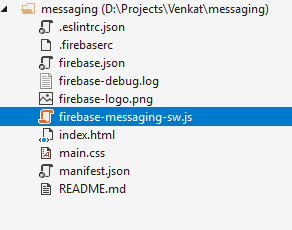
除了firebase-ap.js、firebase-mesaging.js文件之外,我没有做太多更改。如果你需要更多的信息,请告诉我。
回答 3
Stack Overflow用户
发布于 2021-03-19 14:08:35
firebase.messaging需要一个SW注册。如果不指定注册,则在根级别创建一个新的注册,并需要根级的firebase消息传递-sw.js文件。
不建议使用useServiceWorker
可以在getToken()时传递注册:
if ("serviceWorker" in navigator) {
navigator.serviceWorker
  .register("./firebase-messaging-sw.js")
  .then(function(registration) {
    console.log("Registration successful, scope is:", registration.scope);
    messaging.getToken({vapidKey: 'YOUR_VAPID_KEY', serviceWorkerRegistration : registration })
      .then((currentToken) => {
        if (currentToken) {
          console.log('current token for client: ', currentToken);

          // Track the token -> client mapping, by sending to backend server
          // show on the UI that permission is secured
        } else {
          console.log('No registration token available. Request permission to generate one.');

          // shows on the UI that permission is required
        }
      }).catch((err) => {
        console.log('An error occurred while retrieving token. ', err);
        // catch error while creating client token
      });
    })
    .catch(function(err) {
      console.log("Service worker registration failed, error:"  , err );
  });
}Stack Overflow用户
发布于 2020-05-29 14:45:16
这里是答案,这个useServiceWorker (.)拯救我的日子
if('serviceWorker' in navigator) {
          navigator.serviceWorker.register('../firebase-messaging-sw.js')
        .then(function(registration) {
         console.log("Service Worker Registered");
        messaging.useServiceWorker(registration);
          });
}Stack Overflow用户
发布于 2021-09-09 11:34:12
首先,在index.html文件中添加这两个脚本
    <script src="https://www.gstatic.com/firebasejs/7.20.0/firebase-app.js"></script>
<script src="https://www.gstatic.com/firebasejs/7.7.0/firebase-messaging.js"></script>然后在您的public/firebase-messaging-sw.js文件中,复制以下代码
    importScripts('https://www.gstatic.com/firebasejs/8.2.0/firebase-app.js');
    importScripts('https://www.gstatic.com/firebasejs/8.2.0/firebase-messaging.js');

    // Initialize the Firebase app in the service worker by passing the generated config
    var firebaseConfig = {
       apiKey: "XXX",
       authDomain: "XXX",
       projectId: "XXX",
       storageBucket: "XXX",
       messagingSenderId: "XXX",
       appId: "XXX",
    };

   firebase.initializeApp(firebaseConfig);

   // Retrieve firebase messaging
   const messaging = firebase.messaging();

    messaging.setBackgroundMessageHandler(function (payload) {
       console.log('setBackgroundMessageHandler background message ', payload);

       const promiseChain = clients
          .matchAll({
              type: "window",
              includeUncontrolled: true
          })
         .then(windowClients => {
              for (let i = 0; i < windowClients.length; i++) {
                 const windowClient = windowClients[i];
                 windowClient.postMessage(payload);
              }
         })
         .then(() => {
              return self.registration.showNotification("my notification title");
          });
         return promiseChain;
});现在转到您的App.js文件中,在function的生命周期函数componentDidMount中添加以下代码。
    componentDidMount =() => {
         firebase.initializeApp(firebaseConfig);
         const messaging = firebase.messaging();
         firebase.messaging().requestPermission().then(async () => {
             return messaging.getToken();
         }).then((token) => {
             console.log('now the token is>>>>>>>>>>>>>>>>', token)
         }).catch((err) => {
             console.log('catch errror>>>>>>>>>>>>>', err)
         })
}这里的firebaseConfig变量是config对象。
    var firebaseConfig = {
       apiKey: "XXX",
       authDomain: "XXX",
       projectId: "XXX",
       storageBucket: "XXX",
       messagingSenderId: "XXX",
       appId: "XXX",
};如果得到类似于firebase not defined的错误,请在componentDidMount生命周期方法之前添加此注释。
/*global firebase*/希望能给你。
https://stackoverflow.com/questions/61276173
复制相似问题
腾讯云开发者
