
Apache POI -在合并区域内保持原始图片比例
我需要把一张图片放进一个合并的细胞区域的中心。合并的单元格区域总是只有一列宽,但多行高。
如果图片不适合在单元格区域内,它需要调整大小,同时保持原来的比例。
    int pictureIdx = wb.addPicture(bytes, pictype);
    CreationHelper helper = wb.getCreationHelper();
    Drawing drawing = sheet.createDrawingPatriarch();
    ClientAnchor anchor = helper.createClientAnchor();
    anchor.setAnchorType(ClientAnchor.AnchorType.DONT_MOVE_AND_RESIZE);
    anchor.setCol1(column);
    anchor.setRow1(row);
    anchor.setRow2(row+rowspan);
    anchor.setCol2(column+1);
    Picture pict = drawing.createPicture(anchor, pictureIdx);
    pict.resize();

    short rowHeight = (short)0;
    for (int i = row; i<row+rowspan; i++ ) {
        rowHeight += sheet.getRow(i).getHeight();
    }
    int rowHeightPx = heightUnits2Pixel(rowHeight); // (from [https://stackoverflow.com/a/31837639/1320704][1] )
    int columnWidthPx = (int) (sheet.getColumnWidthInPixels(column));
    int pictWidthPx = pict.getImageDimension().width;
    int pictHeightPx = pict.getImageDimension().height;
    float scale = 1;
    if (pictHeightPx > rowHeightPx) {
        float tmpscale = (float)rowHeightPx / (float)pictHeightPx;
        if (tmpscale < scale) scale = tmpscale;
    }
    if (pictWidthPx > columnWidthPx) {
        float tmpscale = (float)columnWidthPx / (float)pictWidthPx;
        if (tmpscale < scale) scale = tmpscale;
    }
    anchor.setDx1(
        (int) ((sheet.getColumnWidthInPixels(column)- pict.getImageDimension().width) /2)
    );
    pict.resize(scale, scale);
结果如下:
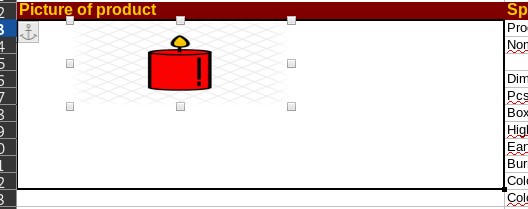
正如你所看到的,我没有达到预期的效果。这幅画是正方形(256x256),尽管x和y的比例尺是一样的,但它还是被扭曲了,而且它的高度不匹配。而且它不是中心的。
为了进行比较,下面是原来大小相同的图片:
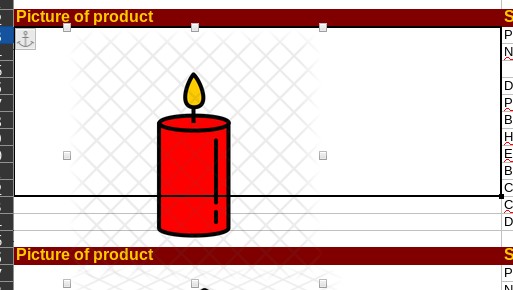
这就是我真正想要达到的目标:
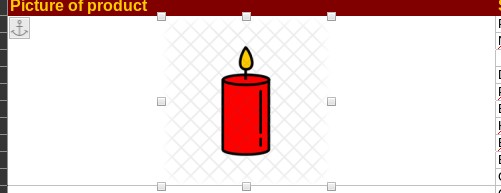
回答 1
Stack Overflow用户
发布于 2020-03-10 08:35:43
第一个问题是,如果您想使用Picture.resize,那么只创建一个左上角单元格Col1和Row1的锚点。只有一个单元格锚,因为右下角锚位置取决于大小。
第二个问题是,您应该只在左上锚位置是众所周知的包容性Dx1和Dy1之后才进行调整。
但主要的问题是,您的heightUnits2Pixel没有得到正确的像素高度行。应该更好地使用Row.getHeightInPoints。这将获得pt中的行高,但可以使用rowHeightPt * Units.PIXEL_DPI / Units.POINT_DPI将其转换为px。见https://poi.apache.org/apidocs/dev/org/apache/poi/util/Units.html。
使用它,至少刻度因子的计算是正确的,因为它现在有正确的像素行高。
要将锚的Dx1设置为水平中心位置,还有一个额外的问题。Dx和Dy的含义在XSSF和HSSF之间有很大的不同。
在XSSF中,它是单元EMU中的水平中心位置。因此,您需要为horCenterPosPx * Units.EMU_PER_PIXEL计算Dx。见https://poi.apache.org/apidocs/dev/org/apache/poi/util/Units.html。
在HSSF中,Dx值依赖于column-width / default column-width因子,Dy值依赖于row-height / default row-height因子。见apache poi XSSFClientAnchor不定位图片相对于dx1,dy1,dx2,dy2。
首先,为了计算垂直中心位置,需要确定锚的正确Row1。即使合并了,也会出现不同的行。因此,锚的Row1需要是图片开始的正确行。到垂直中心位置的其余像素是Dy1。
下面是完整的示例,对我来说是有效的。它将各种不同大小、缩放和中心的图像放入合并范围A3:A12中。
import org.apache.poi.xssf.usermodel.XSSFWorkbook;
import org.apache.poi.hssf.usermodel.HSSFWorkbook;
import org.apache.poi.ss.usermodel.*;
import org.apache.poi.ss.util.*;

import org.apache.poi.util.IOUtils;
import org.apache.poi.util.Units;

import java.io.InputStream;
import java.io.FileInputStream;
import java.io.FileOutputStream;

class CenterImageTest {

 static void putPictureCentered(Sheet sheet, String picturePath, int pictureType, int column, int startRow, int rowspan) throws Exception {
  Workbook wb = sheet.getWorkbook();

  //load the picture
  InputStream inputStream = new FileInputStream(picturePath);
  byte[] bytes = IOUtils.toByteArray(inputStream);
  int pictureIdx = wb.addPicture(bytes, pictureType);
  inputStream.close();

  //create an anchor with upper left cell column/startRow, only one cell anchor since bottom right depends on resizing
  CreationHelper helper = wb.getCreationHelper();
  ClientAnchor anchor = helper.createClientAnchor();
  anchor.setCol1(column);
  anchor.setRow1(startRow);

  //create a picture anchored to Col1 and Row1
  Drawing drawing = sheet.createDrawingPatriarch();
  Picture pict = drawing.createPicture(anchor, pictureIdx);

  //get the picture width in px
  int pictWidthPx = pict.getImageDimension().width;
  //get the picture height in px
  int pictHeightPx = pict.getImageDimension().height;

  //get column width of column in px
  float columnWidthPx = sheet.getColumnWidthInPixels(column);

  //get the heights of all merged rows in px
  float[] rowHeightsPx = new float[startRow+rowspan];
  float rowsHeightPx = 0f;
  for (int r = startRow; r < startRow+rowspan; r++) {
   Row row = sheet.getRow(r);
   float rowHeightPt = row.getHeightInPoints();
   rowHeightsPx[r-startRow] = rowHeightPt * Units.PIXEL_DPI / Units.POINT_DPI;
   rowsHeightPx += rowHeightsPx[r-startRow];
  }

  //calculate scale
  float scale = 1;
  if (pictHeightPx > rowsHeightPx) {
   float tmpscale = rowsHeightPx / (float)pictHeightPx;
   if (tmpscale < scale) scale = tmpscale;
  }
  if (pictWidthPx > columnWidthPx) {
   float tmpscale = columnWidthPx / (float)pictWidthPx;
   if (tmpscale < scale) scale = tmpscale;
  }

  //calculate the horizontal center position
  int horCenterPosPx = Math.round(columnWidthPx/2f - pictWidthPx*scale/2f);
  //set the horizontal center position as Dx1 of anchor
  if (wb instanceof XSSFWorkbook) {
   anchor.setDx1(horCenterPosPx * Units.EMU_PER_PIXEL); //in unit EMU for XSSF
  } else if (wb instanceof HSSFWorkbook) {
   //see https://stackoverflow.com/questions/48567203/apache-poi-xssfclientanchor-not-positioning-picture-with-respect-to-dx1-dy1-dx/48607117#48607117 for HSSF
   int DEFAULT_COL_WIDTH = 10 * 256;
   anchor.setDx1(Math.round(horCenterPosPx * Units.DEFAULT_CHARACTER_WIDTH / 256f * 14.75f * DEFAULT_COL_WIDTH / columnWidthPx));
  }

  //calculate the vertical center position
  int vertCenterPosPx = Math.round(rowsHeightPx/2f - pictHeightPx*scale/2f);
  //get Row1
  Integer row1 = null;
  rowsHeightPx = 0f;
  for (int r = 0; r < rowHeightsPx.length; r++) {
   float rowHeightPx = rowHeightsPx[r];
   if (rowsHeightPx + rowHeightPx > vertCenterPosPx) {
    row1 = r + startRow;
    break;
   }
   rowsHeightPx += rowHeightPx;
  }
  //set the vertical center position as Row1 plus Dy1 of anchor
  if (row1 != null) {
   anchor.setRow1(row1);
   if (wb instanceof XSSFWorkbook) {
    anchor.setDy1(Math.round(vertCenterPosPx - rowsHeightPx) * Units.EMU_PER_PIXEL); //in unit EMU for XSSF
   } else if (wb instanceof HSSFWorkbook) {
    //see https://stackoverflow.com/questions/48567203/apache-poi-xssfclientanchor-not-positioning-picture-with-respect-to-dx1-dy1-dx/48607117#48607117 for HSSF
    float DEFAULT_ROW_HEIGHT = 12.75f;
    anchor.setDy1(Math.round((vertCenterPosPx - rowsHeightPx) * Units.PIXEL_DPI / Units.POINT_DPI * 14.75f * DEFAULT_ROW_HEIGHT / rowHeightsPx[row1]));
   }
  }

  //resize the picture to it's native size
  pict.resize();
  //if it must scaled down, then scale
  if (scale < 1) {
   pict.resize(scale);
  }
 }

 public static void main(String[] args) throws Exception {

  Workbook wb = new HSSFWorkbook(); String resultName = "CenterImageTest.xls";
  //Workbook wb = new XSSFWorkbook(); String resultName = "CenterImageTest.xlsx";
  Sheet sheet = wb.createSheet("Sheet1");

  int column = 2;
  int columnWidth = 100; //in default character widths
  int startRow = 2;
  int rowspan = 10;

  //========================prepare sheet
  //create cell A1 and set cell value
  Row row = sheet.createRow(1);
  Cell cell = row.createCell(column);
  cell.setCellValue("Picture of product");

  //create the cells with different heights
  for (int r = startRow; r < startRow+rowspan; r++) {
   row = sheet.createRow(r);
   row.setHeightInPoints(12 + r*2);
  }
  //merge cells
  sheet.addMergedRegion(new CellRangeAddress(startRow,startRow+rowspan-1,column,column));
  //========================end prepare sheet

  //set column width of column in default character widths
  sheet.setColumnWidth(column, columnWidth * 256);
  //put image centered
  //String picturePath = "./logo.png"; // small image
  //putPictureCentered(sheet, picturePath, Workbook.PICTURE_TYPE_PNG, column, startRow, rowspan);
  String picturePath = "./Bilder/Sample-jpg-image-1.jpg"; // bigger image
  putPictureCentered(sheet, picturePath, Workbook.PICTURE_TYPE_JPEG, column, startRow, rowspan);

  FileOutputStream fileOut = new FileOutputStream(resultName);
  wb.write(fileOut);
  fileOut.close();
  wb.close();

 }
}如果图片很小,并且为锚设置了Picture.resize,那么似乎在Dx1中有一个bug。刻度因子scale根据此代码正确计算,但pict.resize(scale)不按比例缩放高度和宽度。它使用正确的因子缩放高度。但它的宽度不是使用相同的因素,而是一个更大的因素。
我已经在bug.cgi?id=64213上注册了bug。
为了避免错误的Picture.resize,我们可以计算完整的两个细胞锚点。我们有Col1,并且已经在计算Dx1、Row1和Dy1,以得到图片的左上角。现在,我们可以额外计算Dx2、Row2和Dy2,以获得图片的右下角。
下面是我的putPictureCentered示例:
...
/*
  //resize the picture to it's native size
  pict.resize();
  //if it must scaled down, then scale
  if (scale < 1) {
   pict.resize(scale);
  }
*/

  //set Col2 of anchor the same as Col1 as all is in one column
  anchor.setCol2(column);

  //calculate the horizontal end position of picture
  int horCenterEndPosPx = Math.round(horCenterPosPx + pictWidthPx*scale);
  //set set the horizontal end position as Dx2 of anchor
  if (wb instanceof XSSFWorkbook) {
   anchor.setDx2(horCenterEndPosPx * Units.EMU_PER_PIXEL); //in unit EMU for XSSF
  } else if (wb instanceof HSSFWorkbook) {
   //see https://stackoverflow.com/questions/48567203/apache-poi-xssfclientanchor-not-positioning-picture-with-respect-to-dx1-dy1-dx/48607117#48607117 for HSSF
   int DEFAULT_COL_WIDTH = 10 * 256;
   anchor.setDx2(Math.round(horCenterEndPosPx * Units.DEFAULT_CHARACTER_WIDTH / 256f * 14.75f * DEFAULT_COL_WIDTH / columnWidthPx));
  }

  //calculate the vertical end position of picture
  int vertCenterEndPosPx = Math.round(vertCenterPosPx + pictHeightPx*scale);
  //get Row2
  Integer row2 = null;
  rowsHeightPx = 0f;
  for (int r = 0; r < rowHeightsPx.length; r++) {
   float rowHeightPx = rowHeightsPx[r];
   if (rowsHeightPx + rowHeightPx > vertCenterEndPosPx) {
    row2 = r + startRow;
    break;
   }
   rowsHeightPx += rowHeightPx;
  }

  //set the vertical end position as Row2 plus Dy2 of anchor
  if (row2 != null) {
   anchor.setRow2(row2);
   if (wb instanceof XSSFWorkbook) {
    anchor.setDy2(Math.round(vertCenterEndPosPx - rowsHeightPx) * Units.EMU_PER_PIXEL); //in unit EMU for XSSF
   } else if (wb instanceof HSSFWorkbook) {
    //see https://stackoverflow.com/questions/48567203/apache-poi-xssfclientanchor-not-positioning-picture-with-respect-to-dx1-dy1-dx/48607117#48607117 for HSSF
    float DEFAULT_ROW_HEIGHT = 12.75f;
    anchor.setDy2(Math.round((vertCenterEndPosPx - rowsHeightPx) * Units.PIXEL_DPI / Units.POINT_DPI * 14.75f * DEFAULT_ROW_HEIGHT / rowHeightsPx[row1]));
   }
  }
...https://stackoverflow.com/questions/60600112
复制相似问题
腾讯云开发者

Copyright © 2013 - 2026 Tencent Cloud. All Rights Reserved. 腾讯云 版权所有
深圳市腾讯计算机系统有限公司 ICP备案/许可证号:粤B2-20090059  粤公网安备44030502008569号
腾讯云计算(北京)有限责任公司 京ICP证150476号 | 京ICP备11018762号