
使用SDL2渲染文本,更新纹理/输出时出现问题
最近,我开始在一个SDL2项目中使用C++,该项目主要用作培训项目,因此我可以学习使用SDL2。我尝试过的一件事就是编写一个简单的标签类。这个想法是,标签的创建与给定的位置和尺寸在开始。然后,当我调用'setText()‘函数时,文本将呈现并显示在窗口上。一开始,我使用了以下方法:
// get a surface from given text
m_surf = TTF_RenderText_Solid(m_font, txt.c_str(), fgCol);
// get a texture from the previous surface
m_texture = SDL_CreateTextureFromSurface(r, m_surf);
// render it in 'r' which is the window renderer
SDL_RenderCopy(r, m_texture, NULL, &rect);这对我有用。因此,我想消除每次文本更改时创建纹理的开销,然后销毁它们,然后使用SDL_UpdateTexture()。好吧,这不管用!它总是在屏幕上产生错误的输出,即使调用成功:
// Once at ctor create a texture
m_texture = SDL_CreateTexture(r, SDL_PIXELFORMAT_RGBA32,SDL_TEXTUREACCESS_STATIC, rect.w, rect.h);
// ...
// later update when setText() is called get a surface from given text and update texture
m_surf = TTF_RenderText_Solid(m_font, txt.c_str(), fgCol);
rc = SDL_UpdateTexture(m_texture, NULL, m_surf->pixels, m_surf->pitch);我的第一个想法是像素格式有问题.因此,在更新之前,我还使用了格式转换:m_surf = SDL_ConvertSurfaceFormat(ts, SDL_PIXELFORMAT_RGBA32, 0);,其中'ts‘是呈现文本的临时图面,常量SDL_PIXELFORMAT_RGBA32与我用来创建m_texture的相同。
下面是我使用'SDL_UpdateTexture()‘时在窗口上得到的信息
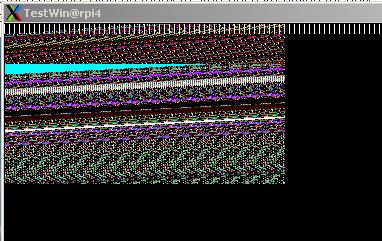
有什么想法吗?
谢谢你,亚历克斯
代码片段:我编写了一段与再现问题相关的代码。
// label class declaration
class label
{
    friend class panel;
    public:
        label(SDL_Window* const w, TTF_Font* const fnt, SDL_Rect rect);
        ~label();

        int draw(SDL_Rect& rect);
        int draw(SDL_Rect& rect,const std::string& txt, SDL_Color fgCol, int quality);

    private:
    std::string     m_txt;
    TTF_Font* const m_font = nullptr;
    SDL_Surface     *m_surf = nullptr;
    SDL_Texture     *m_texture = nullptr;
    SDL_Rect        m_rect{0,0,0,0};
    SDL_Renderer    *m_ren;
    SDL_Window      *m_wnd;
    Uint32          m_pixForm;
};

// label class constructor
label::label(SDL_Window* const w, TTF_Font* const fnt, SDL_Rect rect):m_wnd(w),m_font(fnt),m_surf (nullptr), m_rect(rect)
{
// save window info locally for label object
    m_ren =SDL_GetRenderer(m_wnd);
    m_pixForm =SDL_GetWindowPixelFormat(m_wnd);
    m_texture = SDL_CreateTexture(m_ren, m_pixForm,SDL_TEXTUREACCESS_STATIC, rect.w, rect.h);
    m_surf = nullptr;
    std::cout << "PixelFormat " << m_pixForm << " : " << SDL_GetPixelFormatName(m_pixForm) <<  std::endl;
}

// label class methods to render/draw text on screen
int label::setText(const std::string& txt, SDL_Color fgCol, int quality=0)
{
    int w,h;
    SDL_Surface *ts;
    if(m_surf!=nullptr)SDL_FreeSurface(m_surf);
    switch(quality)
    {
        case 1:
        {
            ts = TTF_RenderText_Shaded(m_font, txt.c_str(), fgCol, SDL_Color{0,0,0,0});
            break;
        }
        case 2:
        {
            ts = TTF_RenderText_Blended(m_font,txt.c_str(), fgCol);
            break;
        }
        default:
        {
            ts = TTF_RenderText_Solid(m_font, txt.c_str(), fgCol);
            break;
        }
    }
    std::cout << "Before pixFormat ts " << SDL_GetPixelFormatName(ts->format->format)<< std::endl;
    m_surf =  SDL_ConvertSurfaceFormat(ts, m_pixForm, 0);
    std::cout << "After pixFormat surf : " <<  SDL_GetPixelFormatName(m_surf->format->format) << " ts " << SDL_GetPixelFormatName(ts->format->format)<< std::endl;
    SDL_FreeSurface(ts);
    TTF_SizeText(m_font, txt.c_str(), &w, &h);
    std::cout << "Set text '" << txt << "' w: " << w << " h: " << h << std::endl;
}

int label::draw(SDL_Rect& rect)
{
    // HERE is the one that draw the noise on screen!
    {
        int rc;
        rc = SDL_UpdateTexture(m_texture,  NULL, m_surf->pixels, m_surf->pitch);
        if(rc)
        {
            std::cout << "Error updating texture " << rc <<std::endl;
            return(rc);
        }
    }
    // if it is replaced with the following it works:
    /*
    {
        if(m_texture!=nullptr)SDL_DestroyTexture(m_texture);
        m_texture = SDL_CreateTextureFromSurface(r, m_surf);
    }
    */

    SDL_RenderCopy(m_ren, m_texture, NULL, &rect);
}

int label::draw(SDL_Rect& rect,const std::string& txt, SDL_Color fgCol, int q)
{
    setText(txt,fgCol,q);
    draw(rect);
}

// main functiom. Init SDL, create window, create label and draw it:
int main( int argc, char * argv[] )
{
    SDL_Window *wnd ;
    SDL_Renderer *wrend;
    int i;

    wnd = SDL_CreateWindow("TestWin",SDL_WINDOWPOS_CENTERED, SDL_WINDOWPOS_CENTERED,500,300,0);
    wrend = SDL_CreateRenderer(wnd,-1,SDL_RENDERER_ACCELERATED);
    SDL_SetRenderDrawBlendMode(wrend,SDL_BLENDMODE_ADD);
    SDL_SetRenderDrawColor(wrend,0,0,0,255);
    SDL_RenderClear(wrend);

    SDL_Color fcol{255,255,0,128};
    SDL_Rect lblBox;
    lblBox.h = 120;
    lblBox.w = 280;
    lblBox.x = 1;
    lblBox.y = 1;

    label lbl(wnd, getCurrentFont(), lblBox); // create a label (getCurrentFont returns a valid TTF_Font pointer)
    lbl.draw(lblBox,std::string("Text Test"), fcol, 2);
    SDL_RenderPresent(wrend);
    SDL_ShowWindow(wnd);
    // .. more code here
}回答 1
Stack Overflow用户
发布于 2019-12-26 13:03:00
我在MacOS Catalina以及SDL2和SDL2_ttf的最后一个版本上测试了您的代码,并出现了分段错误。
调试后,我发现在label::setText()中您使用了一个质量参数,如果您通过quality=2 (使用函数TTF_RenderText_Blended()),您将得到一个分段错误或垃圾像素。
但是函数TTF_RenderText_Shaded()和TTF_RenderText_Solid()工作得很好,我认为这与使用TTF_RenderText_Blended(直接相关)您的表面上有透明。
编辑:
在深入挖掘之后,我通过替换rect行中的NULL值来解决以前的分段错误:
rc = SDL_UpdateTexture(m_texture, NULL, m_surf->pixels, m_surf->pitch);按m_surf大小计算:
SDL_Rect SurfRect;

SurfRect.x = 0;
SurfRect.y = 0;
SurfRect.w = m_surf->w;
SurfRect.h = m_surf->h;
...
rc = SDL_UpdateTexture(m_texture, SurfRect, m_surf->pixels, m_surf->pitch);
编辑2 : --我直接查看SDL2的源文件,以了解我的测试与函数SDL_CreateTexture()在内部完成的代码之间的区别,您必须添加以下几行:
int rc = SDL_UpdateTexture(m_texture, &SurfRect, m_surf->pixels, m_surf->pitch);
{
    Uint8 r, g, b, a;
    SDL_BlendMode blendMode;
    SDL_GetSurfaceColorMod(m_surf, &r, &g, &b);
    SDL_SetTextureColorMod(m_texture, r, g, b);

    SDL_GetSurfaceAlphaMod(m_surf, &a);
    SDL_SetTextureAlphaMod(m_texture, a);

    if (SDL_HasColorKey(m_surf)) {
        /* We converted to a texture with alpha format */
        SDL_SetTextureBlendMode(m_texture, SDL_BLENDMODE_BLEND);
    } else {
        SDL_GetSurfaceBlendMode(m_surf, &blendMode);
        SDL_SetTextureBlendMode(m_texture, blendMode);
    }
}
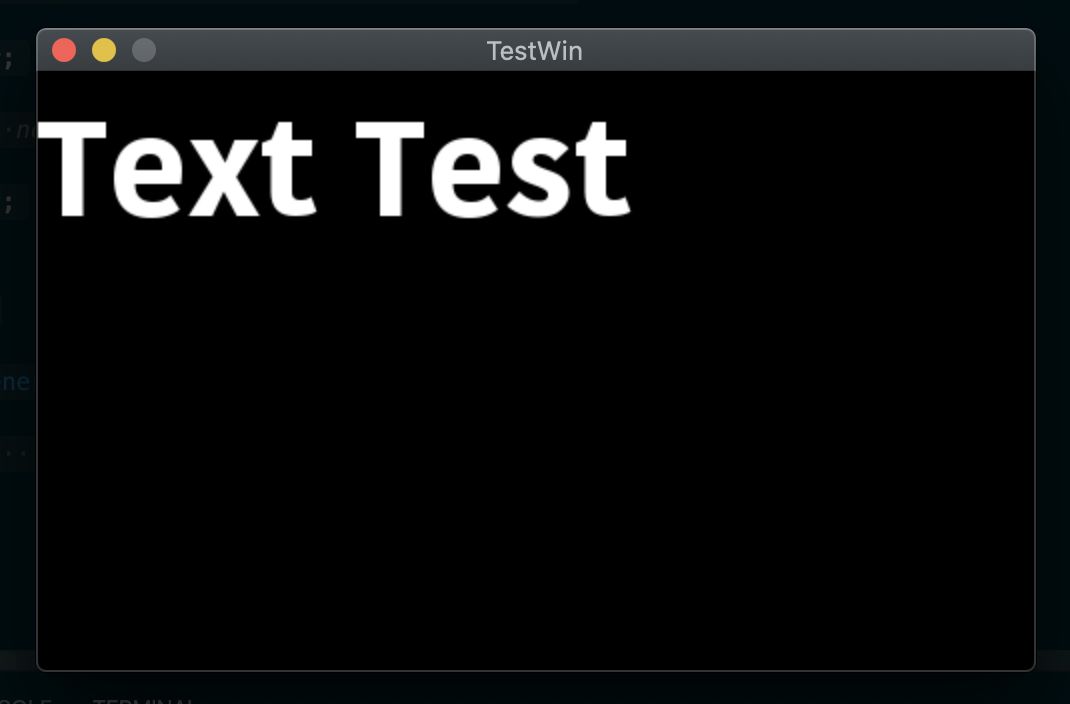
查找这里我的原始调试文件(这不是很漂亮)
https://stackoverflow.com/questions/59485384
复制相似问题
腾讯云开发者

Copyright © 2013 - 2026 Tencent Cloud. All Rights Reserved. 腾讯云 版权所有
深圳市腾讯计算机系统有限公司 ICP备案/许可证号:粤B2-20090059  粤公网安备44030502008569号
腾讯云计算(北京)有限责任公司 京ICP证150476号 | 京ICP备11018762号