
是否有一种方法可以通过单击按钮来捕捉具有焦点的onChange触发器?
场景是这个模式窗口:
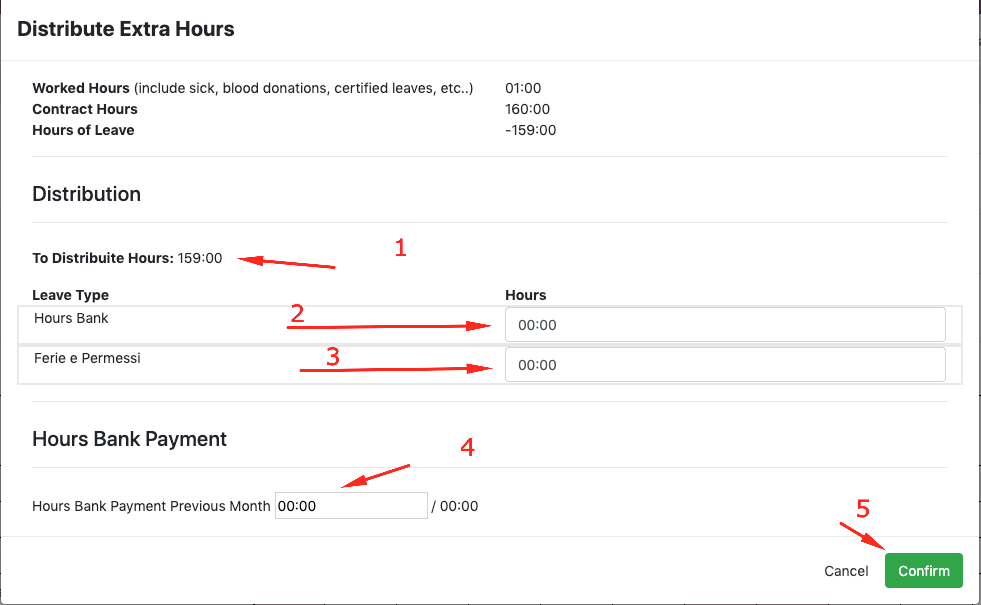
带有.on('change', function () {});的输入2、3和4对指定的控制器进行AJAX调用,该控制器更新重新编码值并重新加载值1。
- 单击输入1,并通过单击输入
- AJAX重新加载值1、更新的
- 、单击input 2并设置值
H 111通过单击外部输入<><代码>H 212AJAX重新加载值1、更新的<代码>H 214<代码>H 115>H 115用户单击确认是否调用了另一个进行某些检查并更改对象状态的控制器(从草稿到已确认的),从而将其聚焦出来。H 216217
问题
如果我这样做的话:
单击输入1并通过单击外部的input value
- focusout
- AJAX重新加载值1 updated
- click input 2并设置值
- ,单击确认按钮调用另一个控制器并触发输入更改
。
现在,通过这种方式出现问题,因为确认方法还没有收到来自上次变更触发器的更新,并且检查是不正确的。
有没有办法从不同的触发器(如onchange和onclick )管理多个AJAX?
如果触发了以下onclick,则类似于这样的情况:
// Trigger for button confirm inside timesheet sheet modal
$(document).on('click', 'button.js_confirm_timesheet_sheet', function (ev) {
    var $button = $(this);
    var wizard_id = $button.data()['wizardId'];
    var sheet_id = $button.data()['sheetId'];
    var values = {
        'wizard_id': wizard_id,
        'sheet_id': sheet_id,
    };
    confirm_sheet_distribution_hours(values);
});检查单击是否来自输入焦点,如果是的,则先触发onchange,然后触发onclick
也许这个解决方案可能是一个不好的方法来做到这一点。
Little,触发器recap:
- 输入有一个onchange触发器,该触发器使用AJAX调用将数据写入后端对象,该调用可以重新计算值,并返回新的
- 确认按钮,检查AJAX调用是否一切正常,并更改后端对象状态
。
另一种解决方法可能是声明一个跟踪每个更改输入框的对象,并在每次AJAX成功返回时清除它。
类似于:
var changedData = {};

function update_wizard_data_and_modal(values, $input_elem, event) {
    changedData[key] = $input_elem;
    ajax.jsonRpc("/my/controller/path", "call", values)
        .then(function (new_modal_values) {
            $input_elem.removeClass('input-value-error');
            if (!jQuery.isEmptyObject(new_modal_values)) {
                if (new_modal_values.error_msg) {
                    var $content = $(new_modal_values.error_msg);
                    $content.modal({
                        backdrop: 'static',
                        keyboard: false
                    });
                    $content.appendTo('body').modal();
                    // Show error class
                    $input_elem.val('00:00');
                    $input_elem.addClass('input-value-error');
                }
                // Update the header values with hours to be distribuited
                $('#header-wizard-values').html(new_modal_values.header_values);
                // Update the hours to get payed available
                $('.js_hours_to_get_payed').html(new_modal_values.hours_get_payed_values);
                // Clear the changedData object
                for (var member in changedData) delete changedData[member];
            }
        });
}

function confirm_sheet_distribution_hours(values) {
    if jQuery.isEmptyObject(changedData){
        ajax.jsonRpc("/confirm/controller/path", "call", values)
            .then(function (response) {
                if ('error' in response) {
                    //response in this case is the modal error template
                    $(response.error).appendTo('body').modal();
                } else {
                    // Close modal and refresh the grid for current period
                    $('#modal_timesheet_sheet_confirm').modal('hide');
                    var sheet_item_data = {
                        'year': response.year,
                        'month': response.month,
                    };
                    update_grid_and_bars_values(sheet_item_data);
                }

            });
    } else {
       // TODO: trigger the change for element inside object and confirm
    }
}


$(document).on("change", "input.distribution-input", function (ev) {
    var $input = $(this);
    var sheet_id = $('input[name="sheet_id"]').val();
    var wiz_line_id = Number($input.attr('id').match(/\d+/)[0]);
    var row_wizard_data = $input.closest('div.row').data();
    var leave_type_id = row_wizard_data['leaveTypeId'];
    var wizard_id = row_wizard_data['wizardId'];
    var values = {
        'sheet_id': Number(sheet_id),
        'wizard_id': wizard_id,
        'wiz_line_id': wiz_line_id,
        'leave_type_id': leave_type_id,
        'input_value': $input.val(),
    };
    var is_good_formatted = check_string_time_format($input, {});
    if (is_good_formatted) {
        update_wizard_data_and_modal(values, $input, ev);
    }
});

// Trigger for button confirm inside timesheet sheet modal
$(document).on('click', 'button.js_confirm_timesheet_sheet', function (ev) {
    ev.preventDefault();
    ev.stopPropagation();
    var $button = $(this);
    var wizard_id = $button.data()['wizardId'];
    var sheet_id = $button.data()['sheetId'];
    var values = {
        'wizard_id': wizard_id,
        'sheet_id': sheet_id,
    };
    confirm_sheet_distribution_hours(values);
});回答 1
Stack Overflow用户
发布于 2019-12-11 19:07:34
正如杨树建议的那样,我也采用了类似的方法。
这里,管理Odoo前端向导的"onchange“的javascript。
// Variable used for the last input changed when user click the Confirm button
var canConfirm = true;
/* Variable used for keep trace of the number of retry inside method
 * confirm_sheet_distribution_hours
 * */
var nr_of_try = 0;

function update_wizard_data_and_modal(values, $input_elem, event) {
    if (event.type !== 'input') {
        ajax.jsonRpc("/controller/path/...", "call", values)
            .then(function (new_modal_values) {
                canConfirm = true;
                $input_elem.removeClass('input-value-error');
                if (!jQuery.isEmptyObject(new_modal_values)) {
                    if (new_modal_values.error_msg) {
                        var $content = $(new_modal_values.error_msg);
                        $content.modal({
                            backdrop: 'static',
                            keyboard: false
                        });
                        $content.appendTo('body').modal();
                        // Show error class
                        $input_elem.val('00:00');
                        $input_elem.addClass('input-value-error');
                    }
                    // Update the header values with hours to be distribuited
                    $('#header-wizard-values').html(new_modal_values.header_values);
                    // Update the hours to get payed available
                    $('.js_hours_to_get_payed').html(new_modal_values.hours_get_payed_values);
                }
            });
    } else {
        canConfirm = false;
    }
}

function set_the_amount_on_wizard($input, values, event) {
    if (event.type !== 'input') {
        ajax.jsonRpc("/controller/path/...", "call", values)
            .then(function (response) {
                canConfirm = true;
                if ('error' in response) {
                    //response in this case is the modal error template
                    $(response.error).appendTo('body').modal();
                    // Reset input value (backend reset the TransientModel value)
                    $input.val('00:00')
                }
            });
    } else {
        canConfirm = false;
    }
}

function confirm_sheet_distribution_hours(values) {
    if (canConfirm) {
        ajax.jsonRpc("/controller/patH/...", "call", values)
            .then(function (response) {
                if ('error' in response) {
                    //response in this case is the modal error template
                    $(response.error).appendTo('body').modal();
                } else {
                    // Close modal and refresh the grid for current period
                    $('#modal_timesheet_sheet_confirm').modal('hide');
                    var sheet_item_data = {
                        'year': response.year,
                        'month': response.month,
                    };
                    update_grid_and_bars_values(sheet_item_data);
                }

            });
    } else {
        /*Try six times to confirm the sheet (Until the onchange doesn't write
         * new values the AJAX call doesn't set canConfirm as True
         * */
        if (nr_of_try <= 5) {
            setTimeout(function () {
                nr_of_try++;
                confirm_sheet_distribution_hours(values);
            }, 500);
        }
    }
}

//Trigger that monitorate hours distribution change
$(document).on("input change", "input.distribution-input", function (ev) {
    var $input = $(this);
    var sheet_id = $('input[name="sheet_id"]').val();
    var wiz_line_id = Number($input.attr('id').match(/\d+/)[0]);
    var row_wizard_data = $input.closest('div.row').data();
    var leave_type_id = row_wizard_data['leaveTypeId'];
    var wizard_id = row_wizard_data['wizardId'];
    var values = {
        'sheet_id': Number(sheet_id),
        'wizard_id': wizard_id,
        'wiz_line_id': wiz_line_id,
        'leave_type_id': leave_type_id,
        'input_value': $input.val(),
    };
    var is_good_formatted = check_string_time_format($input);
    if (is_good_formatted) {
        update_wizard_data_and_modal(values, $input, ev);
    }
});

//Trigger that monitorate hours distribution change
$(document).on("input change", "input.payment-hour-input", function (ev) {
    var $input = $(this);
    var row_wizard_data = $input.closest('div.row').data();
    var wizard_id = row_wizard_data['wizardId'];
    var values = {
        'wizard_id': wizard_id,
        'input_value': $input.val(),
    };
    var is_good_formatted = check_string_time_format($input);
    if (is_good_formatted) {
        set_the_amount_on_wizard($input, values, ev);
    }
});

// Trigger for button confirm inside timesheet sheet modal
$(document).on('click', 'button.js_confirm_timesheet_sheet', function (ev) {
    var $button = $(this);
    var wizard_id = $button.data()['wizardId'];
    var sheet_id = $button.data()['sheetId'];
    var values = {
        'wizard_id': wizard_id,
        'sheet_id': sheet_id,
    };
    // Variable used for retry sheet confirmation until canConfirm is not True
    // Max repeat call is 6 times
    nr_of_try = 0;
    confirm_sheet_distribution_hours(values);
});简单地说。当用户在输入框中键入时,on.()中的类型canConfirm将变量canConfirm设置为false。这可以防止用户更改值时的情况,并在之后单击“确认”按钮。
实际上,如果用户更改了一些输入框,并立即单击“确认”,AJAX调用只有在标记为true时才会启动,如果不是,则方法每500 ms调用6次。
如果有什么更好的方法让我知道。谢谢
PS:我将尝试一种更好的方法,使用DTO后端从模型中克隆数据,并管理更新,比如onchange缓存。
灵感来源:https://python-3-patterns-idioms-test.readthedocs.io/en/latest/Messenger.html
https://stackoverflow.com/questions/59290047
复制相似问题
腾讯云开发者

Copyright © 2013 - 2026 Tencent Cloud. All Rights Reserved. 腾讯云 版权所有
深圳市腾讯计算机系统有限公司 ICP备案/许可证号:粤B2-20090059  粤公网安备44030502008569号
腾讯云计算(北京)有限责任公司 京ICP证150476号 | 京ICP备11018762号