
异常堆栈跟踪中不包括行号(用Roslyn动态编译代码)
我使用roslyn编译器按需编译代码。
现在,当编译的代码(例如:除以零异常)中出现异常时,我在Visual中得到了显示的行号:
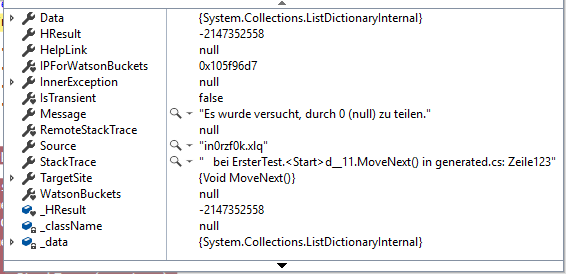
但是,当我执行stacktrace.ToString()时,行信息不包括在内。在frame.GetLineNumber中,行号也是0。
处理异常的代码:
    try
     {
        int i = 0;
        int iiii = 5 / i;
     }
     catch (Exception ex)
     {
        var stackTrace = new StackTrace(ex, true);
        var frame = stackTrace.GetFrame(0);

        Console.WriteLine("Exception message: {0}", ex.Message);
        Console.WriteLine("Exception in file: {0}", frame.GetFileName());
        Console.WriteLine("Exception in method: {0}", frame.GetMethod());
        Console.WriteLine("Exception at line numer: {0}", frame.GetFileLineNumber());
     }
按需编写我的代码代码
 CSharpParseOptions po = new CSharpParseOptions(LanguageVersion.CSharp7, DocumentationMode.Parse, SourceCodeKind.Regular);
     SyntaxTree parsedSyntaxTree = SyntaxFactory.ParseSyntaxTree(code, po);

     List<string> defaultNamespaces = GetUsings(parsedSyntaxTree);

     //// Referenzen über Kommentare heraussuchen:
     List<MetadataReference> defaultReferences = GetReferences(parsedSyntaxTree, rootPfad);

     var encoding = Encoding.UTF8;

     var assemblyName = Path.GetRandomFileName();
     var symbolsName = Path.ChangeExtension(assemblyName, "pdb");
     var sourceCodePath = "generated.cs";

     var buffer = encoding.GetBytes(code);
     var sourceText = SourceText.From(buffer, buffer.Length, encoding, canBeEmbedded: true);

     var syntaxTree = CSharpSyntaxTree.ParseText(
         sourceText,
         new CSharpParseOptions(),
         path: sourceCodePath);

     var syntaxRootNode = syntaxTree.GetRoot() as CSharpSyntaxNode;
     var encoded = CSharpSyntaxTree.Create(syntaxRootNode, null, sourceCodePath, encoding);


     CSharpCompilationOptions defaultCompilationOptions =
           new CSharpCompilationOptions(OutputKind.DynamicallyLinkedLibrary)
                   .WithOverflowChecks(true).WithOptimizationLevel(OptimizationLevel.Debug).WithPlatform(Platform.AnyCpu)
                   .WithUsings(defaultNamespaces);

     CSharpCompilation compilation = CSharpCompilation.Create(
         assemblyName,
         syntaxTrees: new[] { encoded },
         references: defaultReferences,

         options: defaultCompilationOptions
     );

     using (var assemblyStream = new MemoryStream())
     using (var symbolsStream = new MemoryStream())
     {
        var emitOptions = new EmitOptions(
                debugInformationFormat: DebugInformationFormat.PortablePdb,
                pdbFilePath: symbolsName);

        var embeddedTexts = new List<EmbeddedText> { EmbeddedText.FromSource(sourceCodePath, sourceText) };

        EmitResult result = compilation.Emit(
            peStream: assemblyStream,
            pdbStream: symbolsStream,
            embeddedTexts: embeddedTexts,
            options: emitOptions);


        if (result.Success)
        {
           Console.WriteLine("Kompilierung erfolgreich!");
           try
           {
              var assembly = Assembly.Load(assemblyStream.ToArray(), symbolsStream.ToArray());
              var parsedCodeInfo = new IM3ParsedCodeInfo() { Assembly = assembly, Erfolgreich = true };

              return parsedCodeInfo;
           }
           catch (Exception ex)
           {
              Console.WriteLine("Ausnahme aufgetreten:");
              Console.WriteLine(ex);

              var parsedCodeInfo = new IM3ParsedCodeInfo() { ErrorException = ex, Erfolgreich = false };
              return parsedCodeInfo;
           }
        }
        else
        {
           Console.WriteLine("Kompilierung nicht erfolgreich!");
           foreach (var diagnostic in result.Diagnostics)
           {
              Console.WriteLine(diagnostic.ToString());
           }

           var parsedCodeInfo = new IM3ParsedCodeInfo() { ErrorDiagnostics = result.Diagnostics, Erfolgreich = false };
           return parsedCodeInfo;
        }
     }
提供的解决方案建议的图片:

回答 2
Stack Overflow用户
发布于 2019-12-12 01:06:04
更新: As Hans 注释:
如果在.NET Core中运行,则需要PortablePDB文件;对于.NET Framework,则需要PDB文件
根据MSDN,StackTrace.GetFrame(0)返回最近的函数调用,它将是IEnumerator<T>.MoveNext(),您需要用于.NET框架的PDB文件或用于该函数的.NET核心的PortablePDB (但您没有)。
您应该将StackFrames从0循环到StackTrace.FrameCount - 1,在第一个StackFrame.GetFileLineNumber() > 0处停止。
var stack = new StackFrame(ex, true);
StackFrame frame = null;
for (int i = 0; i < stack.FrameCount; i++)
{
    frame = stack.GetFrame(i);
    if (frame.GetFileLineNumber() > 0) break;
}

Console.WriteLine("Exception message: {0}", ex.Message);
Console.WriteLine("Exception in file: {0}", frame.GetFileName());
Console.WriteLine("Exception in method: {0}", frame.GetMethod());
Console.WriteLine("Exception at line number: {0}", frame.GetFileLineNumber());
这个正确的打印
异常消息:序列不包含任何元素 文件中的异常: FilePath\Root.cs 方法中的异常: System.Object GetModuleDescription(System.Object[]) 行号处的例外情况: 70
Stack Overflow用户
发布于 2019-12-12 10:54:37
您还必须在脚本选项中提供源文件。
在我的例子中,看起来是这样的:
var options = ScriptOptions.Default
                           .WithReferences(references)
                           .WithFilePath(sourceFile)
                           .WithFileEncoding(sourceFileEncoding)
                           .WithEmitDebugInformation(true)
.WithImports(imports);注意WithFilePath(sourceFile)
在我的例子中,我将使用它来创建脚本:
CSharpScript.Create(this.Content, options, globalType);为了得到大会:
script.Compile();
var stream = new MemoryStream();
using (stream)
{
  var emitResult = script.GetCompilation().Emit(stream);

  if (emitResult.Success)
    return Assembly.Load(stream.ToArray());
}
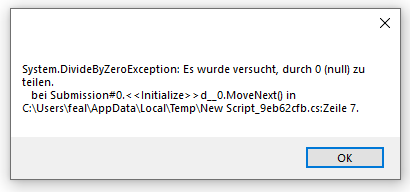
我刚查过了,它在堆栈跟踪中显示了行号。如果你需要更多的信息,只需回复。
https://stackoverflow.com/questions/59246357
复制相似问题
腾讯云开发者

Copyright © 2013 - 2026 Tencent Cloud. All Rights Reserved. 腾讯云 版权所有
深圳市腾讯计算机系统有限公司 ICP备案/许可证号:粤B2-20090059  粤公网安备44030502008569号
腾讯云计算(北京)有限责任公司 京ICP证150476号 | 京ICP备11018762号