
将excel单元格更改为日期格式c#
将excel单元格更改为日期格式c#
提问于 2019-10-22 12:49:17
我试图将单元格设置为日期格式,但当我打开.xls时,它说单元格是“编辑”格式。
我使用的代码:
if(System.DateTime.TryParse(value, out datum))
{
    worksheet.Cells[rowIndex, colInx + 1].Style.Numberformat.Format = "dd-MM-yyyy";
    worksheet.Cells[rowIndex, colInx + 1].Value = datum.ToShortDateString();
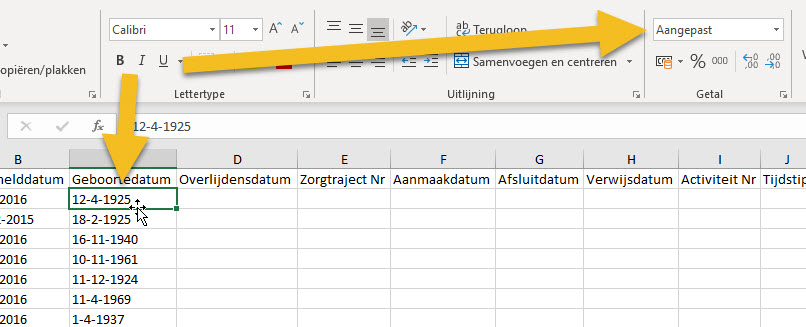
}但在excel中,它说的是"Aangepast"("Edited")而不是"Date":
回答 2
Stack Overflow用户
回答已采纳
发布于 2019-10-22 13:24:16
使用以下代码解决了问题:
worksheet.Cells[rowIndex, colInx + 1].Style.Numberformat.Format = System.Globalization.DateTimeFormatInfo.CurrentInfo.ShortDatePattern;这将从本地窗口获取短日期的日期时间格式。
Stack Overflow用户
发布于 2022-11-21 11:43:00
对我有用的是excel似乎只喜欢日期格式为"dd/mm/yyyy“,所以必须将它与我需要的显示格式结合起来。
if(System.DateTime.TryParse(value, out date))
{
    worksheet.Cells[rowIndex, colInx + 1].Style.Numberformat.Format = "dd/mm/yyyy"; //format for excel date type
    worksheet.Cells[rowIndex, colInx + 1].Value = date.ToString("dd-MMMM-yyyy"); //format displayed in the spreadsheet
}页面原文内容由Stack Overflow提供。腾讯云小微IT领域专用引擎提供翻译支持
原文链接:
https://stackoverflow.com/questions/58504727
复制相关文章
相似问题
腾讯云开发者

Copyright © 2013 - 2026 Tencent Cloud. All Rights Reserved. 腾讯云 版权所有
深圳市腾讯计算机系统有限公司 ICP备案/许可证号:粤B2-20090059  粤公网安备44030502008569号
腾讯云计算(北京)有限责任公司 京ICP证150476号 | 京ICP备11018762号