
iOS - secp224k1曲线的快速生成密钥对
我一直试图为secp224k1曲线在iOS中生成公共密钥和私钥。我们使用ECDH方法在移动端和后端之间进行api握手。在Java中,这是使用下面的代码完成的。
public static KeyPair getECKeyPair() throws NoSuchProviderException, NoSuchAlgorithmException, InvalidAlgorithmParameterException {
    ECGenParameterSpec ecSpec = new ECGenParameterSpec("secp224k1");
    KeyPairGenerator kpg = KeyPairGenerator.getInstance("ECDH", "SC");
    kpg.initialize(ecSpec);
    return kpg.generateKeyPair();
}
是否有一种方法可以生成特定曲线(Secp224k1)类型的快捷键?我尝试使用apple提供的EC算法进行握手,使用下面的代码。
    //Generates public and private key with EC algorithm
public static func getKey() -> [String: SecKey]? {

    let attributes: [String: Any] =
        [kSecAttrKeySizeInBits as String: 256,
         kSecAttrKeyType as String: kSecAttrKeyTypeEC,
         kSecPrivateKeyAttrs as String:
            [kSecAttrIsPermanent as String:    false]
    ]
    var error: Unmanaged<CFError>?
        guard let privateKey = SecKeyCreateRandomKey(attributes as CFDictionary, &error) else {
            let err = error!.takeRetainedValue() as Error
            print(err.localizedDescription)
            return nil
        }
        guard let publicKey = SecKeyCopyPublicKey(privateKey) else {
            print("Error occured while creating public key")
            return nil
        }
        return ["publicKey": publicKey, "privateKey": privateKey]
}
当我发送通过上述方法生成的公钥时,我从服务器收到一个错误消息:
"error":"java.security.InvalidKeyException: ECDH key agreement requires ECPublicKey for doPhase","exception":"InvalidAuthException"我尝试了一下VirgilCrypto,它几乎解决了这个问题。但它在库中没有我需要的特定曲线类型。它只支持secp256r1。另外,我在下面的帖子中给出了答案,但没有成功。
Elliptic Curve Diffie Hellman in ios/swift
任何建议或帮助都会很好,谢谢。
回答 1
Stack Overflow用户
发布于 2019-10-05 19:00:58
iOS不支持Koblitz 224位曲线.一种解决方案可能是使用不同的曲线类型或具有secp224k1支持的第三方库。
从您的评论可以得出结论,secp224k1曲线类型是必需的。
可以使用的第三方库是Virgil Crypto,它可以通过github https://github.com/VirgilSecurity/virgil-crypto获得。它是一个C++库。(Virgil Security还提供了一个称为virgil-crypto的Swift包装器库,但在当前版本中不再支持secp224k1 )。
C++库可以通过创建带有定义接口的Objective++包装器间接地在Swift中使用。
Build VSCCrypto.framework
在命令行中输入:
git clone https://github.com/VirgilSecurity/virgil-crypto
cd virgil-crypto
utils/build.sh --target=ios
这为iOS构建了框架。
向Xcode项目添加VSCCrypto.framework
在项目导航器中选择根节点,在Xcode中创建'New group‘
- ,将其命名为VSCCrypto.framework
&将查找器中的VSCCrypto.framework放在virgil-crypto/build/ios/lib文件夹中的“框架”组
- 的右边,在“Embedded二进制文件”+
+H 117下选择VSCCrypto.framework
目标-C++包装器
- 创建一个ECDHCrypto目标-C文件
- 当被要求‘您想配置一个目标-C桥接头’点击项目导航器中的‘创建桥接标题’
- 时,将文件后缀从.m更改为.mm (以允许C++代码)
- 将
#import "ECDHCrypto.h"添加到桥接头< code >H 231F 232
ECDHCrypto.h
#import <Foundation/Foundation.h>

NS_ASSUME_NONNULL_BEGIN

@interface ECDHCrypto : NSObject

@property(nonatomic, strong) NSString *ownPrivateKey;
@property(nonatomic, strong) NSString *ownPublicKey;

- (void)generateKeyPair;
- (NSString *)shared:(NSString *)otherPublicKey;

@end

NS_ASSUME_NONNULL_END
ECDHCrypto.mm
#import "ECDHCrypto.h"
#import <VSCCrypto/VirgilCrypto.h>

using virgil::crypto::VirgilKeyPair;
using virgil::crypto::VirgilByteArray;
using virgil::crypto::VirgilCipherBase;
using virgil::crypto::str2bytes;
using virgil::crypto::bytes2str;
using virgil::crypto::bytes2hex;


@implementation ECDHCrypto

- (void)generateKeyPair {
    VirgilKeyPair keyPair = VirgilKeyPair::generate(VirgilKeyPair::Type::EC_SECP224K1);

    VirgilByteArray ownPublicKeyBates = keyPair.publicKey();
    self.ownPublicKey = [NSString stringWithCString:bytes2str(ownPublicKeyBates).c_str()
                                           encoding:[NSString defaultCStringEncoding]];

    VirgilByteArray ownPrivateKeyBytes = keyPair.privateKey();
    self.ownPrivateKey = [NSString stringWithCString:bytes2str(ownPrivateKeyBytes).c_str()
                                            encoding:[NSString defaultCStringEncoding]];
}

- (NSString *)shared:(NSString *)otherPublicKey {
    NSAssert(self.ownPrivateKey, @"private key must be set, e.g. use generateKeyPair");
    std::string otherPKString([otherPublicKey cStringUsingEncoding:NSASCIIStringEncoding]);
    VirgilByteArray pubKey = str2bytes(otherPKString);

    std::string ownPrivateKeyString([self.ownPrivateKey cStringUsingEncoding:NSASCIIStringEncoding]);
    VirgilByteArray ownPrivateKeyBytes = str2bytes(ownPrivateKeyString);

    VirgilByteArray shared_ba = VirgilCipherBase::computeShared(pubKey, ownPrivateKeyBytes);

    std::string hex = bytes2hex(shared_ba);
    NSString *shared = [NSString stringWithCString:hex.c_str()
                                          encoding:[NSString defaultCStringEncoding]];

    return shared;
}

@end在Swift中的使用
let otherPK = """
    -----BEGIN PUBLIC KEY-----
    ME4wEAYHKoZIzj0CAQYFK4EEACADOgAEgeW/foqxCDOd1y6lnXONkRThS6xhjLHP
    SEXs7jHSpoaPQH4vArcGmIb1cAZcepEh7WDQxCyfQXg=
    -----END PUBLIC KEY-----
    """

let ecdhCrypto = ECDHCrypto()
ecdhCrypto.generateKeyPair();
print("ecdhCrypto.ownPublicKey: \n" + ecdhCrypto.ownPublicKey);
print("shared secret: " + ecdhCrypto.shared(otherPK));用Java对口进行测试
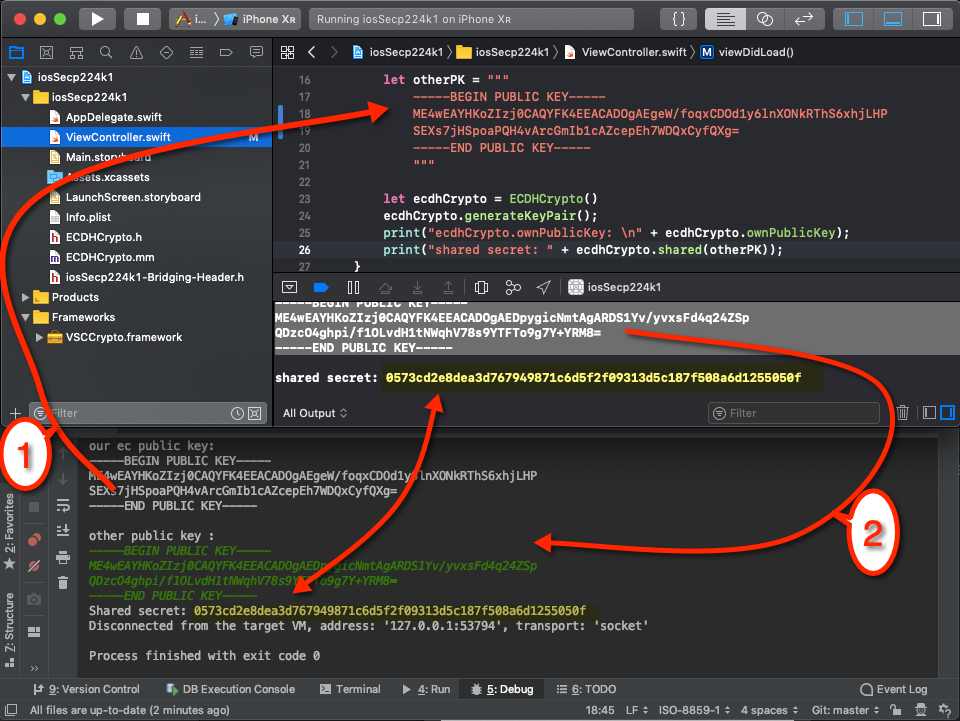
要测试密钥交换是否成功,可以执行以下测试:
在
- 中,生成一个secp224k1密钥对,并将公钥输出到控制台。
- 使用复制/粘贴将公钥复制到iOS应用程序的Swift代码中。然后,应用程序生成一个密钥对,并将自己的公钥写入控制台,以及计算出的共享秘密。然后将iOS公钥作为输入插入到iOS程序中(显示在iOS中,可以比较iOS应用程序和Java程序的共享秘密)。这里是相同的,所以密钥交换是成功的。
在上面的区域中,您可以看到带有iOS源代码的Xcode,而在较低的区域,您可以看到Java程序的输出:
https://stackoverflow.com/questions/58138190
复制相似问题
腾讯云开发者
