
在等待API响应时显示加载指示符
所以我有一个注册页面,注册功能运行良好。现在,我需要的只是一个加载指示后,按下“注册”按钮。
我已经混合了所有我能想到的在谷歌搜索的关键词,我试过所有这些关键词,但都没有用。
以下是我尝试过的事情:
使用FutureBuilder
RaisedButton(
                    onPressed: () async {
                      FutureBuilder<http.Response>(
                        future: registerUser(),
                        builder: (context, snapshot) {
                          if (snapshot.hasData) {
                            return Text("SUCCESS");
                          }
                          if (snapshot.hasError) {
                            return Text("ERROR");
                          }
                          return new Center(
                              child: new CircularProgressIndicator());
                        },
                      );
                    },
                    color: Color(colorPrimary),
                    shape: RoundedRectangleBorder(
                        borderRadius: new BorderRadius.circular(30.0)),
                    child: Text("SignUp"),
                  )
在这个例子中,方法被调用,但是指示符没有显示。
使用一个库progress_hud:我认为这个库正在工作,但是即使我把它放在Center Widget中,它仍然会进入屏幕的底部,从而产生overlapping with pixels错误。
还有其他更好的解决办法吗?或者我应该找到一种方法来修复这个重叠的错误?
谢谢你的帮忙!
回答 3
Stack Overflow用户
发布于 2019-09-25 07:23:39
请使用modal_progress_hud https://pub.dev/packages/modal_progress_hud软件包
ModalProgressHUD必须在脚手架下作为第一个孩子
我的工作代码片段
 @override
  Widget build(BuildContext context) {
    return Scaffold(
      body: ModalProgressHUD(
        inAsyncCall: _isLoading,
        child: SingleChildScrollView(
          child: Container(
               ...
完整示例代码
import 'dart:async';

import 'package:flutter/material.dart';
import 'package:modal_progress_hud/modal_progress_hud.dart';

void main() => runApp(MyApp());

class MyApp extends StatelessWidget {
  @override
  Widget build(BuildContext context) {
    return MaterialApp(
      theme: ThemeData(
        primarySwatch: Colors.blue,
      ),
      home: LoginPage(
        onSignIn: () => print('login successful!'),
      ),
    );
  }
}

class LoginPage extends StatefulWidget {
  final VoidCallback _onSignIn;

  LoginPage({@required onSignIn})
      : assert(onSignIn != null),
        _onSignIn = onSignIn;

  @override
  _LoginPageState createState() => _LoginPageState();
}

class _LoginPageState extends State<LoginPage> {
  // maintains validators and state of form fields
  final GlobalKey<FormState> _loginFormKey = GlobalKey<FormState>();

  // manage state of modal progress HUD widget
  bool _isInAsyncCall = false;

  bool _isInvalidAsyncUser = false; // managed after response from server
  bool _isInvalidAsyncPass = false; // managed after response from server

  String _username;
  String _password;
  bool _isLoggedIn = false;

  // validate user name
  String _validateUserName(String userName) {
    if (userName.length < 8) {
      return 'Username must be at least 8 characters';
    }

    if (_isInvalidAsyncUser) {
      // disable message until after next async call
      _isInvalidAsyncUser = false;
      return 'Incorrect user name';
    }

    return null;
  }

  // validate password
  String _validatePassword(String password) {
    if (password.length < 8) {
      return 'Password must be at least 8 characters';
    }

    if (_isInvalidAsyncPass) {
      // disable message until after next async call
      _isInvalidAsyncPass = false;
      return 'Incorrect password';
    }

    return null;
  }

  void _submit() {
    if (_loginFormKey.currentState.validate()) {
      _loginFormKey.currentState.save();

      // dismiss keyboard during async call
      FocusScope.of(context).requestFocus(new FocusNode());

      // start the modal progress HUD
      setState(() {
        _isInAsyncCall = true;
      });

      // Simulate a service call
      Future.delayed(Duration(seconds: 1), () {
        final _accountUsername = 'username1';
        final _accountPassword = 'password1';
        setState(() {
          if (_username == _accountUsername) {
            _isInvalidAsyncUser = false;
            if (_password == _accountPassword) {
              // username and password are correct
              _isInvalidAsyncPass = false;
              _isLoggedIn = true;
            } else
              // username is correct, but password is incorrect
              _isInvalidAsyncPass = true;
          } else {
            // incorrect username and have not checked password result
            _isInvalidAsyncUser = true;
            // no such user, so no need to trigger async password validator
            _isInvalidAsyncPass = false;
          }
          // stop the modal progress HUD
          _isInAsyncCall = false;
        });
        if (_isLoggedIn)
          // do something
          widget._onSignIn();
      });
    }
  }

  @override
  Widget build(BuildContext context) {
    return Scaffold(
      appBar: AppBar(
        title: Text('Modal Progress HUD Demo'),
        backgroundColor: Colors.blue,
      ),
      // display modal progress HUD (heads-up display, or indicator)
      // when in async call
      body: ModalProgressHUD(
        child: SingleChildScrollView(
          child: Container(
            padding: const EdgeInsets.all(16.0),
            child: buildLoginForm(context),
          ),
        ),
        inAsyncCall: _isInAsyncCall,
        // demo of some additional parameters
        opacity: 0.5,
        progressIndicator: CircularProgressIndicator(),
      ),
    );
  }

  Widget buildLoginForm(BuildContext context) {
    final TextTheme textTheme = Theme.of(context).textTheme;
    // run the validators on reload to process async results
    _loginFormKey.currentState?.validate();
    return Form(
      key: this._loginFormKey,
      child: Column(
        children: [
          Padding(
            padding: const EdgeInsets.all(8.0),
            child: TextFormField(
              key: Key('username'),
              decoration: InputDecoration(
                  hintText: 'enter username', labelText: 'User Name'),
              style: TextStyle(fontSize: 20.0, color: textTheme.button.color),
              validator: _validateUserName,
              onSaved: (value) => _username = value,
            ),
          ),
          Padding(
            padding: const EdgeInsets.all(8.0),
            child: TextFormField(
              key: Key('password'),
              obscureText: true,
              decoration: InputDecoration(
                  hintText: 'enter password', labelText: 'Password'),
              style: TextStyle(fontSize: 20.0, color: textTheme.button.color),
              validator: _validatePassword,
              onSaved: (value) => _password = value,
            ),
          ),
          Padding(
            padding: const EdgeInsets.all(32.0),
            child: RaisedButton(
              onPressed: _submit,
              child: Text('Login'),
            ),
          ),
          Padding(
            padding: const EdgeInsets.all(8.0),
            child: _isLoggedIn
                ? Text(
              'Login successful!',
              key: Key('loggedIn'),
              style: TextStyle(fontSize: 20.0),
            )
                : Text(
              'Not logged in',
              key: Key('notLoggedIn'),
              style: TextStyle(fontSize: 20.0),
            ),
          ),
        ],
      ),
    );
  }
}
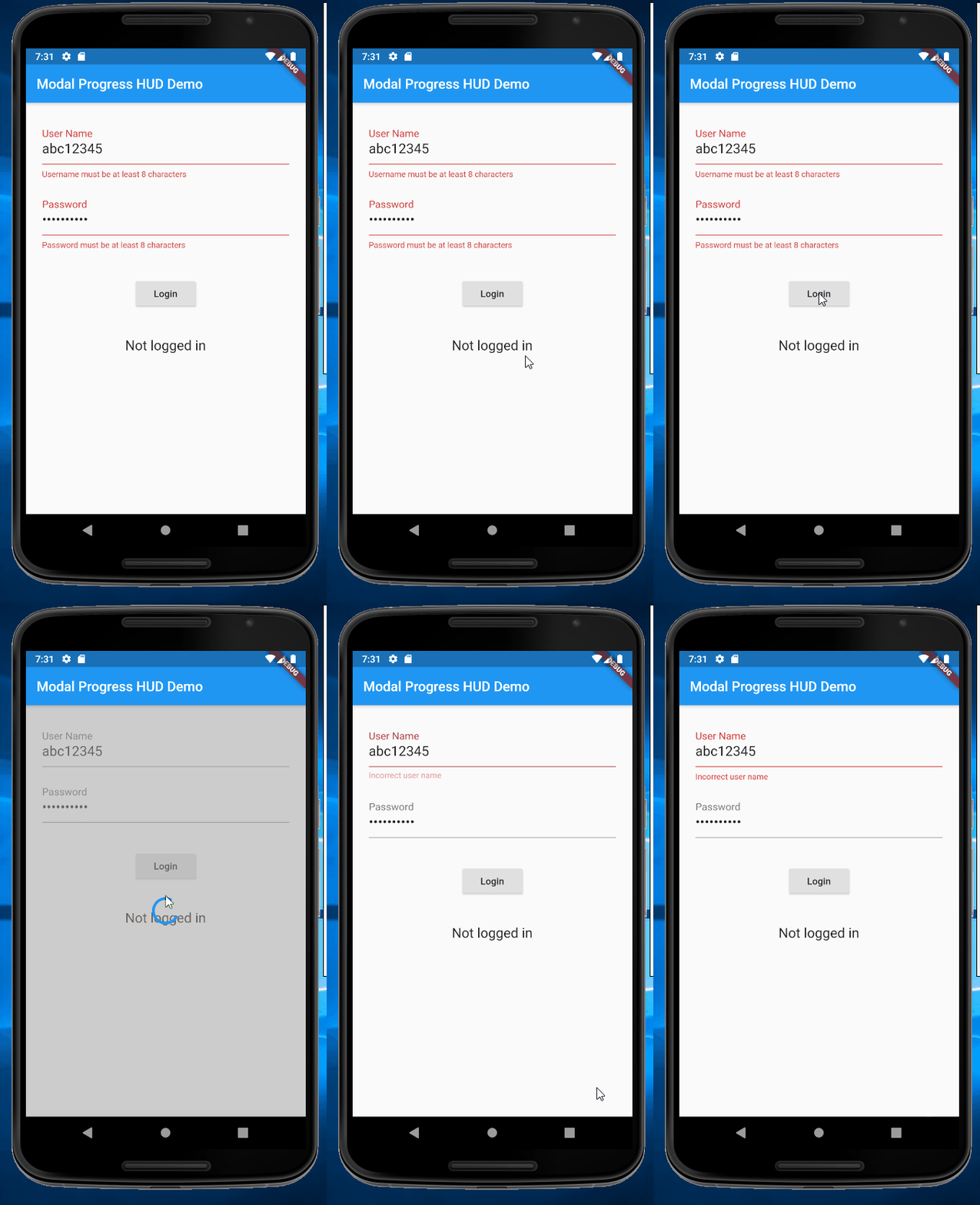
Stack Overflow用户
发布于 2019-09-25 07:25:10
FutureBuilder将其生成的主体放在它所附加的小部件中。否则,返回的Widget会去哪里?
材料脚手架实例
Scaffold(
  appBar:AppBar(),
  body: FutureBuilder(
   future: registerUser(),
   builder: (context,snapshot){
    //...
   }
  )
)问题是,您的未来将绑定到按下的RaisedButton。其次,您可能最好使用StreamBuilder,因为FutureBuilder在构建方法中立即调用它是未来。因此,请调用您的BLoC/ViewModel/wathever来执行registerUser()。让registerUser()返回一个Future<void> (并在内部将结果添加到Stream)。然后观察Stream中的结果或错误。对于Streams/Sinks,您可以使用StreamController<T>。
//In your form Widget

RaisedButton(
 onPressed: registerUser()
)

//In your Widget/BLoC/ViewModel
//Note that the Future can finish with errors from the http call
//call registerUser() with an onError callback to catch these.
//And the Stream can finish with errors(although this is unlikely here)
//the Stream.listen() can also have an onError callback

Future<void> registerUser() async {
 var result = await http.post();

 //then finally pass it to the stream
 _stream.add(result);
}Stack Overflow用户
发布于 2021-08-03 22:04:07
请使用progress_dialog https://pub.dev/packages/progress_dialog软件包
下面是我的工作代码片段。
pub.yaml
progress_dialog: ^1.2.4helper.dart
import 'package:fluttertoast/fluttertoast.dart';
import 'package:progress_dialog/progress_dialog.dart';
ProgressDialog progressDialog;

showProgress(BuildContext context, String message, bool isDismissible) async {
  progressDialog = new ProgressDialog(context,
      type: ProgressDialogType.Normal, isDismissible: isDismissible);
  progressDialog.style(
      message: message,
      borderRadius: 10.0,
      backgroundColor: Color(COLOR_PRIMARY),
      progressWidget: Container(
          padding: EdgeInsets.all(8.0),
          child: CircularProgressIndicator(
            backgroundColor: Colors.white,
          )),
      elevation: 10.0,
      insetAnimCurve: Curves.easeInOut,
      messageTextStyle: TextStyle(
          color: Colors.white, fontSize: 19.0, fontWeight: FontWeight.w600));
  await progressDialog.show();
}

updateProgress(String message) {
  progressDialog.update(message: message);
}

hideProgress() async {
  if(progressDialog!=null)
  await progressDialog.hide();
}
login.dart
import 'package:mygame/services/helper.dart';
...
RaisedButton(
                    onPressed: () async {
                      showProgress(context, 'Registering user, please wait...', true);
                      await registerUser().then((result) {
                        hideProgress();
                        pushAndRemoveUntil(context, HomePage(), false);
                      }).catchError((error) {
                        hideProgress();
                        Fluttertoast.showToast(
                            msg: "Signup failed:"+error.toString(),
                            toastLength: Toast.LENGTH_LONG,
                            gravity: ToastGravity.CENTER,
                            timeInSecForIosWeb: 1,
                            backgroundColor: Colors.green.shade700,
                            textColor: Colors.white,
                            fontSize: 16.0
                        );
                        print('Registration Error: $error');
                      });
                    },
                    color: Color(colorPrimary),
                    shape: RoundedRectangleBorder(
                        borderRadius: new BorderRadius.circular(30.0)),
                    child: Text("SignUp"),
)https://stackoverflow.com/questions/58093029
复制相似问题
腾讯云开发者

Copyright © 2013 - 2026 Tencent Cloud. All Rights Reserved. 腾讯云 版权所有
深圳市腾讯计算机系统有限公司 ICP备案/许可证号:粤B2-20090059  粤公网安备44030502008569号
腾讯云计算(北京)有限责任公司 京ICP证150476号 | 京ICP备11018762号