
在设置Azure DevOps ssh键和git配置之后,它仍然在询问密码。
工作开始使用Azure DevOps和im,试图在我的家用电脑上克隆一个回购程序。我创建了一个ssh键,将它添加到密钥列表中,并将git配置更改为我的工作电子邮件。然而,azure仍然要求一个密码..。
     (base) Name-MacBook-Pro:Company Name$ git clone git@ssh.dev.azure.com:v3/Company/AI/Repo
     Cloning into 'Repo'...
     Enter passphrase for key '/Users/Name/.ssh/id_rsa':
     git@ssh.dev.azure.com's password:
     Permission denied, please try again.
     git@ssh.dev.azure.com's password:
     git@ssh.dev.azure.com: Permission denied (password,publickey).
____________edit________________
试着再生成一次,我仍然有困难
创建新的ssh键
ssh-keygen -t rsa -b 4096 -C“work@email.com”-f ~/.ssh/work_id_rsa
复制
cat ~/..ssh/work_id_rsa_ pbcopy
添加到组织中并尝试克隆
ssh-agent bash -c 'ssh-add ~/.ssh/work_id_rsa;git克隆https://company@dev.azure.com/Repo‘
Cloning into 'Repo'...
Password for 'https://company@dev.azure.com':
fatal: Authentication failed for 'https://comapny@dev.azure.com/Repo'回答 2
Stack Overflow用户
发布于 2019-09-20 09:14:14
如果这是我们(Microsoft)可能引起的问题。我再次尝试了SSH克隆并取得了成功:
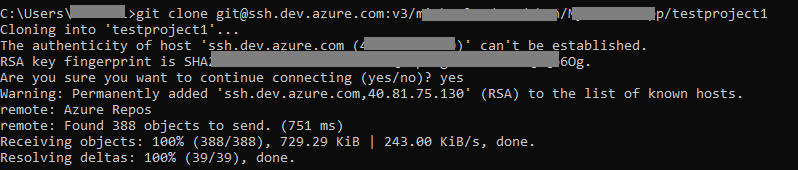
此问题应由SSH密钥格式引起。由于我不清楚您使用哪种方法来生成密钥,但是在您的问题中,应该是因为公钥身份验证失败了,所以它会询问您帐户的密码。
确保您的私钥具有以下格式:
-----BEGIN RSA PRIVATE KEY-----

*
*
*

-----END RSA PRIVATE KEY-----
如果没有,请使用以下命令重新生成:
ssh-keygen -t rsa 然后将公钥配置到组织中。
Stack Overflow用户
发布于 2020-09-04 11:03:36
编辑
我已经使用了一个以上的Azure DevOps帐户已有一段时间了,我只想指出另外两种方法,您可以使用正确的键:
- 使用
-i标志
-i identity_file
选择一个文件,从中读取RSA或DSA身份验证的标识(私钥)。协议版本1的默认值是~/..ssh/ Identity,协议版本2的默认值是~/..ssh/id_rsa和~/..ssh/id_dsa。在配置文件中还可以根据每个主机指定标识文件。有可能有多个-i选项(以及配置文件中指定的多个标识)。
参考文献:https://linux.die.net/man/1/ssh
- 使用配置文件(
~/.ssh/config)并更改主机名(远程)
而不是git clone git@whatever_name_you_configured:v3/Company/AI/Repo,而不是git clone git@ssh.dev.azure.com:v3/Company/AI/Repo
原来的答案:
生成密钥的方法实际上很好(OpenSSH),而且我的.ssh上有多个SSH密钥,所以我假设这也无关紧要。可能您不能有多个使用相同算法的密钥。我认为真正的问题是,密钥的名称。
你用:
ssh-keygen -t rsa -b 4096 -C “work@email.com” - f ~/.ssh/work_id_rsa
它很大(大字节数:)
但是,在测试连接时,永远找不到"work_id_rsa“,例如:
ssh -v git@ssh.dev.azure.com
只是为了测试我重命名并移除我的。
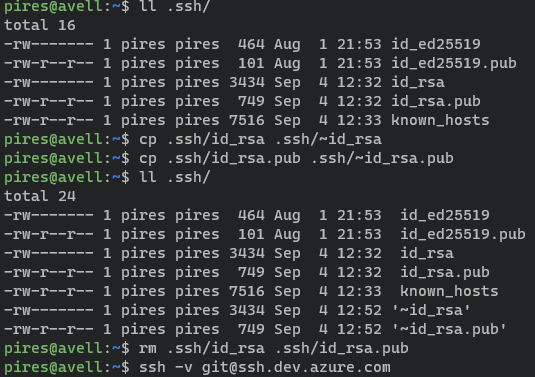
简而言之,结果如下:
pires@avell:~$ ssh -v git@ssh.dev.azure.com
OpenSSH_8.2p1 Ubuntu-4ubuntu0.1, OpenSSL 1.1.1f  31 Mar 2020
debug1: Reading configuration data /etc/ssh/ssh_config
debug1: /etc/ssh/ssh_config line 19: include /etc/ssh/ssh_config.d/*.conf matched no files
debug1: /etc/ssh/ssh_config line 21: Applying options for *
debug1: Connecting to ssh.dev.azure.com [51.144.61.32] port 22.
debug1: Connection established.
(removed for brevity)
debug1: Authenticating to ssh.dev.azure.com:22 as 'git'
(removed for brevity)
debug1: Host 'ssh.dev.azure.com' is known and matches the RSA host key.
debug1: Found key in /home/pires/.ssh/known_hosts:3
debug1: rekey out after 4294967296 blocks
debug1: SSH2_MSG_NEWKEYS sent
debug1: expecting SSH2_MSG_NEWKEYS
debug1: SSH2_MSG_NEWKEYS received
debug1: rekey in after 4294967296 blocks

(((((important detail here:)))))
debug1: Will attempt key: /home/pires/.ssh/id_rsa
debug1: Will attempt key: /home/pires/.ssh/id_dsa
debug1: Will attempt key: /home/pires/.ssh/id_ecdsa
debug1: Will attempt key: /home/pires/.ssh/id_ecdsa_sk
debug1: Will attempt key: /home/pires/.ssh/id_ed25519 ED25519 SHA256: *************
debug1: Will attempt key: /home/pires/.ssh/id_ed25519_sk
debug1: Will attempt key: /home/pires/.ssh/id_xmss
debug1: SSH2_MSG_SERVICE_ACCEPT received
debug1: Authentications that can continue: password,publickey
debug1: Next authentication method: publickey
debug1: Trying private key: /home/pires/.ssh/id_rsa
debug1: Trying private key: /home/pires/.ssh/id_dsa
debug1: Trying private key: /home/pires/.ssh/id_ecdsa
debug1: Trying private key: /home/pires/.ssh/id_ecdsa_sk
debug1: Offering public key: /home/pires/.ssh/id_ed25519 ED25519 SHA256:************
(((((and here:)))))
debug1: Authentications that can continue: password,publickey
debug1: Trying private key: /home/pires/.ssh/id_ed25519_sk
debug1: Trying private key: /home/pires/.ssh/id_xmss
debug1: Next authentication method: password
git@ssh.dev.azure.com's password:所以,实际上OpenSSH永远也找不到它。我的意思是,我没有把一个work_id_rsa放在那里,但这并不重要,因为它没有查找文件夹中的所有内容,在您的例子中,它期望一个/home/pires/.ssh/id_rsa就在那里。或者更好的是,无论~指向+ /.ssh/id_encryptionmethod
另外,由于它找不到要进行身份验证的私钥,所以返回到密码。
https://stackoverflow.com/questions/58020192
复制相似问题
腾讯云开发者

Copyright © 2013 - 2026 Tencent Cloud. All Rights Reserved. 腾讯云 版权所有
深圳市腾讯计算机系统有限公司 ICP备案/许可证号:粤B2-20090059  粤公网安备44030502008569号
腾讯云计算(北京)有限责任公司 京ICP证150476号 | 京ICP备11018762号