
JasperReport图像动态垂直拉伸取决于页面大小-它能做吗?
JasperReport图像动态垂直拉伸取决于页面大小-它能做吗?
提问于 2019-09-18 14:55:03
我有份贾斯珀的报告看上去像个证书。
我有一个背景图像,作为有吸引力的边缘或整个页面的框架。
问题是,例如,如果文本字段中的名称比元素容器大得多,那么它会在底部创建额外的空白。
背景图像/框架不会拉伸到页面的整个边缘。
当文本字段较短时,情况也是如此。但是在这种情况下,页面被缩短到几乎看不到帧的底部的程度。
我希望根据运行时页面的最终大小动态扩展图像。
以下是我设计的外观:
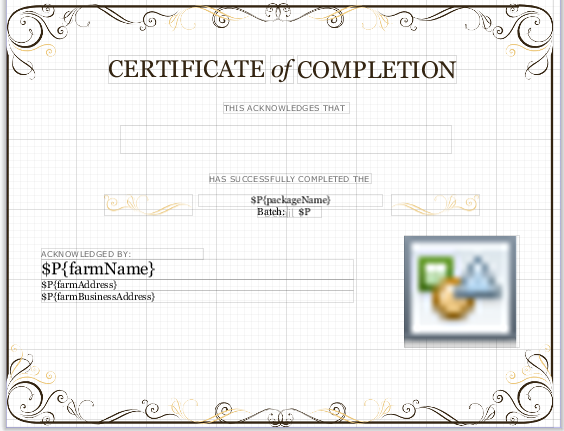
这就是编译时会发生的情况,正如您可以看到的那样,底部有额外的空格:

这是我目前的形象设置。
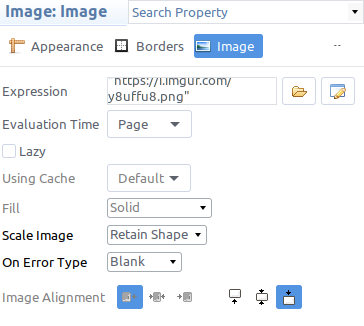
位置类型:浮子
拉伸类型: ContainerBottom
jrxml
<?xml version="1.0" encoding="UTF-8"?>
<!-- Created with Jaspersoft Studio version 6.8.0.final using JasperReports Library version 6.8.0-2ed8dfabb690ff337a5797129f2cd92902b0c87b  -->
<jasperReport xmlns="http://jasperreports.sourceforge.net/jasperreports" xmlns:xsi="http://www.w3.org/2001/XMLSchema-instance" xsi:schemaLocation="http://jasperreports.sourceforge.net/jasperreports http://jasperreports.sourceforge.net/xsd/jasperreport.xsd" name="paiwi-certificate-pdf" pageWidth="792" pageHeight="612" orientation="Landscape" columnWidth="792" leftMargin="0" rightMargin="0" topMargin="0" bottomMargin="0" isIgnorePagination="true" uuid="28bcb6f8-04d6-48df-ab31-e1bedc2f2434">
    <property name="net.sf.jasperreports.print.create.bookmarks" value="false"/>
    <property name="com.jaspersoft.studio.unit." value="pixel"/>
    <parameter name="SUBREPORT_DIR" class="java.lang.String"/>
    <parameter name="farmContactListSubreportDataSource" class="net.sf.jasperreports.engine.data.JRBeanCollectionDataSource"/>
    <parameter name="farmName" class="java.lang.String"/>
    <parameter name="farmLogo" class="java.lang.String"/>
    <parameter name="farmAddress" class="java.lang.String"/>
    <parameter name="farmBusinessAddress" class="java.lang.String"/>
    <parameter name="temporaryPartnersName" class="java.lang.String"/>
    <parameter name="partnerName" class="java.lang.String"/>
    <parameter name="partnerContactNumber" class="java.lang.String"/>
    <parameter name="partnerEmail" class="java.lang.String"/>
    <parameter name="packageName" class="java.lang.String"/>
    <parameter name="batchName" class="java.lang.String"/>
    <queryString>
        <![CDATA[]]>
    </queryString>
    <detail>
        <band height="612" splitType="Stretch">
            <property name="com.jaspersoft.studio.unit.height" value="px"/>
            <staticText>
                <reportElement positionType="Float" x="146" y="80" width="224" height="40" forecolor="#332411" uuid="cb95bd0b-631e-4363-80f5-22d0b0e481fe">
                    <property name="com.jaspersoft.studio.unit.width" value="px"/>
                </reportElement>
                <textElement markup="none">
                    <font fontName="Georgia" size="34" isBold="false"/>
                </textElement>
                <text><![CDATA[CERTIFICATE]]></text>
            </staticText>
            <textField isStretchWithOverflow="true" isBlankWhenNull="true">
                <reportElement positionType="Float" x="50" y="372" width="446" height="28" uuid="6281f2a7-4eca-4319-b298-22184617a6d3">
                    <property name="com.jaspersoft.studio.unit.width" value="px"/>
                    <property name="com.jaspersoft.studio.unit.x" value="px"/>
                    <property name="com.jaspersoft.studio.unit.height" value="px"/>
                </reportElement>
                <textElement>
                    <font fontName="Georgia" size="24" isBold="false" isUnderline="false"/>
                </textElement>
                <textFieldExpression><![CDATA[$P{farmName}]]></textFieldExpression>
            </textField>
            <textField isStretchWithOverflow="true" isBlankWhenNull="true">
                <reportElement positionType="Float" x="50" y="400" width="446" height="17" uuid="f19dc14b-3ada-460b-8633-85fd5a896d45">
                    <property name="com.jaspersoft.studio.unit.width" value="px"/>
                    <property name="com.jaspersoft.studio.unit.x" value="px"/>
                    <property name="com.jaspersoft.studio.unit.height" value="px"/>
                </reportElement>
                <textElement>
                    <font fontName="Georgia" size="14" isBold="false" isUnderline="false"/>
                </textElement>
                <textFieldExpression><![CDATA[$P{farmAddress}]]></textFieldExpression>
            </textField>
            <textField isStretchWithOverflow="true" isBlankWhenNull="true">
                <reportElement positionType="Float" x="50" y="417" width="446" height="17" uuid="dec9944a-2758-4202-acfe-6f97df346b8f">
                    <property name="com.jaspersoft.studio.unit.width" value="px"/>
                    <property name="com.jaspersoft.studio.unit.x" value="px"/>
                    <property name="com.jaspersoft.studio.unit.height" value="px"/>
                </reportElement>
                <textElement>
                    <font fontName="Georgia" size="14" isBold="false" isUnderline="false"/>
                </textElement>
                <textFieldExpression><![CDATA[$P{farmBusinessAddress}]]></textFieldExpression>
            </textField>
            <textField isStretchWithOverflow="true" isBlankWhenNull="true">
                <reportElement positionType="Float" x="164" y="180" width="473" height="40" forecolor="#332411" uuid="b2a59bb8-1557-498f-b17a-3f0e561bb11b">
                    <property name="com.jaspersoft.studio.unit.width" value="px"/>
                    <property name="com.jaspersoft.studio.unit.x" value="px"/>
                </reportElement>
                <textElement textAlignment="Center">
                    <font fontName="Georgia" size="37" isBold="false" isUnderline="false"/>
                </textElement>
                <textFieldExpression><![CDATA[$P{partnerName} != null && !$P{partnerName}.equalsIgnoreCase("") ? $P{partnerName} : $P{temporaryPartnersName}]]></textFieldExpression>
            </textField>
            <image onErrorType="Blank">
                <reportElement positionType="Float" x="569" y="338" width="164" height="160" uuid="717d6475-3d42-4e54-a69a-7271bc862e33"/>
                <imageExpression><![CDATA[$P{farmLogo}]]></imageExpression>
            </image>
            <staticText>
                <reportElement positionType="Float" x="416" y="81" width="228" height="40" forecolor="#332411" uuid="f2a78f2d-ed74-45b9-89e8-3365c4afe801">
                    <property name="com.jaspersoft.studio.unit.width" value="px"/>
                </reportElement>
                <textElement markup="none">
                    <font fontName="Georgia" size="34" isBold="false"/>
                </textElement>
                <text><![CDATA[COMPLETION]]></text>
            </staticText>
            <staticText>
                <reportElement positionType="Float" x="378" y="80" width="33" height="40" forecolor="#332411" uuid="e1c7ac87-81ce-4e8d-b718-2aee4f139003"/>
                <textElement markup="none">
                    <font fontName="Georgia" size="34" isBold="false" isItalic="true"/>
                </textElement>
                <text><![CDATA[of]]></text>
            </staticText>
            <staticText>
                <reportElement positionType="Float" x="311" y="148" width="179" height="15" forecolor="#6E6E6E" uuid="3d5afae8-14e2-4a3b-8471-db8388e2309f">
                    <property name="com.jaspersoft.studio.unit.height" value="px"/>
                </reportElement>
                <textElement markup="none">
                    <font fontName="Verdana" size="12" isBold="false"/>
                    <paragraph lineSpacingSize="1.0"/>
                </textElement>
                <text><![CDATA[THIS ACKNOWLEDGES THAT]]></text>
            </staticText>
            <staticText>
                <reportElement positionType="Float" x="290" y="249" width="232" height="15" forecolor="#6E6E6E" uuid="4c301efe-c460-478e-873a-d16430000b18">
                    <property name="com.jaspersoft.studio.unit.height" value="px"/>
                </reportElement>
                <textElement markup="none">
                    <font fontName="Verdana" size="12" isBold="false"/>
                    <paragraph lineSpacingSize="1.0"/>
                </textElement>
                <text><![CDATA[HAS SUCCESSFULLY COMPLETED THE]]></text>
            </staticText>
            <staticText>
                <reportElement positionType="Float" x="50" y="357" width="232" height="15" forecolor="#6E6E6E" uuid="1060f753-1051-4925-9efe-c2ee62146b25">
                    <property name="com.jaspersoft.studio.unit.height" value="px"/>
                </reportElement>
                <textElement markup="none">
                    <font fontName="Verdana" size="12" isBold="false"/>
                    <paragraph lineSpacingSize="1.0"/>
                </textElement>
                <text><![CDATA[ACKNOWLEDGED BY:]]></text>
            </staticText>
            <textField isStretchWithOverflow="true" isBlankWhenNull="true">
                <reportElement positionType="Float" x="275" y="279" width="263" height="17" uuid="3ab3ec94-b64f-42df-b475-7996bcac1abb">
                    <property name="com.jaspersoft.studio.unit.width" value="px"/>
                    <property name="com.jaspersoft.studio.unit.x" value="px"/>
                    <property name="com.jaspersoft.studio.unit.height" value="px"/>
                </reportElement>
                <textElement textAlignment="Center">
                    <font fontName="Georgia" size="14" isBold="false" isUnderline="false"/>
                </textElement>
                <textFieldExpression><![CDATA[$P{packageName}]]></textFieldExpression>
            </textField>
            <staticText>
                <reportElement positionType="Float" x="359" y="296" width="43" height="16" forecolor="#000000" uuid="c6e10785-2750-4247-af0c-6cbafa3aa294"/>
                <textElement markup="none">
                    <font fontName="Georgia" size="14" isBold="false"/>
                    <paragraph lineSpacingSize="1.0"/>
                </textElement>
                <text><![CDATA[Batch:]]></text>
            </staticText>
            <textField isStretchWithOverflow="true" isBlankWhenNull="true">
                <reportElement positionType="Float" x="402" y="296" width="48" height="16" forecolor="#000000" uuid="dff76163-3fd3-4bf6-94fd-de4612485e29">
                    <property name="com.jaspersoft.studio.unit.x" value="px"/>
                </reportElement>
                <textElement textAlignment="Center">
                    <font fontName="Georgia" size="14" isBold="false" isUnderline="false"/>
                </textElement>
                <textFieldExpression><![CDATA[$P{batchName}]]></textFieldExpression>
            </textField>
            <image onErrorType="Blank">
                <reportElement positionType="Float" x="140" y="279" width="126" height="30" uuid="b0c2acd4-1a0c-4fe6-9a94-be43fe67d704"/>
                <imageExpression><![CDATA["https://i.imgur.com/Ug4T4oX.png"]]></imageExpression>
            </image>
            <image onErrorType="Blank">
                <reportElement positionType="Float" x="550" y="279" width="126" height="30" uuid="9d2cddda-e519-42e2-b74b-554f4c102ef2"/>
                <imageExpression><![CDATA["https://i.imgur.com/paQHNxJ.png"]]></imageExpression>
            </image>
            <image scaleImage="RetainShape" vAlign="Bottom" onErrorType="Blank" evaluationTime="Page">
                <reportElement positionType="Float" stretchType="ContainerBottom" x="0" y="0" width="782" height="612" isPrintInFirstWholeBand="true" uuid="2dadd1da-0694-4e21-86de-fae790844411">
                    <property name="com.jaspersoft.studio.unit.height" value="px"/>
                </reportElement>
                <imageExpression><![CDATA["https://i.imgur.com/y8uffu8.png"]]></imageExpression>
            </image>
        </band>
    </detail>
</jasperReport>Stack Overflow用户
回答已采纳
发布于 2019-09-18 16:30:32
我认为您唯一的问题是没有正确的scaleImage属性集,因此元素实际上正在调整大小,但是由于有scaleImage="RetainShape",图像将不会填充新的元素维度,而是保持原始的图像比例。
贾斯珀报告终极指南:
裁剪图像:如果实际图像大于图像元素大小,则会将其切断,以保持原来的分辨率,并且只有符合指定大小的区域才会显示(scaleImage="Clip").
- Forcing图像大小:如果实际图像的尺寸不适合为所显示的图像元素指定的尺寸,则图像将被迫服从它们并进行拉伸,使其适合指定的输出区域。如果有必要,它将变形图像比例:如果实际图像不适合图像元素,它可以适应这些尺寸,同时保持其原始未变形比例(
scaleImage="RetainShape").
- Stretching图像保持宽度:图像可以垂直拉伸以匹配实际图像高度,同时保持图像元素的声明宽度(
scaleImage="RealHeight").
- Stretching图像调整宽度:图像可以垂直拉伸以匹配实际图像高度,当调整图像元素的宽度以匹配实际图像宽度时,(
scaleImage="RealSize").
所以你需要:
scaleImage="FillFrame"像这样的东西
<image scaleImage="FillFrame" vAlign="Bottom" onErrorType="Blank">
    <reportElement stretchType="ContainerHeight" x="10" y="0" width="782" height="612" uuid="2dadd1da-0694-4e21-86de-fae790844411">
    <property name="com.jaspersoft.studio.unit.height" value="px"/>
    </reportElement>
    <imageExpression><![CDATA["https://i.imgur.com/y8uffu8.png"]]></imageExpression>
</image>页面原文内容由Stack Overflow提供。腾讯云小微IT领域专用引擎提供翻译支持
原文链接:
https://stackoverflow.com/questions/57995669
复制相关文章
相似问题
腾讯云开发者

Copyright © 2013 - 2026 Tencent Cloud. All Rights Reserved. 腾讯云 版权所有
深圳市腾讯计算机系统有限公司 ICP备案/许可证号:粤B2-20090059  粤公网安备44030502008569号
腾讯云计算(北京)有限责任公司 京ICP证150476号 | 京ICP备11018762号