
如何在MaterialAlertDialogBuilder中更改正负按钮背景色?
如何在MaterialAlertDialogBuilder中更改正负按钮背景色?
提问于 2019-10-08 12:56:08
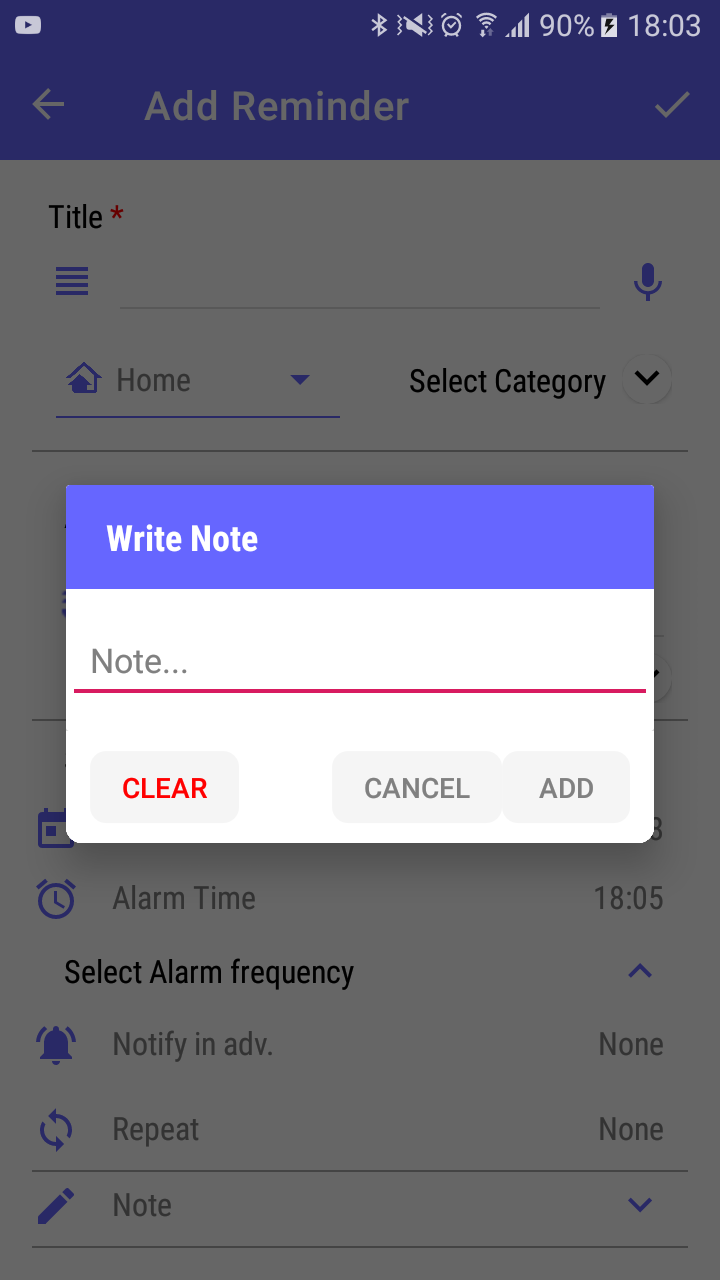
我使用MaterialAlertDialogBuilder,因为我需要圆角模式和昼夜模式。请注意,我不能使用dialog.getWindow().setBackgroundDrawable(new ColorDrawable(android.graphics.Color.TRANSPARENT));行,因为在我的风格中,我在style.xml中有不同的父级,我使用它来根据日夜模式设置颜色。
问:如何在MaterialAlertDialogBuilder中更改正负按钮背景色?
请注意,绘图背景在MaterialAlertDialogBuilder中不起作用。
代码:
public void showNotesDialog() {
        MaterialAlertDialogBuilder alertDialogBuilder = new MaterialAlertDialogBuilder(this, R.style.dialogBoxStyle);
        LayoutInflater li = LayoutInflater.from(this);
        View promptsView = li.inflate(R.layout.row_note_layout, null);
        alertDialogBuilder.setView(promptsView);

        etNote = promptsView.findViewById(R.id.et_note);
        String buttonName = getString(R.string.add);
        if (!getNotes.isEmpty()) {
            buttonName = getString(R.string.update);
            etNote.getText().clear();
            etNote.setText(getNotes);
        }

        alertDialogBuilder.setPositiveButton(buttonName, null);
        alertDialogBuilder.setNegativeButton(getString(R.string.cancel), null);
        alertDialogBuilder.setNeutralButton("Clear", null);

        AlertDialog alertDialog = alertDialogBuilder.create();
        alertDialog.setCancelable(false);


        alertDialog.setOnShowListener(new DialogInterface.OnShowListener() {
            @Override
            public void onShow(DialogInterface dialog) {
                Button buttonPositive = ((AlertDialog) dialog).getButton(AlertDialog.BUTTON_POSITIVE);
                Button buttonNegative = ((AlertDialog) dialog).getButton(AlertDialog.BUTTON_NEGATIVE);
                ((AlertDialog) dialog).getButton(AlertDialog.BUTTON_NEUTRAL).setTextColor(getResources().getColor(R.color.colorRed));
                Button buttonClear = ((AlertDialog) dialog).getButton(AlertDialog.BUTTON_NEUTRAL);
                buttonClear.setOnClickListener(new View.OnClickListener() {
                    @Override
                    public void onClick(View v) {
                        etNote.getText().clear();
                        getNotes = "";
                        noteDesc.setText(getNotes);
                    }
                });

                buttonPositive.setOnClickListener(new View.OnClickListener() {
                    @Override
                    public void onClick(View v) {
                        getNotes = etNote.getText().toString();
                        noteDesc.setText(getNotes);
                        dialog.dismiss();
                    }
                });

                buttonNegative.setOnClickListener(new View.OnClickListener() {
                    @Override
                    public void onClick(View v) {
                        dialog.dismiss();
                    }
                });
            }
        });


        alertDialog.show();
    }
样式(v21)
 <style name="dialogBoxStyle" parent="Theme.AppCompat.DayNight.Dialog.Alert">
        <item name="android:background">?attr/day_colorWhite_night_colorVeryDarkBlackMostlyBlack</item>
        <item name="android:textColor">?attr/day_colorDarkGray_night_colorWhite</item>
        <item name="android:textColorAlertDialogListItem">?attr/day_colorDarkGray_night_colorWhite</item>
        <item name="android:textColorSecondary">?attr/day_colorDarkGray_night_colorWhite</item>
        <item name="android:textColorPrimary">?attr/day_colorDarkGray_night_colorWhite</item>
        <item name="colorAccent">?attr/day_colorDarkGray_night_colorWhite</item>
        <item name="android:typeface">normal</item>
        <item name="textColorAlertDialogListItem">?attr/day_colorDarkGray_night_colorWhite</item>
        <item name="shapeAppearanceOverlay">@style/ShapeAppearanceOverlay.MyApp.Dialog.Rounded</item>
    </style>

    <style name="ShapeAppearanceOverlay.MyApp.Dialog.Rounded" parent="">
        <item name="cornerFamily">rounded</item>
        <!--TODO: Please note that "cornerSize" will give effect on outside of Dialog Box border line, not where the row is inflated.-->
        <!--TODO: If you want to set Inside corner: app:cardCornerRadius="60dp"-->
        <item name="cornerSize">8dp</item>
</style>回答 1
Stack Overflow用户
回答已采纳
发布于 2019-10-08 12:58:45
在对话框中尝试下面的代码
alertDialog.getButton(AlertDialog.BUTTON_NEGATIVE).setTextColor(Color.DKGRAY)
alertDialog.getButton(AlertDialog.BUTTON_POSITIVE).setTextColor(Color.BLUE)若要更改背景,请参考this post
页面原文内容由Stack Overflow提供。腾讯云小微IT领域专用引擎提供翻译支持
原文链接:
https://stackoverflow.com/questions/58286800
复制相关文章
相似问题
腾讯云开发者

Copyright © 2013 - 2026 Tencent Cloud. All Rights Reserved. 腾讯云 版权所有
深圳市腾讯计算机系统有限公司 ICP备案/许可证号:粤B2-20090059  粤公网安备44030502008569号
腾讯云计算(北京)有限责任公司 京ICP证150476号 | 京ICP备11018762号