
Server停靠程序无法在Desktop上使用组合配置启动
Server停靠程序无法在Desktop上使用组合配置启动
提问于 2020-05-30 07:37:20
用例:为了测试和开发目的,我希望通过我的mac上的docker启动Server。由于我不想松开数据库,切换坞容器,所以我想使用卷。
用码头卷我可以做到。
docker run --name 'mssql' -e 'ACCEPT_EULA=Y' -e 'MSSQL_SA_PASSWORD=SuperSecret' -p 1433:1433 -v mssqldata:/var/opt/mssql -d mcr.microsoft.com/mssql/server
但是在mac上,卷数据也存储在VM中。
因此,接下来,我尝试设置一个码头组合配置,以将文件存储在我最喜欢的地方。
version: '3'

volumes:
  dbdata:
    driver: local
    driver_opts:
      type: 'none'
      o: 'bind'
      device: '/Users/rausch/Documents/docker-volumes/mssql/data'

services:
  sql1:
    image: "mcr.microsoft.com/mssql/server"
    ports:
      - 1433:1433
    environment:
      PATH: '/usr/local/sbin:/usr/local/bin:/usr/sbin:/usr/bin:/sbin:/bin'
      ACCEPT_EULA: Y
      SA_PASSWORD: 1sa!1234
      MSSQL_PID: Standard
    volumes:
      - dbdata:/var/opt/mssql
从这开始
docker compose -f myconfig.yml up
sql server启动并开始将文件复制到我定义的位置。
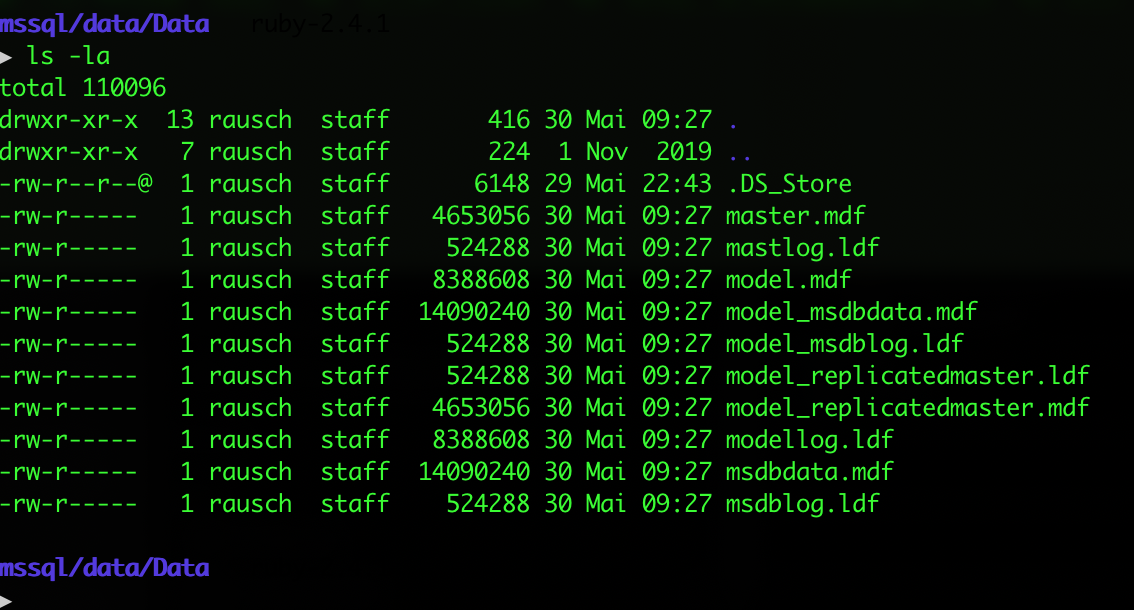
但码头图像存在错误。在这里,输出:
Creating volume "documents_dbdata" with local driver
Creating documents_sql1_1 ... done
Attaching to documents_sql1_1
sql1_1  | SQL Server 2019 will run as non-root by default.
sql1_1  | This container is running as user mssql.
sql1_1  | To learn more visit https://go.microsoft.com/fwlink/?linkid=2099216.
sql1_1  | 2020-05-30 07:27:18.60 Server      Setup step is copying system data file 'C:\templatedata\master.mdf' to '/var/opt/mssql/data/master.mdf'.
2020-05-30 07:27:19.67 Server      Did not find an existing master data file /var/opt/mssql/data/master.mdf, copying the missing default master and other system database files. If you have moved the database location, but not moved the database files, startup may fail. To repair: shutdown SQL Server, move the master database to configured location, and restart.
2020-05-30 07:27:19.70 Server      Setup step is copying system data file 'C:\templatedata\mastlog.ldf' to '/var/opt/mssql/data/mastlog.ldf'.
2020-05-30 07:27:19.79 Server      Setup step is copying system data file 'C:\templatedata\model.mdf' to '/var/opt/mssql/data/model.mdf'.
2020-05-30 07:27:19.98 Server      Setup step is copying system data file 'C:\templatedata\modellog.ldf' to '/var/opt/mssql/data/modellog.ldf'.
2020-05-30 07:27:20.17 Server      Setup step is copying system data file 'C:\templatedata\msdbdata.mdf' to '/var/opt/mssql/data/msdbdata.mdf'.
2020-05-30 07:27:20.47 Server      Setup step is copying system data file 'C:\templatedata\msdblog.ldf' to '/var/opt/mssql/data/msdblog.ldf'.
2020-05-30 07:27:20.55 Server      Setup step is FORCE copying system data file 'C:\templatedata\model_replicatedmaster.mdf' to '/var/opt/mssql/data/model_replicatedmaster.mdf'.
2020-05-30 07:27:20.70 Server      Setup step is FORCE copying system data file 'C:\templatedata\model_replicatedmaster.ldf' to '/var/opt/mssql/data/model_replicatedmaster.ldf'.
2020-05-30 07:27:20.78 Server      Setup step is FORCE copying system data file 'C:\templatedata\model_msdbdata.mdf' to '/var/opt/mssql/data/model_msdbdata.mdf'.
2020-05-30 07:27:21.02 Server      Setup step is FORCE copying system data file 'C:\templatedata\model_msdblog.ldf' to '/var/opt/mssql/data/model_msdblog.ldf'.
2020-05-30 07:27:22.99 Server      Microsoft SQL Server 2019 (RTM-CU4) (KB4548597) - 15.0.4033.1 (X64)
sql1_1  Mar 14 2020 16:10:35
sql1_1  Copyright (C) 2019 Microsoft Corporation
sql1_1  Standard Edition (64-bit) on Linux (Ubuntu 18.04.4 LTS) <X64>
2020-05-30 07:27:23.01 Server      UTC adjustment: 0:00
2020-05-30 07:27:23.02 Server      (c) Microsoft Corporation.
2020-05-30 07:27:23.03 Server      All rights reserved.
2020-05-30 07:27:23.04 Server      Server process ID is 36.
2020-05-30 07:27:23.05 Server      Logging SQL Server messages in file '/var/opt/mssql/log/errorlog'.
2020-05-30 07:27:23.06 Server      Registry startup parameters:
sql1_1   -d /var/opt/mssql/data/master.mdf
sql1_1   -l /var/opt/mssql/data/mastlog.ldf
sql1_1   -e /var/opt/mssql/log/errorlog
2020-05-30 07:27:23.10 Server      Error: 17113, Severity: 16, State: 1.
2020-05-30 07:27:23.10 Server      Error 87(The parameter is incorrect.) occurred while opening file '/var/opt/mssql/data/master.mdf' to obtain configuration information at startup. An invalid startup option might have caused the error. Verify your startup options, and correct or remove them if necessary.
documents_sql1_1 exited with code 1
所以,任何人都可以告诉我我做错了什么?
回答 1
Stack Overflow用户
发布于 2020-05-30 09:40:49
我能够让它在macOS上使用码头容积启动。注意,我的compose.yml文件至少需要3.2版本才能使服务的卷定义工作:
version: "3.2"
services:
  sql1:
    image: "mcr.microsoft.com/mssql/server"
    ports:
      - 1433:1433
    environment:
      PATH: "/usr/local/sbin:/usr/local/bin:/usr/sbin:/usr/bin:/sbin:/bin"
      ACCEPT_EULA: Y
      SA_PASSWORD: 1sa!1234
      MSSQL_PID: Standard
    volumes:
      - type: volume
        source: mssql
        target: /var/opt/mssql
volumes:
  mssql:
    external:
      name: mssql
然后,我用以下方式启动了集装箱:
$ docker volume create mssql
mssql

$ docker volume inspect mssql
[
    {
        "CreatedAt": "2020-05-30T09:36:31Z",
        "Driver": "local",
        "Labels": {},
        "Mountpoint": "/var/lib/docker/volumes/mssql/_data",
        "Name": "mssql",
        "Options": {},
        "Scope": "local"
    }
]

$ docker-compose -f compose.yml up
# lots of startup log...
希望这能有所帮助。
页面原文内容由Stack Overflow提供。腾讯云小微IT领域专用引擎提供翻译支持
原文链接:
https://stackoverflow.com/questions/62099304
复制相关文章
相似问题
腾讯云开发者

Copyright © 2013 - 2026 Tencent Cloud. All Rights Reserved. 腾讯云 版权所有
深圳市腾讯计算机系统有限公司 ICP备案/许可证号:粤B2-20090059  粤公网安备44030502008569号
腾讯云计算(北京)有限责任公司 京ICP证150476号 | 京ICP备11018762号