
如何准确地使用Metals和VS代码调试器?
金属宣布表示“现在可以使用新的”运行“、”测试“、”调试“和”调试“按钮从VS代码直接运行和测试。有一个很好的礼物展示了它能做什么,我不知道该如何做到这一点。
我尝试在launch.json中使用以下配置启动VS代码调试器
{
    // Use IntelliSense to learn about possible attributes.
    // Hover to view descriptions of existing attributes.
    // For more information, visit: https://go.microsoft.com/fwlink/?linkid=830387
    "version": "0.2.0",
    "configurations": [
       {
           "type": "scala",
           "request": "launch",
           "name": "Untitled",
           "mainClass": "com.playZip.Unzip",
           "args": [],
           "jvmOptions": []
       }
    ]
}
并得到以下错误消息:
Couldn't find a debug adapter descriptor for debug type 'scala' (extension might have failed to activate)吉特标量塔/金属上有人遇到了这个问题,答案是他需要Bloop来支持utest,我认为我的Bloop支持utest是因为我的sbt项目中有一个文件.bloop/play-zip-test.json,但是如果我的Bloop支持utest,我就不是100%了,如果它不支持utest,该怎么办呢?我试着运行bloop utest,但是它失败了,因为我没有安装Bloop。我和金属一起有血迹。
回答 3
Stack Overflow用户
发布于 2020-08-13 00:36:27
记录如何运行或调试应用程序#2005在运行和调试代码上添加了正式的调试文档,其中记录了两种方法
- 通过代码镜片
run | debug
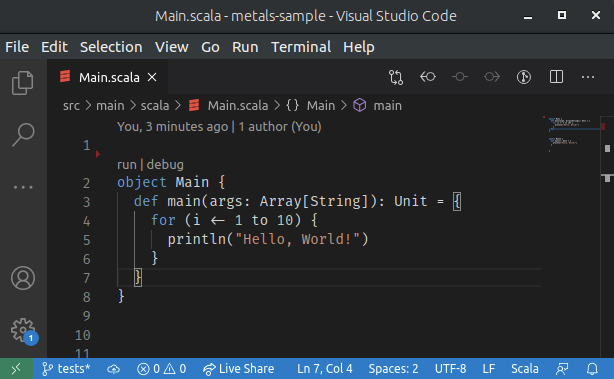
- 通过
launch.json配置
下面是一个hello示例,如何通过launch.json方法使用VSC和Metals调试测试。我们将使用lihaoyi/utest库并在测试中设置一个断点。
- 执行
sbt new scala/scala-seed.g8以创建正确的项目结构 Open...sbt项目与VSC或简单的cd进入项目并执行code .- 在ScalaTest中用utest替换
build.sbtlibraryDependencies += "com.lihaoyi“% "utest”% "0.7.2“% "test",testFrameworks += new TestFramework("utest.runner.Framework") - 将
test/scala/example/HelloSpec.scala替换为HelloTests.scala包示例导入utest._对象HelloTests扩展TestSuite{ val =test{ test("test1"){ 1} - 用
View | Command Palette... | Metals: Import Build导入sbt构建 - 在第8行放置一个断点,然后单击
Run and Debug
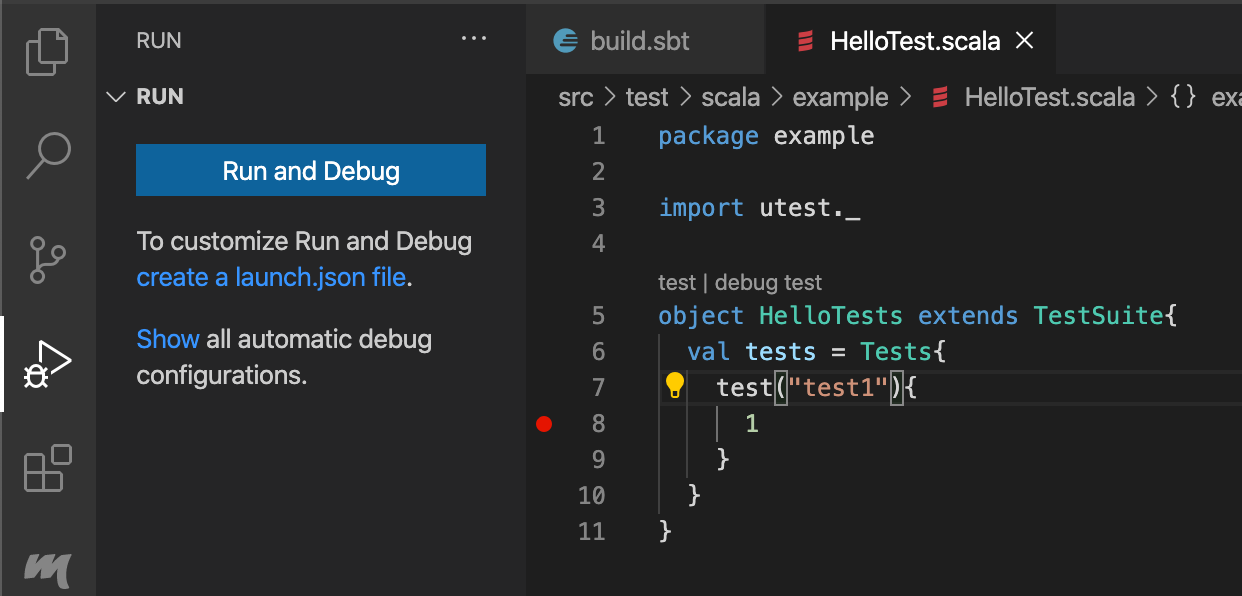
- 为
Test Suite选择Pick the kind of class to debug - 留空给
Enter the name of the build target - 为
example.HelloTests编写Enter the name of the class to debug - 为
Debug example.HelloTests编写Enter the name of configuration - 这应该会创建
.vscode/launch.json{“版本”:"0.2.0",“配置”:{“类型”:"scala",“名称”:"Debug example.HelloTests",“请求”:“启动”,"testClass":"example.HelloTests“} - 现在,您应该可以通过单击绿色三角形并停止在断点上的
Start Debugging。
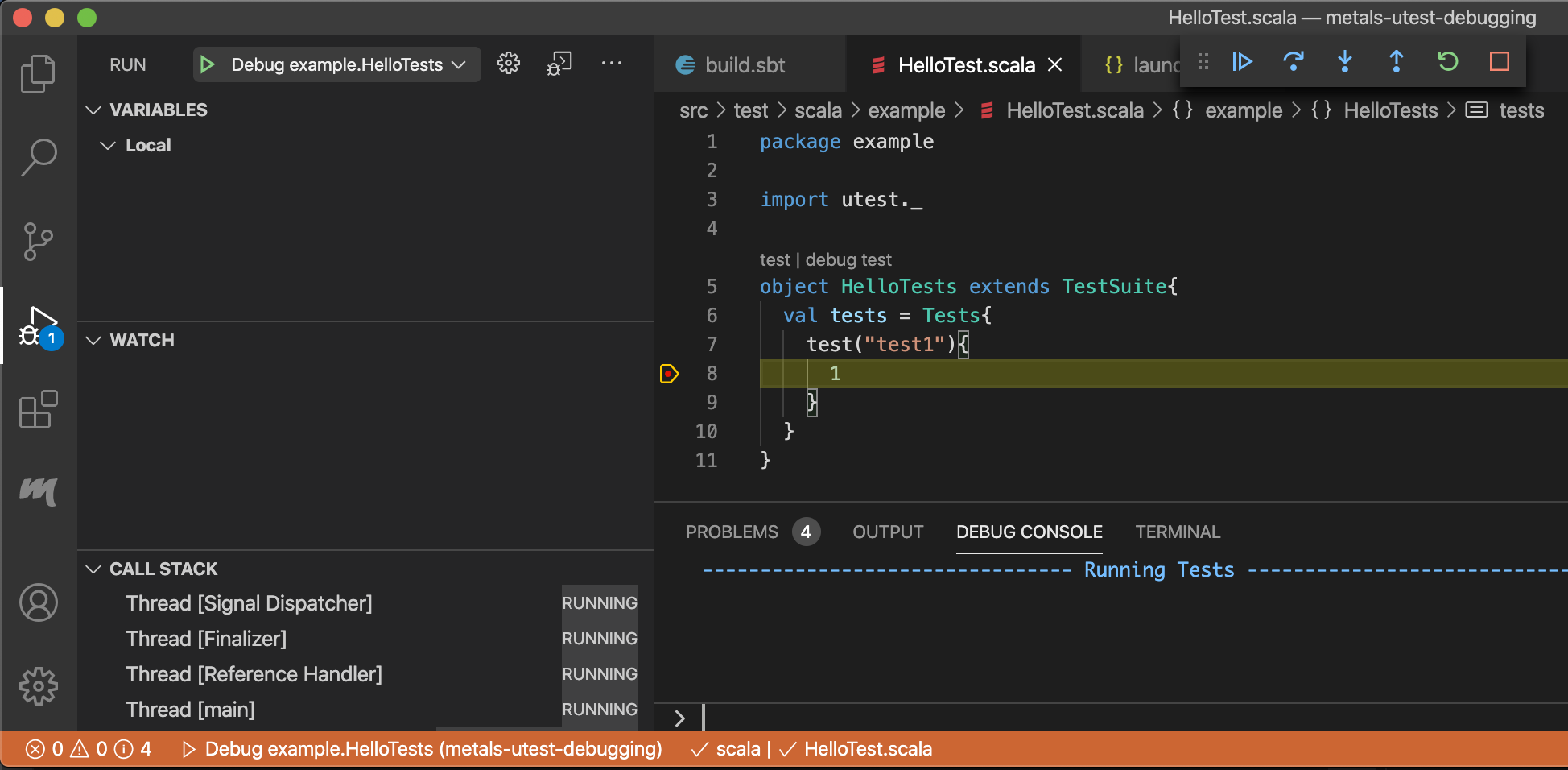
Stack Overflow用户
发布于 2020-10-23 05:13:48
不知道你的问题是否解决了,但我以前也看到过同样的问题。要获得有关错误的更多信息,可以检查Metals输出。见下图:从output选项卡中选择Metals。错误的更多细节应该是可用的。
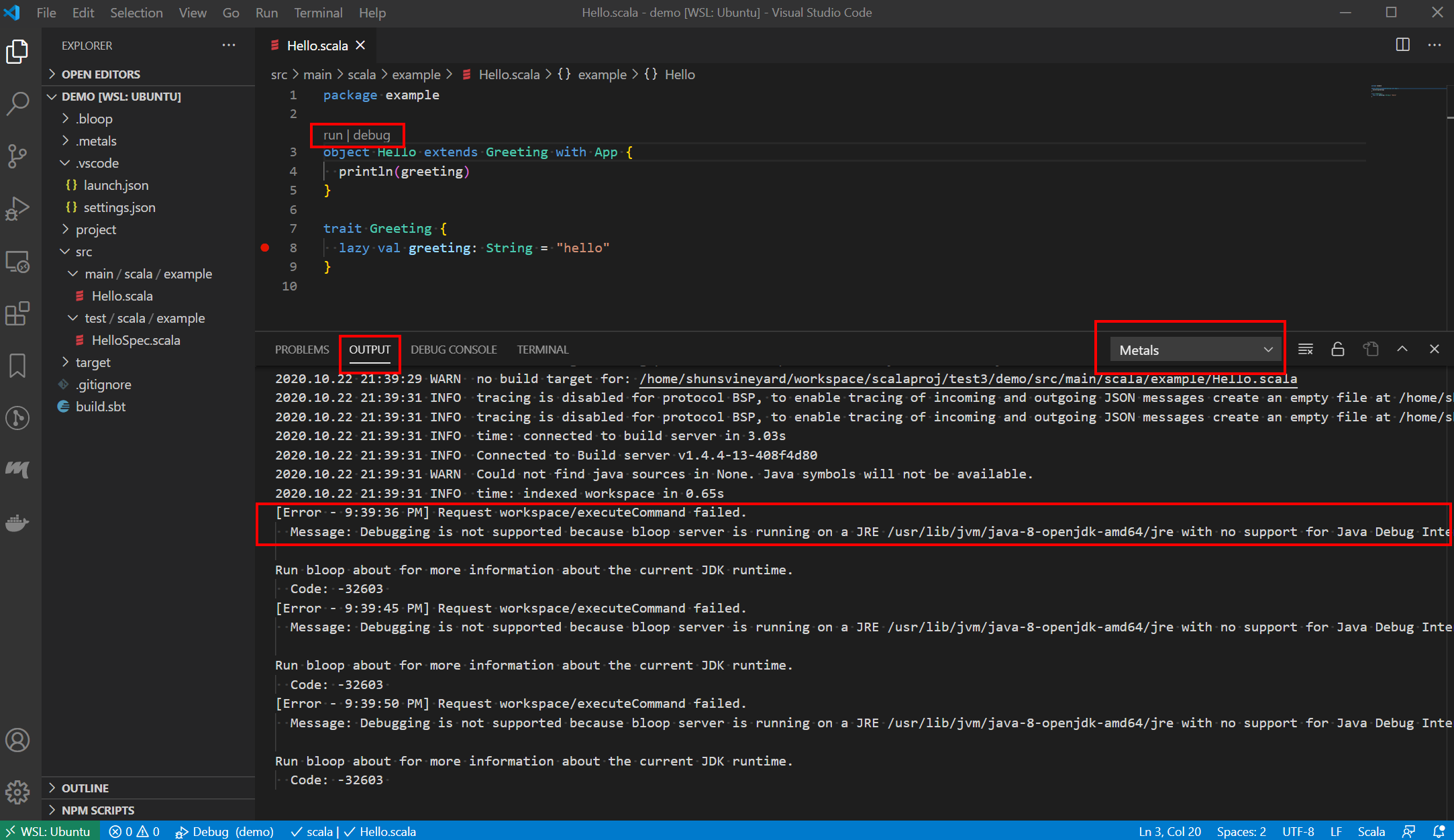
在我的例子中,我得到这个错误(Couldn't find a debug adapter descriptor for debug type 'scala' (extension might have failed to activate) )的原因是我的机器上安装的Java不支持JDI。
Message: Debugging is not supported because bloop server is running on a JRE /usr/lib/jvm/java-8-openjdk-amd64/jre with no support for Java Debug Interface: 'JDI implementation is not provided by the vendor'. To enable debugging, install a JDK and restart the bloop server.我想你的案子可能是一样的。要解决这个问题,只需安装一个支持JDI的Java实现即可。例如,openjdk version "11.0.8" 2020-07-14可以很好地处理Ubuntu上的Metals。你可以这样做来安装它。
$ sudo apt install openjdk-11-jdk如果它仍然不起作用,请确保VS代码设置中的Metals: Java Home指向正确的Java。

Stack Overflow用户
发布于 2020-10-31 10:53:47
我遇到了同样的问题,这归结到了buildTarget。我有一个多模块项目。当我看金属原木时,我看到的是:
Caused by: scala.MatchError: scala.meta.internal.metals.debug.BuildTargetNotFoundException: Build target not found: (of class scala.meta.internal.metals.debug.BuildTargetNotFoundException)我的Scala项目
/client_accounts
   /migrations
/app将launch.json更新为"buildTarget": "app",,并且工作正常。错误报告可能会更好一些。
因此,如果您收到此错误,请查看日志中的根本原因。
https://stackoverflow.com/questions/63385946
复制相似问题
腾讯云开发者

Copyright © 2013 - 2026 Tencent Cloud. All Rights Reserved. 腾讯云 版权所有
深圳市腾讯计算机系统有限公司 ICP备案/许可证号:粤B2-20090059  粤公网安备44030502008569号
腾讯云计算(北京)有限责任公司 京ICP证150476号 | 京ICP备11018762号