
C# -从CSV文件中读取数据并在DataGridView中显示。
C# -从CSV文件中读取数据并在DataGridView中显示。
提问于 2021-03-05 04:52:48
public partial class Form1 : Form
{
    public Form1()
    {
        InitializeComponent();
    }

    private void btnLoad_Click(object sender, EventArgs e)
    {
        dgvData.DataSource = LoadCSV(@"C:\working\Summary.csv");
    }

    public List<Product> LoadCSV(string csvFile)
    {
        var query = from line in File.ReadAllLines(csvFile)
                    let data = line.Split(',')
                    select new Product
                    {
                        A = data[0],
                        B = data[1]
                    };

        return query.ToList();
    }

    public class Product
    {
        public string A { get; set; }
        public string B { get; set; }
    }
}
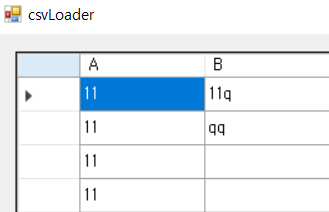
我是一个初学者,从上周开始在工作中使用C#。
读取包含简单数字的.csv文件,但它包含导致错误的空格。
System.IndexOutOfRangeException
回答 1
Stack Overflow用户
发布于 2021-03-05 08:41:43
下面是一个简化的、非LINQ版本的LoadCSV()方法,它可以帮助您更好地理解代码中的场景。这个方法-
只有当行具有任何值时,A
- sets
- 才会创建
Product,只有在第二个值可用的情况下,
- 才能创建
Product,只有在第二个值可用的情况下,才能为属性B创建Product
public List<Product> LoadCSV(string csvFile)
{
    // create an empty list
    var list = new List<Product>();

    // read all the lines
    var lines = File.ReadAllLines(csvFile);

    // do some processing for each line
    foreach (var line in lines)
    {
        // split line based on comma, only if line is not an empty string
        // if line is an empty string, skip processing
        var data = line.Split(',', StringSplitOptions.RemoveEmptyEntries);
        if (data.Length == 0)
            continue;

        // we skipped empty lines, so data has at least one element
        // we can safely create a Product with the first element for property A
        var product = new Product { A = data[0] };

        // if data has more than one element, then we have a second element
        // we can safely assign the second element to property B
        if (data.Length > 1)
        {
            product.B = data[1];
        }

        // add the product to list
        list.Add(product);
    }
    return list;
}页面原文内容由Stack Overflow提供。腾讯云小微IT领域专用引擎提供翻译支持
原文链接:
https://stackoverflow.com/questions/66486981
复制相关文章
相似问题
腾讯云开发者

Copyright © 2013 - 2026 Tencent Cloud. All Rights Reserved. 腾讯云 版权所有
深圳市腾讯计算机系统有限公司 ICP备案/许可证号:粤B2-20090059  粤公网安备44030502008569号
腾讯云计算(北京)有限责任公司 京ICP证150476号 | 京ICP备11018762号