
如何使用具有完成阈值的MaterialAutoCompleteTextView
我想在我的安卓应用程序中开始使用材料组件,我在MaterialAutoCompleteTextView上遇到了一些麻烦。我希望它的行为像一个标准的AutoCompleteTextView,我更喜欢OutlinedBox风格。此外,它应该观察completionThreshold属性,只在输入三个匹配字符之后才展开下拉列表。
此组件有四种可用于创建概述框的样式:Widget.MaterialComponents.TextInputLayout.OutlinedBox.Dense.ExposedDropdownMenu Widget.MaterialComponents.TextInputLayout.OutlinedBox.ExposedDropdownMenu Widget.MaterialComponents.TextInputLayout.OutlinedBox.Dense Widget.MaterialComponents.TextInputLayout.OutlinedBox
但是,前两种样式在对焦时不会立即观察completionThreshold并展开下拉列表。其余的部分似乎已经损坏,很可能不适合与此组件一起使用。
显然,一种选择是使用后一种样式并对其进行修改。但是对于这个相对复杂的组件来说,这可能会变得有点混乱,而且使用内置的行为似乎是一种相当麻烦的方法。
什么是正确的方法?
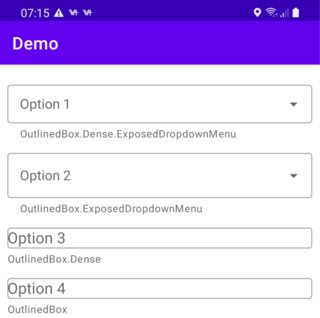
<?xml version="1.0" encoding="utf-8"?>

<LinearLayout xmlns:android="http://schemas.android.com/apk/res/android"
    xmlns:tools="http://schemas.android.com/tools"
    xmlns:app="http://schemas.android.com/apk/res-auto"
    android:layout_width="match_parent"
    android:layout_height="match_parent"
    tools:context=".MainActivity"
    android:orientation="vertical"
    android:layout_margin="10dp">

    <com.google.android.material.textfield.TextInputLayout
        android:layout_width="match_parent"
        android:layout_height="wrap_content"
        android:layout_marginTop="10dp"
        android:hint="Option 1"
        app:helperText="OutlinedBox.Dense.ExposedDropdownMenu"
        style="@style/Widget.MaterialComponents.TextInputLayout.OutlinedBox.Dense.ExposedDropdownMenu">

        <com.google.android.material.textfield.MaterialAutoCompleteTextView
            android:layout_width="match_parent"
            android:layout_height="wrap_content"
            android:completionThreshold="3"
            />

    </com.google.android.material.textfield.TextInputLayout>

    <com.google.android.material.textfield.TextInputLayout
        android:layout_width="match_parent"
        android:layout_height="wrap_content"
        android:layout_marginTop="10dp"
        android:hint="Option 2"
        app:helperText="OutlinedBox.ExposedDropdownMenu"
        style="@style/Widget.MaterialComponents.TextInputLayout.OutlinedBox.ExposedDropdownMenu">

        <com.google.android.material.textfield.MaterialAutoCompleteTextView
            android:layout_width="match_parent"
            android:layout_height="wrap_content"
            android:completionThreshold="3"
            />

    </com.google.android.material.textfield.TextInputLayout>

    <com.google.android.material.textfield.TextInputLayout
        android:layout_width="match_parent"
        android:layout_height="wrap_content"
        android:layout_marginTop="10dp"
        android:hint="Option 3"
        app:helperText="OutlinedBox.Dense"
        style="@style/Widget.MaterialComponents.TextInputLayout.OutlinedBox.Dense">

        <com.google.android.material.textfield.MaterialAutoCompleteTextView
            android:layout_width="match_parent"
            android:layout_height="wrap_content"
            android:completionThreshold="3"
            />

    </com.google.android.material.textfield.TextInputLayout>

    <com.google.android.material.textfield.TextInputLayout
        android:layout_width="match_parent"
        android:layout_height="wrap_content"
        android:layout_marginTop="10dp"
        android:hint="Option 4"
        app:helperText="OutlinedBox"
        style="@style/Widget.MaterialComponents.TextInputLayout.OutlinedBox">

        <AutoCompleteTextView
            android:layout_width="match_parent"
            android:layout_height="wrap_content"
            android:completionThreshold="3"
            />

    </com.google.android.material.textfield.TextInputLayout>

</LinearLayout>回答 1
Stack Overflow用户
发布于 2021-03-11 06:02:04
请尝试在java代码中对您的setThreshold(3)使用AutoCompleteTextView,并在包含AutoCompleteTextView的TextInputLayout中在xml中设置app:endIconMode="none"。
https://stackoverflow.com/questions/66577006
复制相似问题
腾讯云开发者

Copyright © 2013 - 2026 Tencent Cloud. All Rights Reserved. 腾讯云 版权所有
深圳市腾讯计算机系统有限公司 ICP备案/许可证号:粤B2-20090059  粤公网安备44030502008569号
腾讯云计算(北京)有限责任公司 京ICP证150476号 | 京ICP备11018762号