
在RHEL 7 Linux服务器上安装Docker的问题
最近我不断地遇到这个问题,最后我需要一些帮助,因为我完全被困住了。
我刚刚访问了一个RHEL EC2 Linux服务器,我只是简单地尝试安装Docker。这一过程最近极为痛苦。当试图跟踪在线提到的进程时,大量404 HTTP没有找到错误
根据https://docs.aws.amazon.com/AmazonECS/latest/developerguide/docker-basics.html,您只需运行以下两个命令之一:
- sudo amazon安装
- sudo yum安装
但是,这两个组件都不能工作,如下面的输出所示:
[root@d8de679d27f2454 myuser]# sudo amazon-linux-extras install docker
sudo: amazon-linux-extras: command not found
[root@d8de679d27f2454 myuser]# yum install docker
Loaded plugins: amazon-id, search-disabled-repos
No package docker available.
Error: Nothing to do
[root@d8de679d27f2454 myuser]#
下面是我尝试过的事情清单:
第一次尝试 (RE:How to install docker on Amazon Linux2)
建议的第二个答案是,您只需运行以下命令:
sudo yum update -y
sudo yum -y install docker
但是,这也不起作用,如下面的输出所示:
[root@d8de679d27f2454 myuser]# yum update -y
Loaded plugins: amazon-id, search-disabled-repos
No packages marked for update
[root@d8de679d27f2454 myuser]# yum -y install docker
Loaded plugins: amazon-id, search-disabled-repos
No package docker available.
Error: Nothing to do
[root@d8de679d27f2454 myuser]# 第二次尝试:通过get.docker.com安装
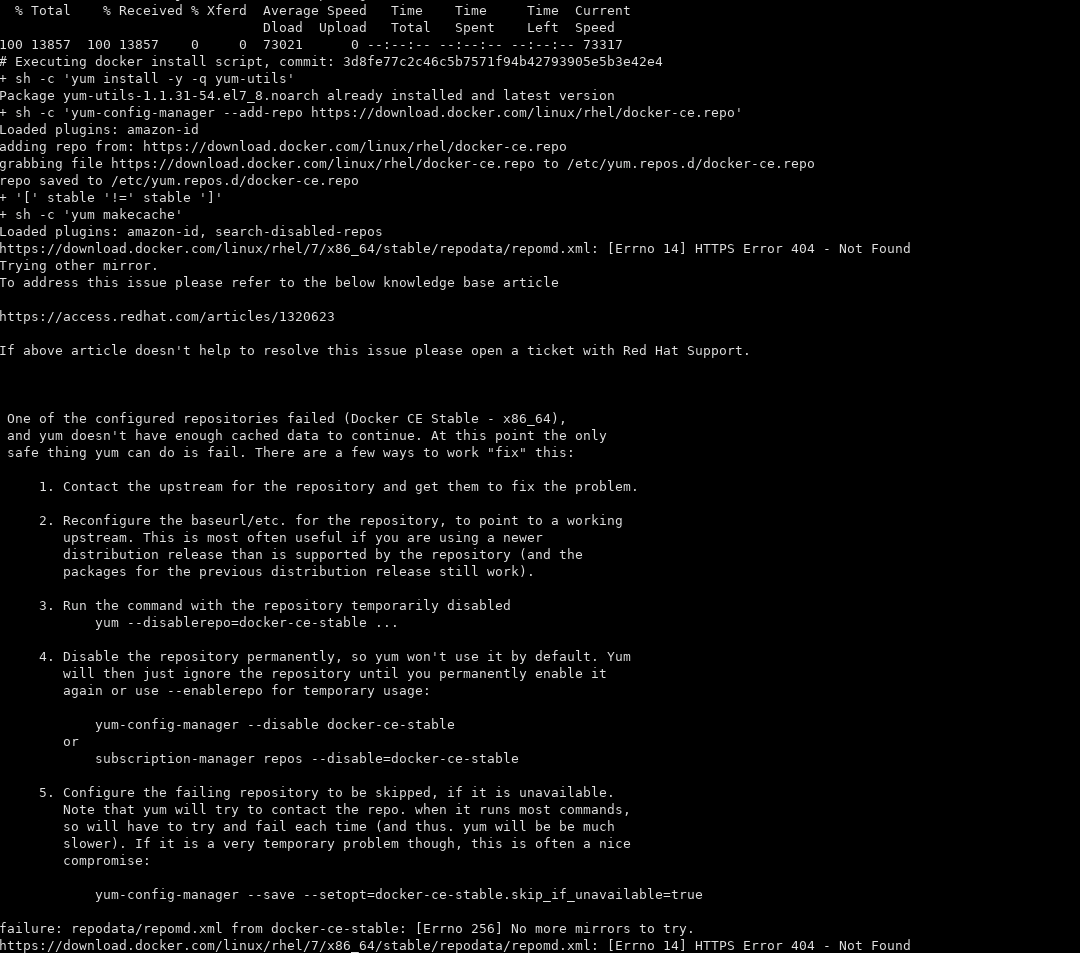
在运行curl https://get.docker.com | bash时,这也不起作用
第三次尝试:https://computingforgeeks.com/install-docker-ce-on-rhel-7-linux/
本文的一部分建议运行以下两个命令:
sudo yum install -y https://dl.fedoraproject.org/pub/epel/epel-release-latest-7.noarch.rpm
sudo yum install -y yum-utils device-mapper-persistent-data lvm2
但是,这也不起作用:
# yum install -y yum-utils device-mapper-persistent-data lvm2
Loaded plugins: amazon-id, product-id, search-disabled-repos, subscription-manager

This system is not registered with an entitlement server. You can use subscription-manager to register.

https://download.docker.com/linux/rhel/7/x86_64/stable/repodata/repomd.xml: [Errno 14] HTTPS Error 404 - Not Found
Trying other mirror.
To address this issue please refer to the below knowledge base article

https://access.redhat.com/articles/1320623

If above article doesn't help to resolve this issue please open a ticket with Red Hat Support.


 One of the configured repositories failed (Docker CE Stable - x86_64),
 and yum doesn't have enough cached data to continue. At this point the only
 safe thing yum can do is fail. There are a few ways to work "fix" this:

     1. Contact the upstream for the repository and get them to fix the problem.

     2. Reconfigure the baseurl/etc. for the repository, to point to a working
        upstream. This is most often useful if you are using a newer
        distribution release than is supported by the repository (and the
        packages for the previous distribution release still work).

     3. Run the command with the repository temporarily disabled
            yum --disablerepo=docker-ce-stable ...

     4. Disable the repository permanently, so yum won't use it by default. Yum
        will then just ignore the repository until you permanently enable it
        again or use --enablerepo for temporary usage:

            yum-config-manager --disable docker-ce-stable
        or
            subscription-manager repos --disable=docker-ce-stable

     5. Configure the failing repository to be skipped, if it is unavailable.
        Note that yum will try to contact the repo. when it runs most commands,
        so will have to try and fail each time (and thus. yum will be be much
        slower). If it is a very temporary problem though, this is often a nice
        compromise:

            yum-config-manager --save --setopt=docker-ce-stable.skip_if_unavailable=true

failure: repodata/repomd.xml from docker-ce-stable: [Errno 256] No more mirrors to try.
https://download.docker.com/linux/rhel/7/x86_64/stable/repodata/repomd.xml: [Errno 14] HTTPS Error 404 - Not Found下面是我的cat /etc/os-release命令的输出
NAME="Red Hat Enterprise Linux Server"
VERSION="7.9 (Maipo)"
ID="rhel"
ID_LIKE="fedora"
VARIANT="Server"
VARIANT_ID="server"
VERSION_ID="7.9"
PRETTY_NAME="Red Hat Enterprise Linux Server 7.9 (Maipo)"
ANSI_COLOR="0;31"
CPE_NAME="cpe:/o:redhat:enterprise_linux:7.9:GA:server"
HOME_URL="https://www.redhat.com/"
BUG_REPORT_URL="https://bugzilla.redhat.com/"
任何帮助都将不胜感激。此时安装码头似乎几乎是不可能的。
Stack Overflow用户
发布于 2021-03-26 02:34:32
运行以下命令,此操作有效:
yum install -y https://download.docker.com/linux/centos/7/x86_64/stable/Packages/docker-ce-selinux-17.03.0.ce-1.el7.centos.noarch.rpm
yum install -y https://download.docker.com/linux/centos/7/x86_64/stable/Packages/docker-ce-17.03.0.ce-1.el7.centos.x86_64.rpmhttps://stackoverflow.com/questions/66810139
复制相似问题
腾讯云开发者

Copyright © 2013 - 2026 Tencent Cloud. All Rights Reserved. 腾讯云 版权所有
深圳市腾讯计算机系统有限公司 ICP备案/许可证号:粤B2-20090059  粤公网安备44030502008569号
腾讯云计算(北京)有限责任公司 京ICP证150476号 | 京ICP备11018762号