
如何在网格中给出扩展程序的全宽度列
如何在网格中给出扩展程序的全宽度列
提问于 2021-04-12 20:54:55
我有一个Expander,它应该接收到列的全部宽度,但是我无法让它工作。
我试图将Horizontal(Content)Alignment = stretch添加到TextBlock和Expander上,甚至在Grid上也是如此,但它不起作用。
我需要的是Expander占用大约90%的宽度,其余的则分配给按钮,如下例所示:
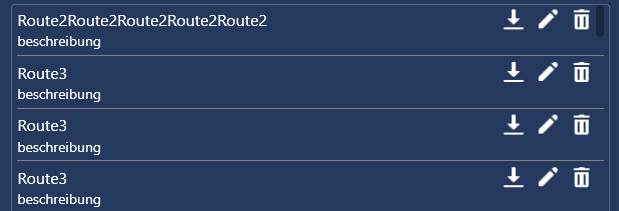
我想显示一个名字,当你按下它时,展开并显示额外的信息,如果按下按钮,那么按钮后面的命令就会被执行(示例中没有绑定命令)。
<ListView
    ItemsSource="{Binding log}"
    SelectionMode="Multiple"
    Style="{StaticResource ListViewStyle}">
    <ListView.ItemTemplate>
        <DataTemplate>
            <Border BorderThickness="0,0,0,1" BorderBrush="Gray">
                <Grid HorizontalAlignment="Stretch">
                    <Grid.ColumnDefinitions>
                        <ColumnDefinition Width="100*" />
                        <ColumnDefinition Width="5*" />
                        <ColumnDefinition Width="5*" />
                    </Grid.ColumnDefinitions>

                    <Expander Grid.Column="0"
                              HorizontalAlignment="Stretch"
                              IsExpanded="{Binding Mode=TwoWay, Path=IsSelected, RelativeSource={RelativeSource AncestorType=ListBoxItem, Mode=FindAncestor}}"
                              Style="{StaticResource ExpanderStyle}">
                        <Expander.Header>
                            <TextBlock Text="{Binding Name}" Foreground="White"
                                       HorizontalAlignment="Stretch" />
                        </Expander.Header>
                        <TextBlock
                            VerticalAlignment="Center"
                            FontSize="16"
                            Foreground="White"
                            Text="{Binding Description}" />
                    </Expander>

                    <Button Grid.Column="1"
                            Style="{StaticResource IconButton}">
                        <Button.Background>
                            <ImageBrush ImageSource="../icons/edit.png"
                                        Stretch="None" />
                        </Button.Background>
                    </Button>
                    <dialogButton:ConfirmButton Grid.Column="2"
                                                Question="{x:Static language:Strings.confirm}"
                                                Style="{DynamicResource IconButton}"
                                                Margin="0,0,10,0">
                        <dialogButton:ConfirmButton.Background>
                            <ImageBrush ImageSource="../icons/delete.png"
                                        Stretch="None" />
                        </dialogButton:ConfirmButton.Background>
                    </dialogButton:ConfirmButton>

                </Grid>
            </Border>
        </DataTemplate>
    </ListView.ItemTemplate>
</ListView>
样式
<Style x:Key="ExpanderDownHeaderStyle" TargetType="{x:Type ToggleButton}">
    <Setter Property="Template">
        <Setter.Value>
            <ControlTemplate TargetType="{x:Type ToggleButton}">
                <Border Padding="{TemplateBinding Padding}">
                    <Grid Background="Transparent" SnapsToDevicePixels="False">
                        <ContentPresenter HorizontalAlignment="Stretch" Margin="0" RecognizesAccessKey="True" SnapsToDevicePixels="True" VerticalAlignment="Center"/>
                    </Grid>
                </Border>
            </ControlTemplate>
        </Setter.Value>
    </Setter>
</Style>

<Style x:Key="ExpanderStyle" TargetType="{x:Type Expander}">
    <Setter Property="Foreground" Value="{DynamicResource {x:Static SystemColors.ControlTextBrushKey}}"/>
    <Setter Property="Background" Value="Transparent"/>
    <Setter Property="HorizontalContentAlignment" Value="Stretch"/>
    <Setter Property="VerticalContentAlignment" Value="Stretch"/>
    <Setter Property="BorderBrush" Value="Transparent"/>
    <Setter Property="BorderThickness" Value="1"/>
    <Setter Property="Template">
        <Setter.Value>
            <ControlTemplate TargetType="{x:Type Expander}">
                <Border Background="{TemplateBinding Background}" BorderThickness="{TemplateBinding BorderThickness}" BorderBrush="{TemplateBinding BorderBrush}" CornerRadius="3" SnapsToDevicePixels="true">
                    <DockPanel>
                        <ToggleButton x:Name="HeaderSite" ContentTemplate="{TemplateBinding HeaderTemplate}" Content="{TemplateBinding Header}" ContentTemplateSelector="{TemplateBinding HeaderTemplateSelector}" DockPanel.Dock="Top" FontStyle="{TemplateBinding FontStyle}" FontStretch="{TemplateBinding FontStretch}" FontWeight="{TemplateBinding FontWeight}" FocusVisualStyle="{StaticResource ExpanderHeaderFocusVisual}" FontFamily="{TemplateBinding FontFamily}" Foreground="{TemplateBinding Foreground}" FontSize="{TemplateBinding FontSize}" HorizontalContentAlignment="{TemplateBinding HorizontalContentAlignment}" IsChecked="{Binding IsExpanded, Mode=TwoWay, RelativeSource={RelativeSource TemplatedParent}}" MinHeight="0" MinWidth="0" Margin="1" Padding="{TemplateBinding Padding}" Style="{StaticResource ExpanderDownHeaderStyle}" VerticalContentAlignment="{TemplateBinding VerticalContentAlignment}"/>
                        <ContentPresenter x:Name="ExpandSite" DockPanel.Dock="Bottom" Focusable="false" HorizontalAlignment="{TemplateBinding HorizontalContentAlignment}" Margin="{TemplateBinding Padding}" VerticalAlignment="{TemplateBinding VerticalContentAlignment}" Visibility="Collapsed"/>
                    </DockPanel>
                </Border>
                <ControlTemplate.Triggers>
                    <Trigger Property="IsExpanded" Value="true">
                        <Setter Property="Visibility" TargetName="ExpandSite" Value="Visible"/>
                    </Trigger>

                    <Trigger Property="ExpandDirection" Value="Down">
                        <Setter Property="DockPanel.Dock" TargetName="ExpandSite" Value="Bottom"/>
                        <Setter Property="DockPanel.Dock" TargetName="HeaderSite" Value="Top"/>
                        <Setter Property="Background" Value="Transparent" />
                        <Setter Property="Style" TargetName="HeaderSite" Value="{StaticResource ExpanderDownHeaderStyle}"/>
                    </Trigger>

                    <Trigger Property="IsEnabled" Value="false">
                        <Setter Property="Foreground" Value="{DynamicResource {x:Static SystemColors.GrayTextBrushKey}}"/>
                    </Trigger>

                </ControlTemplate.Triggers>
            </ControlTemplate>
        </Setter.Value>
    </Setter>
</Style>
我还尝试了以下线程中的内容
wpf - Header of Expander fit contents width?
这里的问题是Button被从视图中推开。
最好的解决方案是,如果Expander只接受列的宽度,那么我就可以通过Grid.ColumnDefinition来调整元素的宽度。
回答 1
Stack Overflow用户
回答已采纳
发布于 2021-04-13 06:20:31
问题是,在默认情况下,项目容器( ListViewItem )不会扩展其内容。您必须创建一个项目容器样式,以便将HorizontalContentAlignment设置为Stretch。
<ListView.ItemContainerStyle>
   <Style TargetType="{x:Type ListViewItem}">
      <Setter Property="HorizontalContentAlignment" Value="Stretch"/>
   </Style>
</ListView.ItemContainerStyle>页面原文内容由Stack Overflow提供。腾讯云小微IT领域专用引擎提供翻译支持
原文链接:
https://stackoverflow.com/questions/67065561
复制相关文章
相似问题
腾讯云开发者

Copyright © 2013 - 2026 Tencent Cloud. All Rights Reserved. 腾讯云 版权所有
深圳市腾讯计算机系统有限公司 ICP备案/许可证号:粤B2-20090059  粤公网安备44030502008569号
腾讯云计算(北京)有限责任公司 京ICP证150476号 | 京ICP备11018762号