
Autocad .NET -展开命令行
Autocad .NET -展开命令行
提问于 2021-06-16 16:05:18
我正在开发一个Autocad .NET插件(通过NETLOAD加载的.dll),我使用大量的Document.Editor对象来获取用户输入,比如字符串、数字、点和实体。
我希望我的一些提示显示几个供用户选择的选项(与本机-DWGUNITS命令完全相同)。
显示提示符和选项是很好的(我正在使用Editor.GetInteger,传递带有选项的多行消息,有时还传递一两个关键字)。
但我想不出如何展开命令栏使其显示所有选项(否则用户必须手动展开以查看列表)
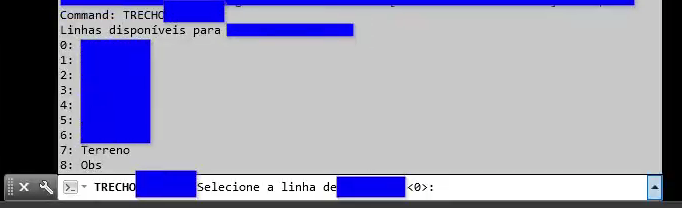
所以,下面是我当前的命令(蓝色的私有内容):
这些选项仅限于这三行(更改CLIPROMPTLINES似乎不是最好的选择,但如果您知道如何使用.NET,这是一个好的开始)。

。
,这就是我想要的:
回答 1
Stack Overflow用户
回答已采纳
发布于 2021-06-27 02:22:15
它很简单,这个选项在Autodesk.Autocad.ApplicationServices.Application.DisplayTextScreen中
using Autodesk.Autocad.ApplicationServices;
using Autodesk.AutoCAD.EditorInput;

private int AskUser(IEnumerable<string> userOptions)
{

        Document document= Application.DocumentManager.MdiActiveDocument;
        Editor editor = document.Editor;

        //Autocad's setting before you change
        bool originalSetting = CadApp.DisplayTextScreen;

        string message = "Available options:\n";
        message += string.join("\n",
            userOptions.Select((opt,i)=>i.ToString() + ": " + opt));
        message += "\nChoose an option"

        PromptIntegerOptions promptOptions = new PromptIntegerOptions(message);
        promptOptions.LowerLimit = 0;
        promptOptions.UpperLimit = userOptions.Count - 1;

        //display full command bar
        Application.DisplayTextScreen = true;
        var result = editor.GetInteger(promptOptions);

        int selection;
        if (result.Status == PromptStatus.OK)
            selection = result.Value;
        else
            selection = -1;

        //restore original setting
        Application.DisplayTextScreen = originalSetting;

        return selection;
}页面原文内容由Stack Overflow提供。腾讯云小微IT领域专用引擎提供翻译支持
原文链接:
https://stackoverflow.com/questions/68006324
复制相关文章
相似问题
腾讯云开发者

Copyright © 2013 - 2026 Tencent Cloud. All Rights Reserved. 腾讯云 版权所有
深圳市腾讯计算机系统有限公司 ICP备案/许可证号:粤B2-20090059  粤公网安备44030502008569号
腾讯云计算(北京)有限责任公司 京ICP证150476号 | 京ICP备11018762号