
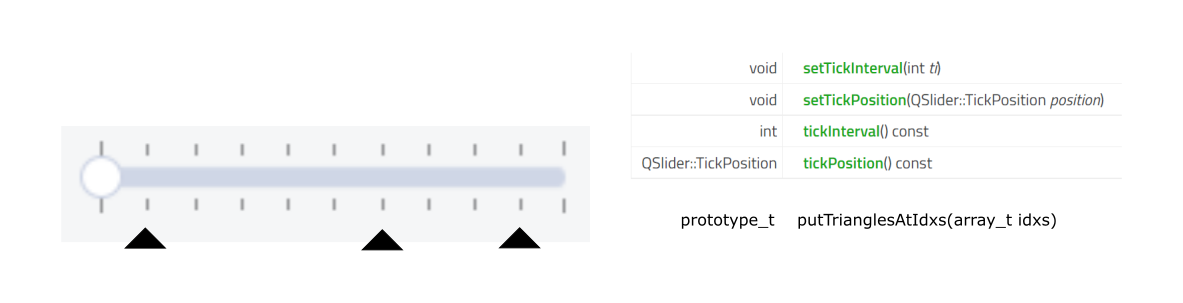
QSlider:在任意索引处添加“特殊”滴答标记
回答 2
Stack Overflow用户
发布于 2021-11-19 16:11:55
sliderPositionFromValue不能仅与滑块本身的宽度(或高度)一起使用,因为每种样式都以不同的方式绘制滑块,而且要考虑的手柄移动空间通常小于小部件的实际大小。
手柄运动所使用的实际空间考虑了整个范围(像素度量PM_SliderSpaceAvailable),其中包括手柄本身的大小。
因此,在计算指示器的位置时,需要考虑这个空间,减去手柄大小的一半,还减去指针大小的一半(否则三角形的顶部将与正确的位置不重合)。
这是你答案的修正版本:
class NewSlider(QtWidgets.QSlider):
    def __init__(self, *args, **kwargs):
        super().__init__(*args, **kwargs)
        self._secondary_slider_pos = []

    @property
    def indicator(self):
        try:
            return self._indicator
        except AttributeError:
            image = QtGui.QPixmap('triangle.png')
            if self.orientation() == QtCore.Qt.Horizontal:
                height = self.height() / 2
                if image.height() > height:
                    image = image.scaledToHeight(
                        height, QtCore.Qt.SmoothTransformation)
            else:
                width = self.width() / 2
                if image.height() > width:
                    image = image.scaledToHeight(
                        width, QtCore.Qt.SmoothTransformation)
                rotated = QtGui.QPixmap(image.height(), image.width())
                rotated.fill(QtCore.Qt.transparent)
                qp = QtGui.QPainter(rotated)
                qp.rotate(-90)
                qp.drawPixmap(-image.width(), 0, image)
                qp.end()
                image = rotated
            self._indicator = image
            return self._indicator

    def set_secondary_slider_pos(self, other_pos):
        self._secondary_slider_pos = other_pos
        self.update()

    def paintEvent(self, event):
        super().paintEvent(event)
        if not self._secondary_slider_pos:
            return
        style = self.style()
        opt = QtWidgets.QStyleOptionSlider()
        self.initStyleOption(opt)

        # the available space for the handle
        available = style.pixelMetric(style.PM_SliderSpaceAvailable, opt, self)
        # the extent of the slider handle
        sLen = style.pixelMetric(style.PM_SliderLength, opt, self) / 2

        x = self.width() / 2
        y = self.height() / 2
        horizontal = self.orientation() == QtCore.Qt.Horizontal
        if horizontal:
            delta = self.indicator.width() / 2
        else:
            delta = self.indicator.height() / 2

        minimum = self.minimum()
        maximum = self.maximum()
        qp = QtGui.QPainter(self)
        # just in case
        qp.translate(opt.rect.x(), opt.rect.y())
        for value in self._secondary_slider_pos:
            # get the actual position based on the available space and add half
            # the slider handle size for the correct position
            pos = style.sliderPositionFromValue(
                minimum, maximum, value, available, opt.upsideDown) + sLen
            # draw the image by removing half of its size in order to center it
            if horizontal:
                qp.drawPixmap(pos - delta, y, self.indicator)
            else:
                qp.drawPixmap(x, pos - delta, self.indicator)

    def resizeEvent(self, event):
        # delete the "cached" image so that it gets generated when necessary
        if (self.orientation() == QtCore.Qt.Horizontal and
            event.size().height() != event.oldSize().height() or
            self.orientation() == QtCore.Qt.Vertical and
            event.size().width() != event.oldSize().width()):
                try:
                    del self._indicator
                except AttributeError:
pass注意,在任何情况下,这种方法都有其局限性:三角形总是显示在句柄的上方,从UX的角度来看,这不是一件很好的事情。正确的解决方案需要对paintEvent()进行部分重写,并多次调用drawComplexControl,以便按照适当的顺序绘制所有元素:凹槽和刻痕,然后是指示符,最后是句柄;可以这样做,但您需要添加更多的方面(包括考虑当前样式视觉一致性的当前活动控制)。
我建议你研究QSlider的来源,以了解如何做它。
Stack Overflow用户
发布于 2021-11-19 08:18:13
下面是一个basic实现(使用QPixmap):
class NewSlider(QtWidgets.QSlider):

    indicator_up = None

    def __init__(self, *args):
        # for now, this class is prepared for horizontal sliders only
        super().__init__(*args)
        self._secondary_slider_pos = []
        if self.__class__.indicator_up is None:
            indicator_up = QPixmap(r'path_to_image.png')
            center = self.height() / 2
            if indicator_up.height() > center:
                indicator_up = indicator_up.scaledToHeight(center)
            self.__class__.indicator_up = indicator_up

    def set_secondary_slider_pos(self, other_pos: List[int]):
        self._secondary_slider_pos = other_pos

    def get_px_of_secondary_slider_pos(self):
        return [
            QtWidgets.QStyle.sliderPositionFromValue(self.minimum(), self.maximum(), idx, self.width())
            for idx in self._secondary_slider_pos
        ]

    def paintEvent(self, ev: QtGui.QPaintEvent) -> None:
        super().paintEvent(ev)
        pix_secondary_slider_pos = self.get_px_of_secondary_slider_pos()

        if len(pix_secondary_slider_pos) > 0:
            painter = QtGui.QPainter(self)
            center = self.height() / 2
            for x_pos in pix_secondary_slider_pos:
                painter.drawPixmap(QtCore.QPoint(x_pos, center), self.__class__.indicator_up)
用法示例:
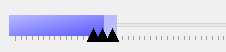
不知何故,我无法使它与painter.drawImage一起工作。
所使用的图像是:

https://stackoverflow.com/questions/70016302
复制相似问题
腾讯云开发者

Copyright © 2013 - 2026 Tencent Cloud. All Rights Reserved. 腾讯云 版权所有
深圳市腾讯计算机系统有限公司 ICP备案/许可证号:粤B2-20090059  粤公网安备44030502008569号
腾讯云计算(北京)有限责任公司 京ICP证150476号 | 京ICP备11018762号