
JQuery表单工具提示
JQuery表单工具提示
提问于 2009-12-09 13:56:10
在大表单中,我希望在每个表单字段活动时显示其他信息,如下所示:
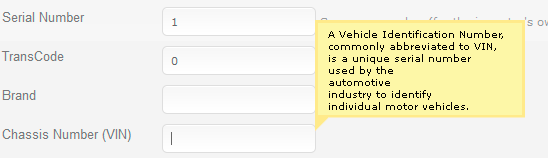
因此,每个表单字段都有一个关联的提示文本,并且这个提示文本显示在焦点上。
有些东西在html/javascript中将此链接起来:
<input type="text" id="VIN" name="VIN" class="tooltipped">

<label for="VIN" class="formfieldtooltip">A vehicle Iden... </label>

<input type="text" id="Brand" name="Brand" class="tooltipped">

<label for="Brand" class="formfieldtooltip">In Danish "brand" means "fire"</label>

<script type="text/javascript">

    jQuery(function($) {

        $(".tooltipped").FormFieldToolTipBinder();

    });

</script>
它通过类“工具提示”在所有表单字段中运行,并在焦点上显示相关的标签。
是这样的东西已经存在了,还是我必须自己写?
是的,我在googled上搜索了很多插件来制作实际的工具提示,但是没有什么能像这样自动地将它们与表单字段连接起来。
回答 2
Stack Overflow用户
回答已采纳
发布于 2009-12-09 15:21:40
听起来您可能被困在label元素中嵌入工具提示内容--但是如果您可以自由地将内容移动到input元素的alt属性中,那么你可以用qTip做你想做的事如下所示:
<input type="text" id="VIN" class="tooltipped" alt="A vehicle iden...">和
// content: false tells qtip to use the selected elements' alt text
$('.tooltipped').qtip({
    content: false,
    show: { when: { event: 'focus' } }
});Stack Overflow用户
发布于 2009-12-09 14:51:36
其实写你自己是很容易的。这里有件事可以让你开始:
var tooltip = function (formElementId) {
    var form = $('#' + formElementId),
        toolTipClass = 'tooltip',
        input = form.find('input.'+ tooltip);

    input.each(function (index, elem) {
        $(elem).focus(function () {
            $(this).parent().append('<div id="tooltip"></div>');
        })

        $(elem).blur(function () {
            $('#tooltip').remove();
        })
    });
}页面原文内容由Stack Overflow提供。腾讯云小微IT领域专用引擎提供翻译支持
原文链接:
https://stackoverflow.com/questions/1874067
复制相关文章
相似问题
腾讯云开发者

Copyright © 2013 - 2026 Tencent Cloud. All Rights Reserved. 腾讯云 版权所有
深圳市腾讯计算机系统有限公司 ICP备案/许可证号:粤B2-20090059  粤公网安备44030502008569号
腾讯云计算(北京)有限责任公司 京ICP证150476号 | 京ICP备11018762号