
Android相对布局布局问题
Android相对布局布局问题
提问于 2010-07-20 10:36:22
我在用XML为用于ListView中的一系列项的列表项创建相对布局时遇到了问题。我已经试了好几个小时了,我的头发被扯掉了,试图让它看起来我想要的样子,但不能让所有的东西都出现在正确的位置,而不是重叠或不对齐。我可以获得第一个图像和下两个文本视图到位,但不能获得最后的文本视图和图像视图。
我附上了一个线框风格的形象,我是如何努力让它看起来,并想知道是否有人可以帮助我?
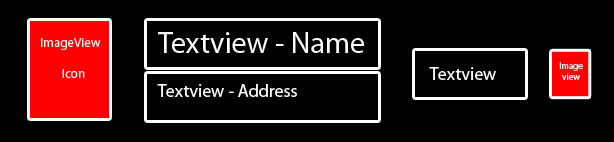
右边的
- ImageView是一行完全高度的集合图标,其周围有填充物?
- ,这两个TextViews占据了宽度的大部分。地址文本视图有可能文本是长的,所以如果它没有空间,它可能需要被截断,或者在理想情况下,字体大小缩小?
- next textview只会容纳一个最大5的小字符串,最后一个ImageView是一个小箭头,暗示这个列表项可以点击以获得更多的信息。
- i希望图标、最后的文本视图和最后的图像总是位于列表的同一位置/对齐。
如果有人能在这方面提供一些帮助,我将不胜感激。
干杯,伙计们
Stack Overflow用户
回答已采纳
发布于 2010-08-15 23:18:57
对任何感兴趣的人来说,我都能做到这一点。我知道去寻找一个问题的答案是多么痛苦,但它从来没有完全解决。
<?xml version="1.0" encoding="utf-8"?>
<RelativeLayout xmlns:android="http://schemas.android.com/apk/res/android"
android:id="@+id/RelativeLayout"
android:layout_width="fill_parent"
android:layout_height="?android:attr/listPreferredItemHeight"
android:padding="6dip">
<ImageView
    android:id="@+id/Icon"
    android:layout_margin="5dip"
    android:layout_width="wrap_content"
    android:layout_height="wrap_content"
    android:layout_centerVertical="true" />
<TextView
    android:id="@+id/topLine"
    android:layout_height="wrap_content"
    android:layout_width="fill_parent"
    android:lines="1"
    android:layout_toRightOf="@+id/Icon"
    android:layout_toLeftOf="@+id/distance"
    android:textColor="@color/blacktext"
    android:textSize="20dip"
    android:text="Name" />
<TextView
    android:id="@+id/bottomLine"
    android:layout_height="wrap_content"
    android:layout_width="fill_parent"
    android:lines="1"
    android:layout_toRightOf="@+id/Icon"
    android:layout_below="@+id/topLine"
    android:layout_toLeftOf="@+id/distance"
    android:textColor="@color/blacktext"
    android:textSize="15dip"
    android:text="Address" />
<TextView
    android:id="@+id/distance"
    android:layout_height="wrap_content"
    android:layout_toLeftOf="@+id/arrow"
    android:layout_centerVertical="true"
    android:layout_width="wrap_content"
    android:lines="1"
    android:textColor="@color/blacktext"
    android:textSize="12dip"
    android:text="100m" />
<ImageView
    android:id="@+id/arrow"
    android:layout_height="wrap_content"
    android:layout_width="wrap_content"
    android:layout_margin="5dip"
    android:layout_alignParentRight="true"
    android:layout_centerVertical="true"
    android:src="@drawable/redarrow"/>
</RelativeLayout>页面原文内容由Stack Overflow提供。腾讯云小微IT领域专用引擎提供翻译支持
原文链接:
https://stackoverflow.com/questions/3289096
复制相关文章
相似问题
腾讯云开发者

Copyright © 2013 - 2026 Tencent Cloud. All Rights Reserved. 腾讯云 版权所有
深圳市腾讯计算机系统有限公司 ICP备案/许可证号:粤B2-20090059  粤公网安备44030502008569号
腾讯云计算(北京)有限责任公司 京ICP证150476号 | 京ICP备11018762号