
有人知道如何让WPF MessageBox看起来更好看(就像Windows一样)吗?
有人知道如何让WPF MessageBox看起来更好看(就像Windows一样)吗?
提问于 2011-04-22 19:19:19
可能重复: WPF MessageBox窗口样式
由于某些原因,WPF附带的MessageBox有禁用的视觉样式,我无法找到打开它们的方法,在Windows中,这只是在程序开始时调用Application.EnableVisualStyles()的问题。
为了了解我说的是什么,这里有两个例子:
System.Windows.Forms.Application.EnableVisualStyles();
System.Windows.Forms.MessageBox.Show(
    "Windows Forms Dialog",
    "Message Box Test",
    System.Windows.Forms.MessageBoxButtons.OK,
    System.Windows.Forms.MessageBoxIcon.Asterisk);
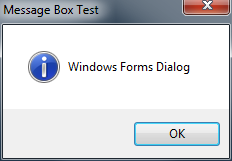
System.Windows.MessageBox.Show(
    "WPF Dialog",
    "Message Box Test",
    System.Windows.MessageBoxButton.OK,
    System.Windows.MessageBoxImage.Asterisk);
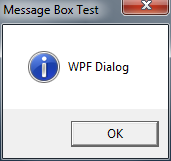
调用System.Windows.Forms.Application.EnableVisualStyles()对WPF没有影响。
扩展WPF工具包有一个很好的主题实现,但我正在寻找一种方法来创建与用户正在运行的操作系统相匹配的消息框。如果您想在每个操作系统上使用相同的样式,那么EWPFT的实现是非常棒的。
回答 1
Stack Overflow用户
回答已采纳
发布于 2011-04-22 19:27:55
不要再使用MessageBox了,而是P/Invoke TaskDialogIndirect --它看起来比两者都好,并且有更多的选项(例如,具有任意按钮文本)。
页面原文内容由Stack Overflow提供。腾讯云小微IT领域专用引擎提供翻译支持
原文链接:
https://stackoverflow.com/questions/5759141
复制相关文章
相似问题
腾讯云开发者
