
如何使用powershell在批处理中创建ascii到十六进制转换器?
我对批量编写脚本相当陌生,我正在寻找一种有效的方法来制作ASCII到十六进制转换器。我试着在网上搜索一些教程,但我发现的唯一东西是使用Perl或其他脚本语言。
所以,我真正的问题是,我可以在批处理文件中使用哪些语言?标准语言是什么?什么是兼容的?我知道我真的应该投资于一本脚本书或脚本类,但这只是我在公司从事的众多附带项目之一,而且我没有太多的时间成为专家。感谢您事先提供的任何信息,并帮助消除我的困惑!!
编辑
好的,看起来最好的方法是使用支持脚本工具之一,如VBscript、Jscript或powershell。有没有人知道哪种方法最适合我的情况。
基本上,我需要从要求零件编号开始,看上去是这样的:"BL6A-19T508-NYL“。我可以用这个来做。
设置/p "str1=Enter部件号“
但是从那里开始,我应该使用哪个脚本支持工具呢?我如何实现它来使用我输入的变量呢?
从这里开始,我可能应该将十六进制输出回同一个变量中。在我的例子中,最好没有十六进制值之间的空格。因此,我希望零件编号BL6A-19T508-NY转换为424c36412d31395435382d4e59。
我不太明白我怎么能
我在从ascii转换为十六进制时找到了这个powershell代码。
$a = "http://www.google.com";
$b = $a.ToCharArray();
Foreach ($element in $b) {$c = $c + " " + [System.String]::Format("{0:X2}", [System.Convert]::ToUInt32($element))}我尝试使用这个网站http://learningpcs.blogspot.com/2009/07/powershell-string-to-hex-or-whatever.html的规则来允许它在我的批处理文件中工作。这就是我得到的。
@echo off
SET /p "str1=Enter part number "
powershell.exe -command '$a = "BL6A-19T508-NYL";'
powershell.exe -command '$b = $a.ToCharArray();'
powershell.exe -command 'Foreach ($element in $b) {$c = $c + " " + [System.String]::Format("{0:X2}", [System.Convert]::ToUInt32($element))}'
powershell.exe -command '$c'
pause
我把零件编号放进去,加上停顿,看看会发生什么。它所做的就是
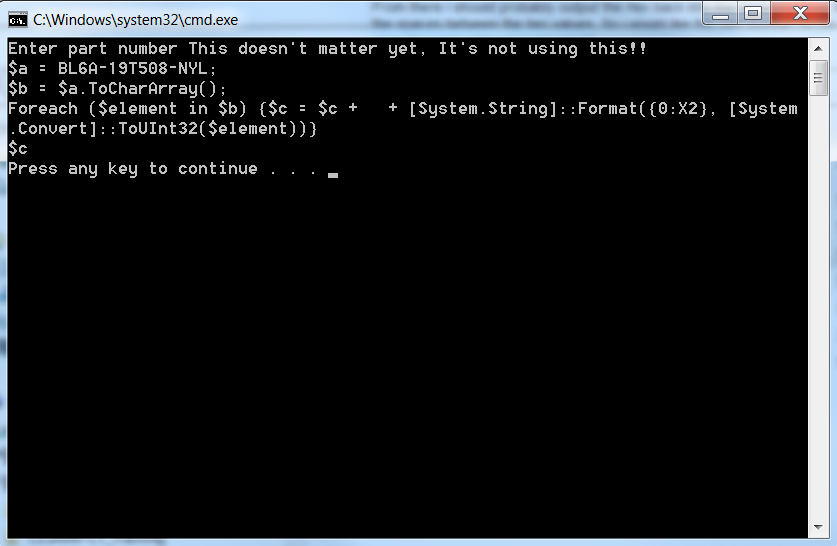
不太管用..。
因此,我的第一步是努力使转换器按其应有的方式工作。从那里开始,从变量开始工作,最后将十六进制值放回变量中,或者放到一个新变量中。
我会继续努力,如果有人看到我能做什么,或者我做错了什么,我会非常感激的。谢谢大家!!
回答 1
Stack Overflow用户
发布于 2014-05-07 16:44:33
注释--当问题要求批处理解决方案时,我开始研究这个答案,然后对其进行编辑以请求PowerShell.。
这是我心中最深情的话题。(实际上,很多科目)
在批处理中嵌入其他脚本语言
在批处理中嵌入许多脚本语言有很好的策略。见js/vbs/html/hta杂交和cmd/bat中的嵌合体。
一般来说,我认为创建混合代码不是一个好主意。批处理功能非常有限。如果您可以编写嵌入另一种语言的混合批处理脚本,那么使用另一种脚本语言编写整个解决方案可能会更容易,效率也更高。
但是我认为创建独立的混合批处理实用程序来解决批处理的一些限制是合理的。这些实用程序可以有效地扩展批处理语言,用于任何想要继续在批处理中工作的人。当然,第三方可执行文件也可以做同样的事情,但是许多公司不愿意引进非标准的可执行文件,但允许脚本。
下面是我编写的几个混合实用程序:
- REPL.BAT -在stdin上执行正则表达式搜索和替换,并将结果写入stdout。
- getTimestamp.bat -日期和时间格式化程序和计算引擎
使用批处理的ASCII到十六进制转换器
这是我处理过的首批项目之一。我成功地创建了CHARLIB.BAT --一个包含str2Hex的纯批处理实用程序,该函数将字符串转换为表示ASCII代码值的十六进制数字字符串。如果您遵循这个链接,它将下载一个名为CHARLIB.BAT.TXT的文件-只需将该文件重命名为CHARLIB.BAT,它就可以使用了。在没有任何参数的情况下运行脚本,以获得有关如何使用它的帮助。
该实用程序的开发可以在http://www.dostips.com/forum/viewtopic.php?f=3&t=1733上进行。
下面是一个简单的用法示例:
@echo off
setlocal
set "str=Hello world!"
call charlib str2hex str hex
echo str=%str%
echo hex=%hex%
-产出--
str=Hello world!
hex=48656C6C6F20776F726C6421
但是,CHARLIB.BAT在脚本中嵌入了一些字符,这些字符不能很好地在这样的站点上发布。
然后,我在在ASCII代码和字符之间转换的批处理宏上创建了两个关键函数的宏版本。这有两个主要的改进:
- 它使用了一种先进的批处理编程技术批处理带有参数的“宏”,以显着地提高性能。
- 它通过WSF使用嵌入式VBScript生成查找映射,以便代码现在可以发布到类似这样的站点。
下面是一个扩展版本,它添加了一个@Str2Hex宏,我在最初的DosTips帖子中没有这个宏:
charMacros.bat
<!-- : Begin batch script
@echo off
:: charMacros.bat
::
::   This script installs macros that can be used to interconvert between
::   numeric extended ASCII codes and character values.
::
::   The script defines the following variables:
::
::     @Str2Hex - A macro used to convert a string into a string of hex digit
::                pairs representing the ASCII codes in the string.
::
::     @asc - A macro used to convert a character into the decimal ASCII code
::
::     @ascHex - A macro used to convert a character into the hex ASCII codde
::
::     @chr - A macro used to convert a numeric ASCII code into a character
::
::     #LF - A variable containing a line feed character
::
::     #CR - A variable containing a carriage return character
::
::     #charMap - A variable used by the @asc macro
::
::     #asciiMap - A variable used by the @chr macro
::
::     #mapCodePage - The CHCP setting at the time the maps were loaded
::
::     \n - used for specifiying the end of line in a macro definition
::
:: Originally developed and posted by Dave Benham (with help from DosTips users) at
:: http://www.dostips.com/forum/viewtopic.php?f=3&t=4284

if "!" == "" >&2 echo ERROR: Delayed expansion must be disabled when loading %~nx0&exit /b 1

:: Define a Carriage Return string, only useable as !#CR!
for /f %%a in ('copy /Z "%~dpf0" nul') do set "#CR=%%a"

:: Define a Line Feed (newline) string (normally only used as !#LF!)
set #LF=^


:: Above 2 blank lines are required - do not remove

:: Define a newline with line continuation
set ^"\n=^^^%#LF%%#LF%^%#LF%%#LF%^^"

:: Define character maps used to interconvert between extended ASCII codes
:: and characters.
set "#charMap="
for /f "delims=" %%A in ('cscript //nologo "%~f0?.wsf"') do (
  if defined #charMap (set "#asciiMap=%%A") else set "#charMap= %%A"
)
for /f "delims=" %%A in ('chcp') do set "#mapCodePage=%%A"


:: %@Str2Hex%  StrVar  [RtnVar]
::
::   Converts the string within StrVar into a string of extended ASCII codes,
::   with each code represented as a pair of hexadecimal digits. The length of
::   the result will always be exactly twice the length of the original string.
::
::   Any character within the string that is not in the currently loaded code
::   page will be represented as 00.
::
::   The result is stored in RtnVar, or ECHOed if RtnVar is not specified.
::
::   The macro is safe to "call" regardless whether delayed expansion
::   is enabled or not.
::
::     StrVar = The name of a variable that contains the string
::              to be converted
::
::     RtnVar = The name of the variable used to store the result.
::
set @Str2Hex=for %%# in (1 2) do if %%#==2 (%\n%
for /f "eol= tokens=1,2 delims=, " %%a in ("!#args!") do (endlocal%\n%
  setlocal enableDelayedExpansion%\n%
  if defined %%~a (%\n%
    set "str=!%%~a!"%\n%
    set "s=!%%~a!"%\n%
    set "len=0"%\n%
    for %%P in (4096 2048 1024 512 256 128 64 32 16 8 4 2 1) do (%\n%
      if "!s:~%%P,1!" neq "" (%\n%
        set /a "len+=%%P"%\n%
        set "s=!s:~%%P!"%\n%
      )%\n%
    )%\n%
    set "rtn="%\n%
    for /l %%N in (0 1 !len!) do (%\n%
      set "chr=!str:~%%N,1!"%\n%
      set "hex="%\n%
      if "!chr!"=="=" set hex=3D%\n%
      if "!chr!"=="^!" set hex=21%\n%
      if "!chr!"=="!#lf!" set hex=0A%\n%
      if not defined hex for /f delims^^=^^ eol^^= %%c in ("!chr!!#CR!") do (%\n%
        set "test=!#asciiMap:*#%%c=!"%\n%
        if not "%%c"=="!test:~0,1!" set "test=!test:*#%%c=!"%\n%
        if "%%c"=="!test:~-0,1!" (set "hex=!test:~1,2!") else set "hex=00"%\n%
      )%\n%
      set "rtn=!rtn!!hex!"%\n%
    )%\n%
    for %%v in (!rtn!) do endlocal^&if "%%~b" neq "" (set "%%~b=%%v") else echo(%%v%\n%
  ) else endlocal%\n%
set "#args=")) else setlocal enableDelayedExpansion^&set #args=,


:: %@asc%  StrVar  Position  [RtnVar]
::
::   Converts a character into the extended ASCII code value.
::   The result is stored in RtnVar, or ECHOed if RtnVar is not specified.
::   A value of -1 is returned if the character is not in the currently loaded
::   code page. The macro is safe to "call" regardless whether delayed expansion
::   is enabled or not.
::
::     StrVar = The name of a variable that contains the character
::              to be converted
::
::     Position = The position of the character within the string
::                to be converted. 0 based.
::
::     RtnVar = The name of the variable used to store the result.
::
set @asc=for %%# in (1 2) do if %%#==2 (%\n%
for /f "eol= tokens=1-3 delims=, " %%a in ("!#args!") do (endlocal%\n%
  setlocal enableDelayedExpansion%\n%
  if defined %%~a (%\n%
    set "str=!%%~a!"%\n%
    set /a "n=%%~b" 2^>nul%\n%
    for %%N in (!n!) do set "chr=!str:~%%N,1!"%\n%
    if defined chr (%\n%
      set "rtn="%\n%
      if "!chr!"=="=" set rtn=61%\n%
      if "!chr!"=="^!" set rtn=33%\n%
      if "!chr!"=="!#lf!" set rtn=10%\n%
      if not defined rtn for /f delims^^=^^ eol^^= %%c in ("!chr!!#CR!") do (%\n%
        set "test=!#asciiMap:*#%%c=!"%\n%
        if not "%%c"=="!test:~0,1!" set "test=!test:*#%%c=!"%\n%
        if "%%c"=="!test:~-0,1!" (set /a "rtn=0x!test:~1,2!") else set "rtn=-1"%\n%
      )%\n%
    )%\n%
    for %%v in (!rtn!) do endlocal^&if "%%~c" neq "" (set "%%~c=%%v") else echo(%%v%\n%
  ) else endlocal%\n%
set "#args=")) else setlocal enableDelayedExpansion^&set #args=,


:: %@chr%  AsciiCode  [RtnVar]
::
::   Converts an extended ASCII code into the corresponding character.
::   The result is stored in RtnVar, or ECHOed if RtnVar is not specified.
::   The macro supports value 1 - 255. The value 0 is not supported.
::   The macro is safe to "call" regardless whether delayed expansion is
::   enabled or not.
::
::     AsciiCode - Any value from 1 to 255. The value can be expressed as any
::                 numeric expression supported by SET /A.
::
::     RtnVar - The name of the variable used to store the result
::
set @chr=for %%# in (1 2) do if %%#==2 (%\n%
for /f "eol= tokens=1,2 delims=, " %%a in ("!#args!") do (endlocal%\n%
  setlocal%\n%
  set "NotDelayed=!"%\n%
  setlocal EnableDelayedExpansion%\n%
  set "n=0"%\n%
  set /a "n=%%~a"%\n%
  if !n! gtr 255 set "n=0"%\n%
  if !n! gtr 0 (%\n%
    if !n! equ 10 (%\n%
      for %%C in ("!#LF!") do (%\n%
        endlocal^&endlocal%\n%
        if "%%~b" neq "" (set "%%~b=%%~C") else echo(%%~C%\n%
      )%\n%
    ) else (%\n%
      for %%N in (!n!) do set "c=!#charMap:~%%N,1!"%\n%
      if "!c!" equ "^!" if not defined NotDelayed set "c=^^^!"%\n%
      for /f delims^^=^^ eol^^= %%C in ("!c!!#CR!") do (%\n%
        endlocal^&endlocal%\n%
        if "%%~b" neq "" (set "%%~b=%%C") else echo(%%C%\n%
      )%\n%
    )%\n%
  ) else endlocal^&endlocal%\n%
set "#args=")) else setlocal enableDelayedExpansion^&set #args=,


:: %@ascHex%  StrVar  Position  [RtnVar]
::
::   Converts a character into the extended ASCII code hex value.
::   The result is stored in RtnVar, or ECHOed if RtnVar is not specified.
::   A value of -1 is returned if the character is not in the currently loaded
::   code page. The macro is safe to "call" regardless whether delayed expansion
::   is enabled or not.
::
::     StrVar = The name of a variable that contains the character
::              to be converted
::
::     Position = The position of the character within the string
::                to be converted. 0 based.
::
::     RtnVar = The name of the variable used to store the result.
::
set @ascHex=for %%# in (1 2) do if %%#==2 (%\n%
for /f "eol= tokens=1-3 delims=, " %%a in ("!#args!") do (endlocal%\n%
  setlocal enableDelayedExpansion%\n%
  if defined %%~a (%\n%
    set "str=!%%~a!"%\n%
    set /a "n=%%~b" 2^>nul%\n%
    for %%N in (!n!) do set "chr=!str:~%%N,1!"%\n%
    if defined chr (%\n%
      set "rtn="%\n%
      if "!chr!"=="=" set rtn=3D%\n%
      if "!chr!"=="^!" set rtn=21%\n%
      if "!chr!"=="!#lf!" set rtn=0A%\n%
      if not defined rtn for /f delims^^=^^ eol^^= %%c in ("!chr!!#CR!") do (%\n%
        set "test=!#asciiMap:*#%%c=!"%\n%
        if not "%%c"=="!test:~0,1!" set "test=!test:*#%%c=!"%\n%
        if "%%c"=="!test:~-0,1!" (set "rtn=!test:~1,2!") else set "rtn=-1"%\n%
      )%\n%
    )%\n%
    for %%v in (!rtn!) do endlocal^&if "%%~c" neq "" (set "%%~c=%%v") else echo(%%v%\n%
  ) else endlocal%\n%
set "#args=")) else setlocal enableDelayedExpansion^&set #args=,


exit /b 0


----- Begin wsf script --->
<job><script language="VBScript">
for i=1 to 255
  if i=10 then WScript.Stdout.Write " " else WScript.Stdout.Write chr(i)
next
WScript.Stdout.Write chr(10)+"#"
for i=1 to 255
  if i<>10 then WScript.Stdout.Write chr(i)+chr(i)+right("0"+hex(i),2)+"#"
next
</script></job>
charMacros被设计为“终止并驻留”,这意味着它们只需要加载一次,然后任意数量的批处理脚本都可以利用它们。
下面是如何使用@Str2Hex的一个简单示例:
@echo off
:: Load the charMacros if not already loaded. The macros are dependent on
:: the active code page, so if it has changed, then the macros are reloaded.
:: The macros are loaded prior to SETLOCAL so that the macros persist after
:: the script terminates
for /f "delims=" %%A in ('chcp') do if "%%A" neq "%#mapCodePage%" call charMacros

:: Test the Str2Hex macro
setlocal
set "str=Hello world!"
%@Str2Hex% str hex
echo str=%str%
echo hex=%hex%
-产出--
str=Hello world!
hex=48656C6C6F20776F726C6421https://stackoverflow.com/questions/23519422
复制相似问题
腾讯云开发者

Copyright © 2013 - 2026 Tencent Cloud. All Rights Reserved. 腾讯云 版权所有
深圳市腾讯计算机系统有限公司 ICP备案/许可证号:粤B2-20090059  粤公网安备44030502008569号
腾讯云计算(北京)有限责任公司 京ICP证150476号 | 京ICP备11018762号