
调用-命令似乎不起作用-我是否使用winrm.cmd正确地配置了TrustedHosts?
我不确定是否使用winrmcmd正确配置TrustedHosts。
我在PowerShell中从host_computer (工作组的一部分)运行命令
$cred = Get-Credential -credential user提示出现,然后输入密码。
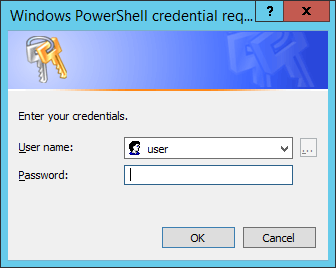
然后我执行一个命令,以便setup.exe将在remote_computer上执行(也是工作组的一部分)
invoke-command -ComputerName remote_computer -credential $cred -scriptBlock {& 'C:\share\setup.exe'}出现错误:
[remote_computer] Connecting to remote server remote_computer failed with the following error message : The WinRM client cannot process the request. If the authentication scheme is different from Kerberos, or if the client
computer is not joined to a domain, then HTTPS transport must be used or the destination machine must be added to the TrustedHosts configuration setting. Use winrm.cmd to configure TrustedHosts. Note that computers in the
TrustedHosts list might not be authenticated. You can get more information about that by running the following command: winrm help config. For more information, see the about_Remote_Troubleshooting Help topic.
    + CategoryInfo          : OpenError: (remote_computer:String) [], PSRemotingTransportException
+ FullyQualifiedErrorId : ServerNotTrusted,PSSessionStateBroken我按照10/GUID-D4ACA4EF-D018-448A-866A-DECDDA5CC3C1.html执行步骤
在host_computer上打开命令提示符(shift,右键单击,选择“”)并执行以下操作
C:\Windows\system32>winrm quickconfig

C:\Windows\system32>winrm e winrm/config/listener

C:\Windows\system32>winrm get winrm/config

C:\Windows\system32>winrm set winrm/config/service/auth @{Basic="true"}

C:\Windows\system32>winrm set winrm/config/service @{AllowUnencrypted="true"}

C:\Windows\system32>winrm set winrm/config/client @{TrustedHosts="remote_computer"}
在remote_computer上打开命令提示符(shift,右键单击,选择“”)并执行以下操作
C:\Windows\system32>winrm get winrm/config

C:\Windows\system32>winrm set winrm/config/client/auth @{Basic="true"}

C:\Windows\system32>winrm set winrm/config/client @{AllowUnencrypted="true"}

C:\Windows\system32>winrm set winrm/config/client @{TrustedHosts="host_computer"}

C:\Windows\system32>winrm identify -r:http://host_computer:5985 -auth:basic -u:user -p:password -encoding:utf-8
我得到了以下回应
IdentifyResponse
    ProtocolVersion = http://schemas.dmtf.org/wbem/wsman/1/wsman.xsd
    ProductVendor = Microsoft Corporation
    ProductVersion = OS: 6.3.9600 SP: 0.0 Stack: 3.0
    SecurityProfiles
        SecurityProfileName = http://schemas.dmtf.org/wbem/wsman/1/wsman/secprof
ile/http/basic, http://schemas.dmtf.org/wbem/wsman/1/wsman/secprofile/http/spneg
o-kerberos
现在当我去host_computer并执行
invoke-command -ComputerName remote_computer -credential $cred -scriptBlock {& 'C:\share\setup.exe'}我不再收到任何错误消息,但是当我远程进入remote_host时,我看不到任务管理器中的setup.exe。已经过了半个多小时了,我找不到文件被执行的任何证据。
如何排除故障?
回答 3
Stack Overflow用户
发布于 2014-08-28 12:40:42
在使用TrustedHosts (参见OP)添加wmirm.cmd之后,下面的命令可以工作
invoke-command -ComputerName remote_Computer -credential $cred -scriptBlock {cmd /c 'C:\share\setup.exe'}Stack Overflow用户
发布于 2017-06-18 03:57:27
除了禁用machineA和machineB上的防火墙,并在机器A上执行winrm set winrm/config/client @{TrustedHosts="machineB"}之外,我还可以调用Invoke-Command -FilePath c:\scripts\test.ps1 -ComputerName machineB
这个链接也帮助了10%2FGUID-D4ACA4EF-D018-448A-866A-DECDDA5CC3C1.html。
Stack Overflow用户
发布于 2020-04-15 05:33:31
我知道这是个老生常谈的问题,但它可能会帮助那些找不到答案的人。因此,WinRM类似于基于SOAP的web,当您想在非AD环境中使用该API时,可能会遇到不同的安全相关问题。首先要注意的是,不仅要配置服务器端,还要配置客户端!
例如,如果您将远程计算机配置为不使用HTTPS,并将管理员的计算机添加到您还必须在管理员机器上执行的受信任主机(从该主机启动会话):
Set-Item wsman:\localhost\client\trustedhosts <target machine> 若要将目标(目标)计算机添加到受信任列表中,请执行以下操作。
可以很容易地看到,如果错误如下:“WinRM客户端无法处理请求。如果身份验证方案与Kerberos不同,或者客户端计算机未连接到域,则必须使用HTTPS传输,或者必须将目标机器添加到TrustedHosts”,它告诉您客户端问题 ("WinRM客户端无法处理“)。而且,在这种情况下,您将不会看到机器之间的任何TCP/HTTP相关通信,因为客户机不会启动交互并抛出错误。
https://stackoverflow.com/questions/25533731
复制相似问题
腾讯云开发者

Copyright © 2013 - 2026 Tencent Cloud. All Rights Reserved. 腾讯云 版权所有
深圳市腾讯计算机系统有限公司 ICP备案/许可证号:粤B2-20090059  粤公网安备44030502008569号
腾讯云计算(北京)有限责任公司 京ICP证150476号 | 京ICP备11018762号