
如何通过更改inno设置脚本在欢迎页中添加新文本?
如何通过更改inno设置脚本在欢迎页中添加新文本?
提问于 2014-12-21 08:29:37
在inno安装程序的欢迎屏幕上,我希望在“单击下一步继续,或取消退出安装”行下方的空白区域中添加NEW_TEXT。
但只有在“单击下一步以继续,或取消退出设置”行之上添加NEW_TEXT,才能重写[Messages]部分的值:
[Messages]
WelcomeLabel2=This will install [name/ver] on your computer.%n%nIt is recommended that you close all other applications before continuing %n%n NEW_TEXT.
截图:
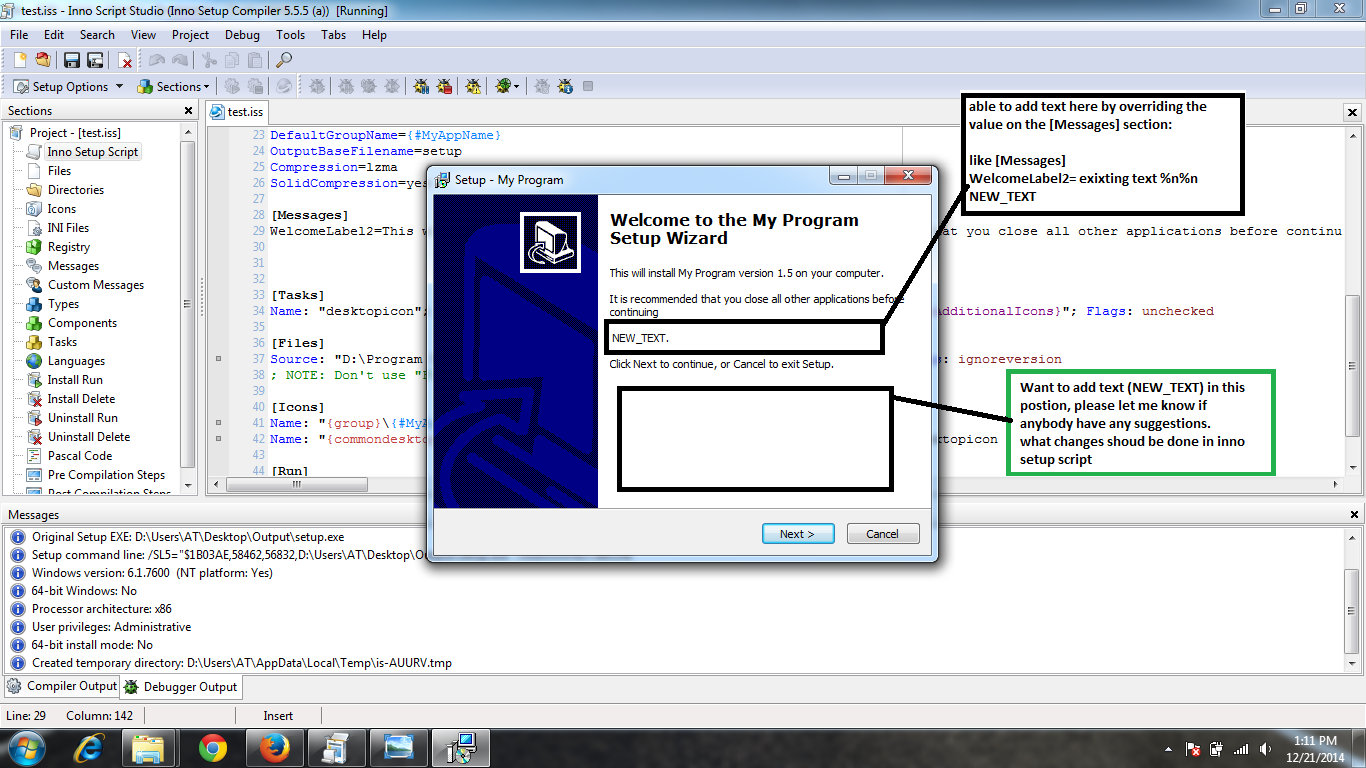
我可以通过编辑inno安装脚本在上面指定的空白区域中添加文本吗?
回答 2
Stack Overflow用户
回答已采纳
发布于 2014-12-21 17:51:59
您可以降低扩展到页面底部的WelcomeLabel2的高度,并创建您自己的静态文本控件,例如:
[Setup]
AppName=My Program
AppVersion=1.5
DefaultDirName={pf}\My Program

[CustomMessages]
WelcomeLabel3=Hello world!

[Code]
var
  WelcomeLabel3: TNewStaticText;

procedure InitializeWizard;
begin
  // you can set e.g. the fixed height to the original WelcomeLabel2, or
  // you can set the WelcomeLabel2 to auto-size to the text content it's
  // showing; to set the fixed height, use the following line:
  // WizardForm.WelcomeLabel2.Height := 97;
  WizardForm.WelcomeLabel2.AutoSize := True;

  // now you got some space on the welcome page, so let's fill it up with
  // your own label called WelcomeLabel3
  WelcomeLabel3 := TNewStaticText.Create(WizardForm);
  WelcomeLabel3.Parent := WizardForm.WelcomePage;
  WelcomeLabel3.AutoSize := False;
  WelcomeLabel3.Left := WizardForm.WelcomeLabel2.Left;
  WelcomeLabel3.Top := WizardForm.WelcomeLabel2.Top +
    WizardForm.WelcomeLabel2.Height;
  WelcomeLabel3.Width := WizardForm.WelcomeLabel2.Width;
  WelcomeLabel3.Height := WizardForm.WelcomePage.Height - WelcomeLabel3.Top;
  WelcomeLabel3.Font.Assign(WizardForm.WelcomeLabel2.Font);
  WelcomeLabel3.Caption := CustomMessage('WelcomeLabel3');

  // these three lines can help you to see the label composition since it
  // colorize them; remove this when you'll be done
  WizardForm.WelcomeLabel1.Color := clYellow;
  WizardForm.WelcomeLabel2.Color := $000080FF;
  WelcomeLabel3.Color := clRed;
end;Stack Overflow用户
发布于 2015-01-09 12:08:18
您还可以简单地更改ClickNext消息如下:
[Messages]
ClickNext=Click Next to continue, or Cancel to exit Setup.%n%nADD YOUR TEXT HERE页面原文内容由Stack Overflow提供。腾讯云小微IT领域专用引擎提供翻译支持
原文链接:
https://stackoverflow.com/questions/27587827
复制相关文章
相似问题
腾讯云开发者

Copyright © 2013 - 2026 Tencent Cloud. All Rights Reserved. 腾讯云 版权所有
深圳市腾讯计算机系统有限公司 ICP备案/许可证号:粤B2-20090059  粤公网安备44030502008569号
腾讯云计算(北京)有限责任公司 京ICP证150476号 | 京ICP备11018762号