
如何以编程方式设置默认的应用程序启动程序?
我正在创建一个可通过google下载的launcher (kiosk)应用程序。当第一次安装此应用程序时,用户可以选择默认的发射器(我的还是股票)。如果用户没有将我的应用程序设置为默认启动程序,我将尝试手动打开它。我希望用户被迫选择始终,而不是仅仅一次,当该对话框出现时,否则对话框将继续定期出现与友好的消息。到目前为止,我一直在尝试这样做。
我创建了一个方法来检查我的应用程序是否是默认的。
/**
 * method checks to see if app is currently set as default launcher
 * @return boolean true means currently set as default, otherwise false
 */
private boolean isMyAppLauncherDefault() {
    final IntentFilter filter = new IntentFilter(Intent.ACTION_MAIN);
    filter.addCategory(Intent.CATEGORY_HOME);

    List<IntentFilter> filters = new ArrayList<IntentFilter>();
    filters.add(filter);

    final String myPackageName = getPackageName();
    List<ComponentName> activities = new ArrayList<ComponentName>();
    final PackageManager packageManager = (PackageManager) getPackageManager();

    packageManager.getPreferredActivities(filters, activities, null);

    for (ComponentName activity : activities) {
        if (myPackageName.equals(activity.getPackageName())) {
            return true;
        }
    }
    return false;
}
然后,我尝试启动选择器。
/**
 * method starts an intent that will bring up a prompt for the user
 * to select their default launcher. It comes up each time it is
 * detected that our app is not the default launcher
 */
private void launchAppChooser() {
    Log.d(TAG, "launchAppChooser()");
    Intent intent = new Intent(Intent.ACTION_MAIN);
    intent.addCategory(Intent.CATEGORY_HOME);
    intent.setFlags(Intent.FLAG_ACTIVITY_NEW_TASK);
    startActivity(intent);
}当我这样做时,我没有得到我的应用程序和股票发射器之间的选择。我试着使用startActivity(Intent.createChooser(intent, "Please set launcher settings to ALWAYS"));,我可以在我的应用程序和股票启动器之间做出选择,但是,我并不总是或仅仅得到一次选择。
我可以为此创建一个自定义对话框,而不是启动chooser,但我需要知道如何以编程方式设置默认的应用程序启动程序。提前感谢!
Stack Overflow用户
发布于 2022-01-20 22:09:54
Android (API 29)有RoleManager。假设你的应用程序是一个发射器。
[AndroidManifest.xml]
<activity
    ... />

    <intent-filter>
        <action android:name="android.intent.action.MAIN" />
        <category android:name="android.intent.category.HOME" />
        <category android:name="android.intent.category.DEFAULT" />
    </intent-filter>


private val startForResult = registerForActivityResult(
    ActivityResultContracts.StartActivityForResult()
) { activityResult ->
    if (activityResult.resultCode == Activity.RESULT_OK) {
        // Perhaps log the result here.
    }
}

private fun showLauncherSelection() {
    val roleManager = requireActivity().getSystemService(Context.ROLE_SERVICE)
            as RoleManager
    if (roleManager.isRoleAvailable(RoleManager.ROLE_HOME) &&
        !roleManager.isRoleHeld(RoleManager.ROLE_HOME)
    ) {
        val intent = roleManager.createRequestRoleIntent(RoleManager.ROLE_HOME)
        startForResult.launch(intent)
    }
}当您调用showLauncherSelection()时,您应该会看到一个类似于下面的对话框。
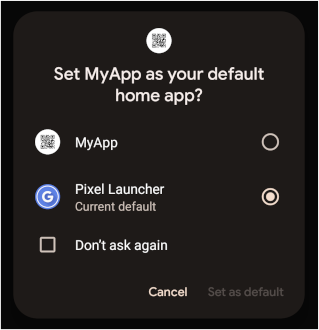
还有其他角色,如ROLE_BROWSER、ROLE_DIALER、ROLE_SMS等等。
https://stackoverflow.com/questions/27991656
复制相似问题
腾讯云开发者

Copyright © 2013 - 2026 Tencent Cloud. All Rights Reserved. 腾讯云 版权所有
深圳市腾讯计算机系统有限公司 ICP备案/许可证号:粤B2-20090059  粤公网安备44030502008569号
腾讯云计算(北京)有限责任公司 京ICP证150476号 | 京ICP备11018762号