
EPPlus Excel更改单元格颜色
EPPlus Excel更改单元格颜色
提问于 2015-06-24 11:34:53
我正在尝试用另一个单元格的颜色设置给定单元格的颜色(该颜色已经在模板中显示了)。但是worksheet.Cells[row, col].Style.Fill.BackgroundColor似乎没有get属性。可以这样做吗?还是我必须在互联网上找到确切的六进制颜色代码?
编辑
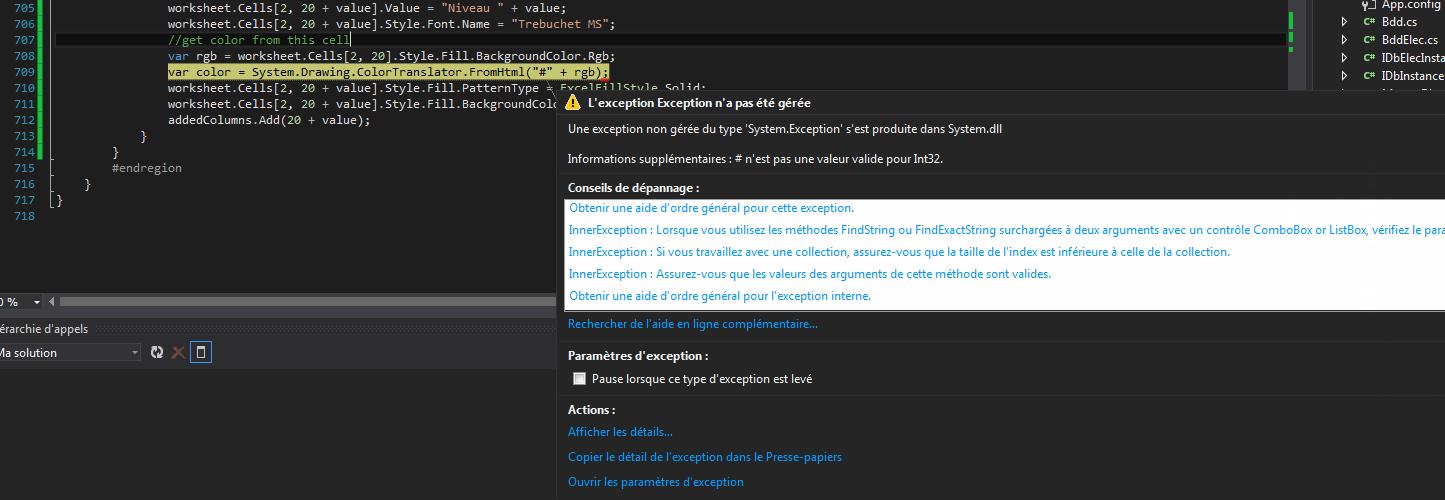
使用答案中的代码,我得到了这个错误(它是用法语编写的,但它与我在第一条评论中所写的内容一起翻译)
回答 2
Stack Overflow用户
发布于 2015-06-24 12:31:46
像这样的怎么样?
//get color from this cell
var rgb = ws.Cells[1, 2].Style.Fill.BackgroundColor.Rgb;
//Convert to system.drawing.color
var color = System.Drawing.ColorTranslator.FromHtml("#" + rgb);
//set color in this cell
ws.Cells[1, 1].Style.Fill.PatternType = ExcelFillStyle.Solid;
ws.Cells[1, 1].Style.Fill.BackgroundColor.SetColor(color);更新:如果您从系统颜色或调色板中选择一种颜色作为填充颜色,则效果很好。如果您选择填充下拉列表中的“主题颜色”之一,.Rgb将返回一个空字符串
//get style
var style = ws.Cells[400, 1].Style;

//If color from System colors or palette
if (!string.IsNullOrEmpty(style.Fill.BackgroundColor.Rgb))
{
   //Convert to system.drawing.colow
   var color = System.Drawing.ColorTranslator.FromHtml("#" + style.Fill.BackgroundColor.Rgb);
   //set color in this cell
   ws.Cells[1, 1].Style.Fill.PatternType = ExcelFillStyle.Solid;
   ws.Cells[1, 1].Style.Fill.BackgroundColor.SetColor(color);
}
else if (!string.IsNullOrEmpty(style.Fill.BackgroundColor.Theme))
{
   //No idea how to get color from Theme
}我不确定它是否支持..。根据EPPlus常见问题的说法:
库不支持什么(这些是最明显的特性)?
Stack Overflow用户
发布于 2020-02-03 08:06:14
对于任何来到这里的人来说,因为我和EPPlus玩得很开心,而且我对上面的答案并不满意:
cell.Style.Fill.BackgroundColor.LookupColor()返回#AARRGGBB颜色(即红色为# red 0000)。你被插入的部分可能是最后的6位数。
页面原文内容由Stack Overflow提供。腾讯云小微IT领域专用引擎提供翻译支持
原文链接:
https://stackoverflow.com/questions/31025464
复制相关文章
相似问题
腾讯云开发者

Copyright © 2013 - 2026 Tencent Cloud. All Rights Reserved. 腾讯云 版权所有
深圳市腾讯计算机系统有限公司 ICP备案/许可证号:粤B2-20090059  粤公网安备44030502008569号
腾讯云计算(北京)有限责任公司 京ICP证150476号 | 京ICP备11018762号