
使用Youtube API V3在C#中从频道获取视频
我有一个ASP.Net网页,在那里我正在用V2显示来自我频道的Youtube视频。由于谷歌已经退出了V2 API,我尝试使用V3 API,但无法从频道获得视频。
我确实看过github的示例,但是这个例子展示了如何创建视频,但是无法检索视频。因此,我看到使用php库的示例,我正在查找特定于C#的内容。
在这方面有人能帮我吗?
回答 3
Stack Overflow用户
发布于 2015-06-30 07:29:35
通过向Search.list添加通道id,它返回频道中的视频列表。
var searchListRequest = service.Search.List("snippet");
searchListRequest.ChannelId = "UCIiJ33El2EakaXBzvelc2bQ";
var searchListResult = searchListRequest.Execute();
更新对正在发生的事情的注释解释的响应:
实际上,搜索返回与通道id相关的所有内容,毕竟,您是在一个通道id上搜索。
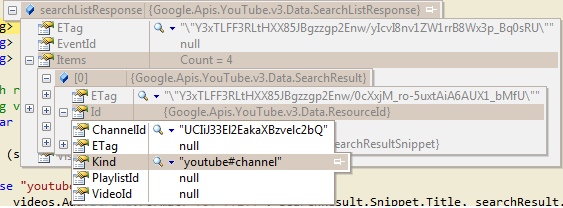
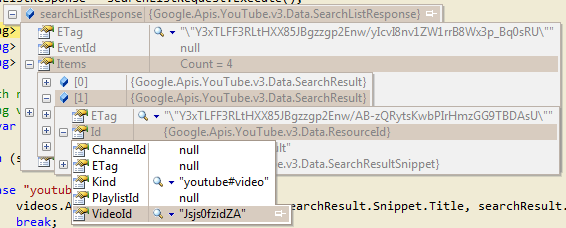
搜索返回包含许多项的SearchListResponse。每个项目都是类型的SearchResource搜索资源可以有不同的类型或种类。在下面的两张图片中,您可以看到第一张是youtube#channel,第二张是youtube#video,它将由您循环浏览并找到youtube视频。如果您滚动到search.list页面的底部,您可以尝试它并查看API返回的原始JSon。
解决方案:
现在,如果你想要做的就是把视频拿回来,你只需要告诉它,你想要的只是通过在你的请求中添加类型的视频:
searchListRequest.Type = "video";Stack Overflow用户
发布于 2016-04-04 20:07:53
虽然在一段时间前被问及如何使用C#从频道中获取视频(全部),我也已经搜索了一段时间。目前,我有支持分页的方法(也许可以做得更好:)
希望这能有所帮助
    public Task<List<SearchResult>> GetVideosFromChannelAsync(string ytChannelId)
    {

        return Task.Run(() =>
        {
            List<SearchResult> res = new List<SearchResult>();

var _youtubeService = new YouTubeService(new BaseClientService.Initializer()
        {
            ApiKey = "AIzaXyBa0HT1K81LpprSpWvxa70thZ6Bx4KD666",
            ApplicationName = "Videopedia"//this.GetType().ToString()
        });

            string nextpagetoken = " ";

            while (nextpagetoken != null)
            {
                var searchListRequest = _youtubeService.Search.List("snippet");
                searchListRequest.MaxResults = 50;
                searchListRequest.ChannelId = ytChannelId;
                searchListRequest.PageToken = nextpagetoken;

                // Call the search.list method to retrieve results matching the specified query term.
                var searchListResponse = searchListRequest.Execute();

                // Process  the video responses
                res.AddRange(searchListResponse.Items);

                nextpagetoken = searchListResponse.NextPageToken;

            }

            return res;

        });
} Stack Overflow用户
发布于 2020-01-02 06:37:36
在youtube频道里,有很多播放列表。每个播放列表下面都有很多视频。所以,一开始,我拿出播放列表,然后从每个播放列表中拿出视频列表。这是我在我的项目中实现的解决方案。这是一个完整的代码,可以从youtube频道获取视频,并像youtube频道一样显示视频,并提供视频发布日期等信息。在这里,我还实现了缓存,以更快地加载视频。我需要很长时间才能实现这一点。希望能帮上忙。
模型:
    public class VideoViewModel
    {
        public List<PlayList> PlayList { get; internal set; }
    }


    public class PlayList
    {

        public string Title { get; set; }
        public string Description { get; set; }
        public string Id { get; set; }
        public string Url { get; set; }
        public List<VideoList> VideoList { get; set; }


    }

    public class VideoList
    {

        public string Title { get; set; }
        public string Description { get; set; }
        public string Id { get; set; }
        public string Url { get; set; }
        public string PublishedDate { get; set; }

    }
主计长:
    public ActionResult Index(string VideoId, string VideoType, int? PageNo)
    {

     VideoViewModel ob = new VideoViewModel();
     ob = GetFromList();
     return View(ob);

    }


     VideoViewModel GetFromList()
     {

        VideoViewModel ob = new VideoViewModel();
        IDatabase cache = Connection.GetDatabase();
        string serializedVideos = cache.StringGet("");
        if (!String.IsNullOrEmpty(serializedVideos))
        {
            ob.PlayList = JsonConvert.DeserializeObject<List<PlayList>>(serializedVideos);

        }
        else
        {

            GetYoutubeVideosFromApi(ob);
            cache.StringSet("", JsonConvert.SerializeObject(ob.PlayList));


        }
        return ob;
    }


    public void GetYoutubeVideosFromApi(VideoViewModel ob)

    {
        ob.PlayList = new List<PlayList>();
        WebClient wc = new WebClient { Encoding = Encoding.UTF8 };
        try
        {
            string jsonstring = wc.DownloadString("https://www.googleapis.com/youtube/v3/playlists?part=snippet&key=yourkey&maxResults=50&channelId=yourchaneelid");

            JObject jobj = (JObject)JsonConvert.DeserializeObject(jsonstring);

            foreach (var entry in jobj["items"])
            {
                PlayList pl = new PlayList();


                pl.Title = entry["snippet"]["title"].ToString();
                pl.Description = entry["snippet"]["description"].ToString();
                pl.Id = entry["id"].ToString();
                pl.VideoList = new List<VideoList>();
                string jsonstring2 = wc.DownloadString("https://www.googleapis.com/youtube/v3/playlistItems?part=snippet&playlistId=" + entry["id"].ToString() + "&key=yourkey&maxResults=50");

                JObject jobj2 = (JObject)JsonConvert.DeserializeObject(jsonstring2);

                foreach (var vl in jobj2["items"])
                {
                    VideoList v = new VideoList();
                    v.Title = vl["snippet"]["title"].ToString();
                    v.Description = vl["snippet"]["description"].ToString();
                    v.Id = vl["snippet"]["resourceId"]["videoId"].ToString();
                    v.Url = vl["snippet"]["thumbnails"]["medium"]["url"].ToString();

                    var publishTime = vl["snippet"]["publishedAt"].ToString();
                    var temp = DateTime.Parse(publishTime);
                    v.PublishedDate = GetTimeInMonth(temp);

                    pl.VideoList.Add(v);

                }

                ob.PlayList.Add(pl);

            }

        }
        catch (Exception ex)
        {
            throw;
        }

    }


    public static string GetTimeInMonth(DateTime objDateTime)
    {
        const int SECOND = 1;
        const int MINUTE = 60 * SECOND;
        const int HOUR = 60 * MINUTE;
        const int DAY = 24 * HOUR;
        const int MONTH = 30 * DAY;

        var ts = new TimeSpan(DateTime.UtcNow.Ticks - objDateTime.Ticks);
        double delta = Math.Abs(ts.TotalSeconds);

        if (delta < 1 * MINUTE)
            return ts.Seconds == 1 ? "one second ago" : ts.Seconds + " seconds ago";

        if (delta < 2 * MINUTE)
            return "a minute ago";

        if (delta < 45 * MINUTE)
            return ts.Minutes + " minutes ago";

        if (delta < 90 * MINUTE)
            return "an hour ago";

        if (delta < 24 * HOUR)
            return ts.Hours + " hours ago";

        if (delta < 48 * HOUR)
            return "yesterday";

        if (delta < 30 * DAY)
            return ts.Days + " days ago";

        if (delta < 12 * MONTH)
        {
            int months = Convert.ToInt32(Math.Floor((double)ts.Days / 30));
            return months <= 1 ? "one month ago" : months + " months ago";
        }
        else
        {
            int years = Convert.ToInt32(Math.Floor((double)ts.Days / 365));
            return years <= 1 ? "one year ago" : years + " years ago";
        }

    }


     private static Lazy<ConnectionMultiplexer> lazyConnection = new Lazy<ConnectionMultiplexer>(() =>
    {
        string cacheConnection = ConfigurationManager.AppSettings["CacheConnection"].ToString();
        return ConnectionMultiplexer.Connect(cacheConnection);
    });

    public static ConnectionMultiplexer Connection
    {
        get
        {
            return lazyConnection.Value;
        }
    }
视图:它实际上取决于您想要如何显示视频列表。
https://stackoverflow.com/questions/31131859
复制相似问题
腾讯云开发者

Copyright © 2013 - 2026 Tencent Cloud. All Rights Reserved. 腾讯云 版权所有
深圳市腾讯计算机系统有限公司 ICP备案/许可证号:粤B2-20090059  粤公网安备44030502008569号
腾讯云计算(北京)有限责任公司 京ICP证150476号 | 京ICP备11018762号