
Unity3D :使圆柱体从一个点延伸到另一点
Unity3D :使圆柱体从一个点延伸到另一点
提问于 2015-12-05 22:37:00
我希望,在每一个框架中,移动,缩放和旋转一个给定的圆柱,使它的行为就像两点之间的“绳子”。
我现在有这段代码,但它根本不像预期的那样工作:
hook.transform.position = (rightHandPosition + hookDestination)/2;

hook.transform.localScale = new Vector3(0.5F, Vector3.Magnitude(hookDestination - rightHandPosition), 0.5F);

hook.transform.rotation = Quaternion.Euler(hookDestination - rightHandPosition);
你可以猜到这两点是rightHandPosition和hookDestination。目前,圆柱体在“随机”位置产卵,具有“随机”旋转和巨大的尺度。
我怎么才能修好它?
“完整”剧本:
public class FirstPersonController : MonoBehaviour {

    public GameObject hook;
    bool isHooked = false;
    Vector3 hookDestination;
    Vector3 rightHandPosition;

    void Start() {
        hook.renderer.enabled = false;
        rightHandPosition = hook.transform.position;
    }

    // Update is called once per frame
    void Update () {
        if (isHooked) {
            hook.transform.position = (rightHandPosition + hookDestination)/2;
            hook.transform.localScale = new Vector3(0.5F, Vector3.Magnitude(hookDestination - rightHandPosition), 0.5F);
            hook.transform.rotation = Quaternion.Euler(hookDestination - rightHandPosition);
        }

        if (isHooked && !Input.GetMouseButton(1)) {
            isHooked = false;
            hook.renderer.enabled = false;
        }

        if (Input.GetMouseButtonDown (1) && !isHooked) {
            Ray ray = GameObject.FindGameObjectWithTag ("MainCamera").camera.ViewportPointToRay (new Vector3 (0.5F, 0.5F, 0));
            RaycastHit hit;
            if (Physics.Raycast (ray, out hit) && hit.distance < 5000000 && hit.collider.tag != "Player") {
                isHooked = true;
                hookDestination = hit.point;
                hook.renderer.enabled = true;
            }
        }
    }
}
现场截图:
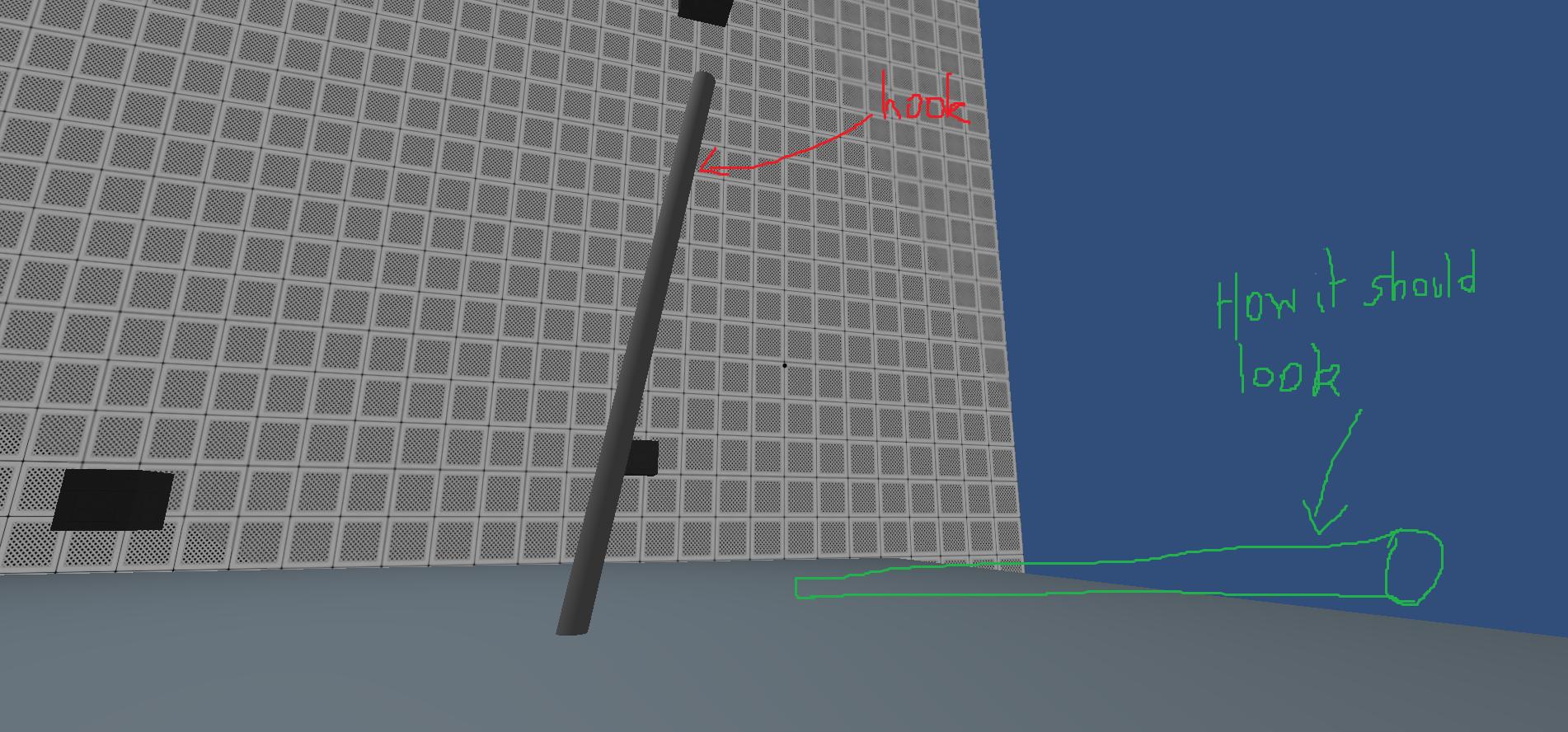
回答 2
Stack Overflow用户
回答已采纳
发布于 2015-12-16 21:04:09
fafase的评论是正确的答案:使用LineRenderer。
hookRender.SetPosition(0, rightHandPosition);
hookRender.SetPosition(1, hookDestination);Stack Overflow用户
发布于 2018-05-30 11:54:38
让我们假设cubeStart是起点,cubeEnd是终点。“汽缸”就是你的汽缸
using System.Collections;
using System.Collections.Generic;
using UnityEngine;

public class AlignCyl : MonoBehaviour {


    GameObject cubeStart;
    GameObject cubeEnd;
    GameObject cylinder;

    Vector3 endV;
    Vector3 startV;
    Vector3 rotAxisV;
    Vector3 dirV;
    Vector3 cylDefaultOrientation = new Vector3(0,1,0);

    float dist;

    // Use this for initialization
    void Start () {

         cubeStart = GameObject.Find("CubeStart");
         cubeEnd   = GameObject.Find("CubeEnd");

         cylinder  = GameObject.Find("Cylinder");

        endV   = cubeEnd.transform.position;
        startV = cubeStart.transform.position;


    }

    // Update is called once per frame
    void Update () {

        // Position
        cylinder.transform.position = (endV + startV)/2.0F;

        // Rotation
        dirV = Vector3.Normalize(endV - startV);

        rotAxisV = dirV + cylDefaultOrientation;

        rotAxisV = Vector3.Normalize(rotAxisV);

        cylinder.transform.rotation = new Quaternion(rotAxisV.x, rotAxisV.y, rotAxisV.z, 0);

        // Scale
        dist = Vector3.Distance(endV, startV);

        cylinder.transform.localScale = new Vector3(1, dist/2, 1);

    }
}
用Unity3D 2018.1测试,我关于旋转的概念完全是基于四元数的。
x=rotAxis.x * sin(angle/2)  = rotAxis.x;
y=rotAxis.y * sin(angle/2) = rotAxis.y;
z=rotAxis.z * sin(angle/2) = rotAxis.z;
w = cos(angle/2) = 0;
其中rotAxis是两个向量之和,即默认的圆柱方向和所需的方向。角度是180度,因为我们希望圆柱体绕rotAxis旋转180度。这是四元数旋转(绕轴旋转)的定义。
页面原文内容由Stack Overflow提供。腾讯云小微IT领域专用引擎提供翻译支持
原文链接:
https://stackoverflow.com/questions/34111745
复制相关文章
相似问题
腾讯云开发者

Copyright © 2013 - 2026 Tencent Cloud. All Rights Reserved. 腾讯云 版权所有
深圳市腾讯计算机系统有限公司 ICP备案/许可证号:粤B2-20090059  粤公网安备44030502008569号
腾讯云计算(北京)有限责任公司 京ICP证150476号 | 京ICP备11018762号