
SpeechSynthesizer.SelectVoice()失败,“没有安装匹配的语音或声音被禁用”
我正在修改斯科特·汉斯曼的BabySmash代码以支持其他语言。
- 我为每个这些步骤安装了语音平台和一种新的语言。
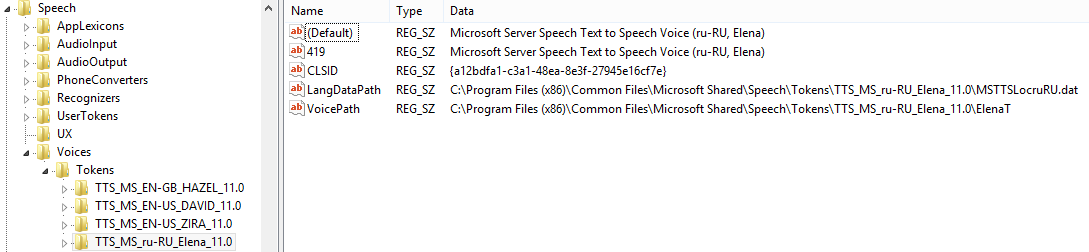
- 该语言现在显示在注册表中:
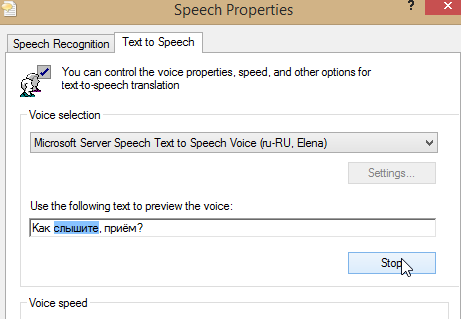
- 现在,Windows可以选择并播放该语言:
System.Speech.Synthesis.SpeechSynthesizer.GetInstalledVoices()现在返回声音。- 但是,下面代码中的
SelectVoice()抛出错误"System.ArgumentException:无法设置语音。没有安装匹配的语音或禁用了语音“。
string phrase = null;
SpeechSynthesizer speech = new SpeechSynthesizer();
CultureInfo keyboardCulture = System.Windows.Forms.InputLanguage.CurrentInputLanguage.Culture;
InstalledVoice neededVoice = speech.GetInstalledVoices(keyboardCulture).FirstOrDefault();
if (neededVoice == null)
{
    phrase = "Unsupported Language";
}
else if (!neededVoice.Enabled)
{
    phrase = "Voice Disabled";
}
else
{
    speech.SelectVoice(neededVoice.VoiceInfo.Name);
}

speech.Speak(phrase);- 我尝试过升级到
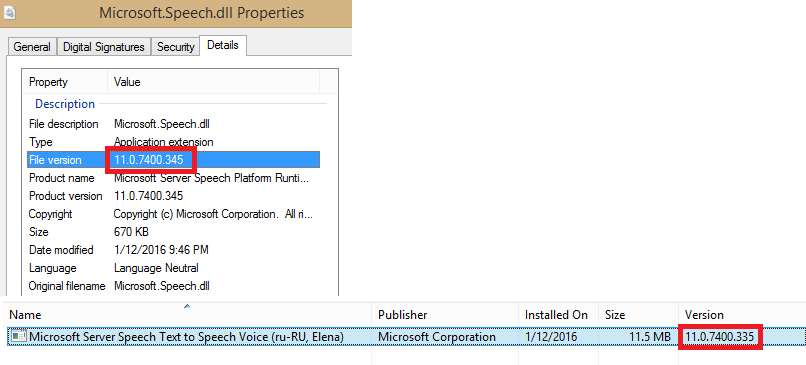
C:\Program Files (x86)\Reference Assemblies\Microsoft\Framework\.NETFramework\v4.6.1\System.Speech.dll。 - 我有验证了版本 of
Microsoft.Speech.dll和语言包匹配。
- 此代码适用于我已经安装的默认声音。
- 在绝望中,我甚至尝试通过反射直接调用
System.Speech.Internal.Synthesis.VoiceSynthesis.GetVoice(),但是同样的错误。
我非常感谢您能提供的任何帮助!谢谢。
回答 5
Stack Overflow用户
发布于 2016-01-13 21:02:21
哈哈我觉得很特别:这篇关于Python的文章实际上解决了我的问题:构建配置平台需要的是x64,而不是Any CPU!
Stack Overflow用户
发布于 2022-05-04 12:01:40
问题是,有些声音并不是所有申请都有登记的。这里有一篇很好的文章:https://www.ghacks.net/2018/08/11/unlock-all-windows-10-tts-voices-system-wide-to-get-more-of-them/
但是对于那些在上面的链接不起作用的时候找到这个答案的人来说:
其中涉及两个注册表项。
- Computer\HKEY_LOCAL_MACHINE\SOFTWARE\Microsoft**Speech**\Voices\Tokens
- Computer\HKEY_LOCAL_MACHINE\SOFTWARE\Microsoft**Speech_OneCore**\Voices\Tokens
第一个是在使用GetInstalledVoices() API调用查询时使用的。第二个被Windows设置应用程序使用。
要使未列出的声音可用于GetInstalledVoices(),您需要将所需声音的数据从Speech_OneCore复制到语音节点(如果需要,则将其x86对应)复制到语音节点。
- 步骤1:打开(regedit.exe)
- 步骤2:在Computer\HKEY_LOCAL_MACHINE\SOFTWARE\Microsoft\Speech_OneCore\Voices\Tokens中打开可用的声音列表
- 第三步:导出所需声音的键。
- 步骤4:修改导出的注册表文件并替换
- HKEY_LOCAL_MACHINE\SOFTWARE\Microsoft**Speech_OneCore**\Voices\Tokens\与
- HKEY_LOCAL_MACHINE\SOFTWARE\Microsoft**Speech**\Voices\Tokens\
- 步骤5:通过复制条目并替换,为32位应用程序添加两个条目(如果需要的话)
- HKEY_LOCAL_MACHINE\SOFTWARE\Microsoft**Speech_OneCore**\Voices\Tokens\与
- HKEY_LOCAL_MACHINE\SOFTWARE**WOW6432Node\Microsoft**Speech\Voices\Tokens\
- 步骤6:将修改后的文件导入注册表。
现在它应该可以工作了(可能需要重新启动)
Stack Overflow用户
发布于 2016-04-12 15:59:40
另一种解决方案是安装(x64)位版本的和Microsoft语音平台运行时。我认为您已经安装了(x86)两种类型的位,平台尝试用(x64)位来读取它。
我和你有同样的问题,但恰恰相反,这对我来说是有效的!
https://stackoverflow.com/questions/34776593
复制相似问题
腾讯云开发者

Copyright © 2013 - 2026 Tencent Cloud. All Rights Reserved. 腾讯云 版权所有
深圳市腾讯计算机系统有限公司 ICP备案/许可证号:粤B2-20090059  粤公网安备44030502008569号
腾讯云计算(北京)有限责任公司 京ICP证150476号 | 京ICP备11018762号