
使用ipdb在一个单元格(jupyter或Ipython)中调试python代码
我在firefox中使用jupyter (或Ipython)笔记本,并希望在单元格中调试一些python代码。我使用'import;ipdb.set_trace()‘作为断点,例如,我的单元格有以下代码:
a=4
import ipdb; ipdb.set_trace()
b=5
print a
print b
在使用Shift+Enter执行之后,会出现以下错误:
--------------------------------------------------------------------------
MultipleInstanceError                     Traceback (most recent call last)
<ipython-input-1-f2b356251c56> in <module>()
      1 a=4
----> 2 import ipdb; ipdb.set_trace()
      3 b=5
      4 print a
      5 print b

/home/nnn/anaconda/lib/python2.7/site-packages/ipdb/__init__.py in <module>()
     14 # You should have received a copy of the GNU General Public License along with this program. If not, see http://www.gnu.org/licenses/.
     15
---> 16 from ipdb.__main__ import set_trace, post_mortem, pm, run, runcall, runeval, launch_ipdb_on_exception
     17
     18 pm                       # please pyflakes

/home/nnn/anaconda/lib/python2.7/site-packages/ipdb/__main__.py in <module>()
     71         # the instance method will create a new one without loading the config.
     72         # i.e: if we are in an embed instance we do not want to load the config.
---> 73         ipapp = TerminalIPythonApp.instance()
     74         shell = get_ipython()
     75         def_colors = shell.colors

/home/nnn/anaconda/lib/python2.7/site-packages/traitlets/config/configurable.pyc in instance(cls, *args, **kwargs)
    413             raise MultipleInstanceError(
    414                 'Multiple incompatible subclass instances of '
--> 415                 '%s are being created.' % cls.__name__
    416             )
    417

MultipleInstanceError: Multiple incompatible subclass instances of TerminalIPythonApp are being created.
如果我不是在浏览器中的jupyter笔记本中使用此代码,而是在jupyter qt控制台中使用此代码,则会出现相同的错误。这个错误意味着什么,如何避免它?是否可以一步一步地调试单元格中的代码,使用pdb调试器的next、next等命令?
回答 4
Stack Overflow用户
发布于 2016-03-03 13:19:21
也有这个问题,它似乎与jupyter和ipdb的版本有关。
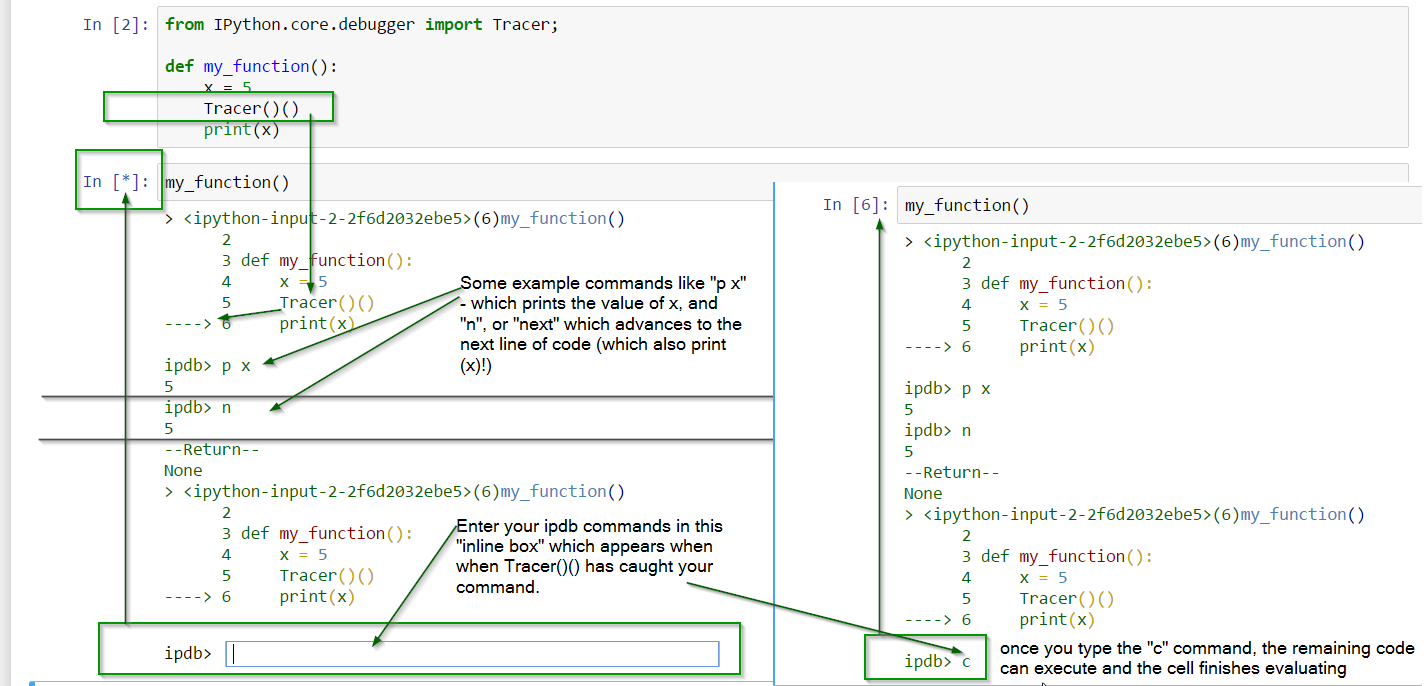
解决方案是使用它而不是ipdb库set_trace调用:
from IPython.core.debugger import Tracer
Tracer()() #this one triggers the debugger来源:http://devmartin.com/blog/2014/10/trigger-ipdb-within-ipython-notebook/
带注释的截图:
Stack Overflow用户
发布于 2017-11-23 08:56:34
Tracer()被否决了。
使用:
from IPython.core.debugger import set_trace
然后将set_trace()放在需要断点的地方。
from IPython.core.debugger import set_trace

def add_to_life_universe_everything(x):
    answer = 42
    set_trace()
    answer += x

    return answer

add_to_life_universe_everything(12)
这很好的工作,给我们带来了一点舒适(例如语法高亮),而不仅仅是使用内置pdb。
Stack Overflow用户
发布于 2017-03-29 06:57:01
如果使用朱庇特笔记本,请使用神奇命令“%%调试”开始您的单元格。然后,在单元格底部显示ipdb行,这将帮助您在调试会话中导航。下面的命令将帮助您开始工作:
n-执行当前行并转到下一行。
c-继续执行直到下一个断点。
确保每次决定调试时都重新启动内核,以便所有变量都是新的,assigned.You可以通过ipdb行检查每个变量的值,并且在执行分配值给该变量的行之前,变量是未定义的。
%%debug
import pdb
from pdb import set_trace as bp
def function_xyz():
    print('before breakpoint')
    bp() # This is a breakpoint.
print('after breakpoint')https://stackoverflow.com/questions/35613249
复制相似问题
腾讯云开发者

Copyright © 2013 - 2026 Tencent Cloud. All Rights Reserved. 腾讯云 版权所有
深圳市腾讯计算机系统有限公司 ICP备案/许可证号:粤B2-20090059  粤公网安备44030502008569号
腾讯云计算(北京)有限责任公司 京ICP证150476号 | 京ICP备11018762号