
要更改UISearchBar的“取消”按钮的位置
要更改UISearchBar的“取消”按钮的位置
提问于 2016-05-09 07:50:07
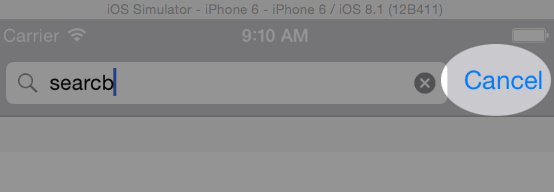
我希望更改取消按钮出现的位置,而不是像在图像中那样出现在右侧,我希望它出现在搜索栏的左侧。
回答 2
Stack Overflow用户
回答已采纳
发布于 2016-05-09 07:59:04
无法更改默认SearchBar和搜索显示控制器的位置。
对于您的需求,您需要创建您自己的自定义搜索栏与取消您的愿望。
希望能帮上忙..。
Stack Overflow用户
发布于 2022-05-13 17:32:59
将cancel按钮放在左侧的一种方法是重写搜索栏的effectiveUserInterfaceLayoutDirection (iOS 10+)。
final class CustomSearchController: UISearchController {
    private var customSearchBar = CustomSearchBar()

    override var searchBar: UISearchBar { customSearchBar }
}

final class CustomSearchBar: UISearchBar {
    override var effectiveUserInterfaceLayoutDirection: UIUserInterfaceLayoutDirection {
        // Overriding this property swaps the layout at the top level without swapping the layout for the subviews
        super.effectiveUserInterfaceLayoutDirection.flipped
    }

    override func willMove(toSuperview newSuperview: UIView?) {
        super.willMove(toSuperview: newSuperview)
        // Set and unset the semanticContentAttribute so the effectiveUserInterfaceLayoutDirection is reevaluated.
        semanticContentAttribute = .forceLeftToRight
        semanticContentAttribute = .unspecified
    }
}

extension UIUserInterfaceLayoutDirection {
    var flipped: UIUserInterfaceLayoutDirection {
        switch self {
        case .rightToLeft: return .leftToRight
        case .leftToRight: return .rightToLeft
        @unknown default: return .rightToLeft
        }
    }
}
这将使LTR语言的左侧为cancel按钮,RTL语言为右侧。
英语成绩:

页面原文内容由Stack Overflow提供。腾讯云小微IT领域专用引擎提供翻译支持
原文链接:
https://stackoverflow.com/questions/37110334
复制相关文章
相似问题
腾讯云开发者

Copyright © 2013 - 2026 Tencent Cloud. All Rights Reserved. 腾讯云 版权所有
深圳市腾讯计算机系统有限公司 ICP备案/许可证号:粤B2-20090059  粤公网安备44030502008569号
腾讯云计算(北京)有限责任公司 京ICP证150476号 | 京ICP备11018762号