
用ListViewItem隐藏或显示VisualStateManager堆栈
用ListViewItem隐藏或显示VisualStateManager堆栈
提问于 2016-06-17 06:05:54
我不太熟悉VisualStateManager在C# UWP,我需要您的帮助,以隐藏或显示在我的ListViewItem堆栈面板。
<ListView.ItemTemplate>
<DataTemplate>
    <Grid Width="500">
        <Grid.RowDefinitions>
            <RowDefinition />
            <RowDefinition />
        </Grid.RowDefinitions>

        <StackPanel Orientation="Horizontal">
            <Image Height="45" Width="45" Margin="0,8,0,8" Source="../../Assets/ViewBox.png" Stretch="UniformToFill"/>
            <StackPanel Orientation="Vertical" VerticalAlignment="Top" Margin="8,8,0,0">
                <TextBlock Text="Test" Style="{StaticResource BaseTextBlockStyle}" />
                <TextBlock Text="test1" Margin="0,4,8,0" Style="{StaticResource BodyTextBlockStyle}" />
            </StackPanel>
        </StackPanel>

        <StackPanel x:Name="EDITOR_PANEL" Grid.Row="1" Orientation="Horizontal" Visibility="Collapsed">
            <Button Content="Edit" />
            <Button Content="Delete" />
        </StackPanel>

        <VisualStateManager.VisualStateGroups>
            <VisualStateGroup x:Name="CommonStates">
                <VisualState x:Name="Normal">
                    <Storyboard>
                        <PointerUpThemeAnimation Storyboard.TargetName="ContentPresenter" />
                    </Storyboard>
                </VisualState>
                <VisualState x:Name="Selected">
                    <VisualState.Setters>
                        <Setter Target="EDITOR_PANEL.Visibility" Value="Visible"></Setter>
                    </VisualState.Setters>
                </VisualState>
            </VisualStateGroup>
        </VisualStateManager.VisualStateGroups>
    </Grid>
</DataTemplate>
</ListView.ItemTemplate>
我想做的是这样的:
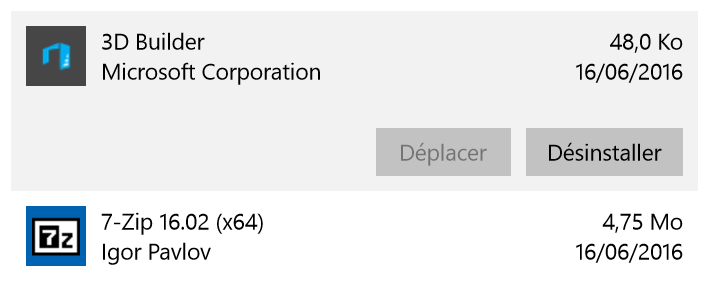
当我选择列表视图中的一个项时,它会显示带有两个按钮的EDITOR_PANEL,如果选择另一个按钮,则前面选择的项会折叠,而当前项则显示EDITOR_PANEL等等。
你有什么想法吗?
回答 1
Stack Overflow用户
回答已采纳
发布于 2016-06-20 13:58:00
一种解决方案是创建一个UserControl,其中包含要在ListViewItem中公开的所有控件。
然后,从后面的代码中可以更新VisualState上的ListView事件SelectionChanged。
下面是一个工作示例:
UserControl视图:
<UserControl
    x:Class="App4.EditablePanel"
    xmlns="http://schemas.microsoft.com/winfx/2006/xaml/presentation"
    xmlns:x="http://schemas.microsoft.com/winfx/2006/xaml"
    xmlns:local="using:App4"
    xmlns:d="http://schemas.microsoft.com/expression/blend/2008"
    xmlns:mc="http://schemas.openxmlformats.org/markup-compatibility/2006"
    mc:Ignorable="d"
    d:DesignHeight="300"
    d:DesignWidth="400">

    <Grid Width="500">
        <Grid.RowDefinitions>
            <RowDefinition />
            <RowDefinition />
        </Grid.RowDefinitions>

        <StackPanel Orientation="Horizontal">
            <Image Height="45" Width="45" Margin="0,8,0,8" Source="../../Assets/ViewBox.png" Stretch="UniformToFill"/>
            <StackPanel Orientation="Vertical" VerticalAlignment="Top" Margin="8,8,0,0">
                <TextBlock Text="{Binding Title}" Style="{StaticResource BaseTextBlockStyle}" />
                <TextBlock Text="{Binding Headline}" Margin="0,4,8,0" Style="{StaticResource BodyTextBlockStyle}" />
            </StackPanel>
        </StackPanel>

        <StackPanel x:Name="EDITOR_PANEL" Grid.Row="1" Orientation="Horizontal" Visibility="Collapsed">
            <Button Content="Edit" />
            <Button Content="Delete" />
        </StackPanel>

        <VisualStateManager.VisualStateGroups>
            <VisualStateGroup x:Name="CommonStates">
                <VisualState x:Name="Normal">
                </VisualState>
                <VisualState x:Name="Selected">
                    <VisualState.Setters>
                        <Setter Target="EDITOR_PANEL.Visibility" Value="Visible"></Setter>
                    </VisualState.Setters>
                </VisualState>
            </VisualStateGroup>
        </VisualStateManager.VisualStateGroups>
    </Grid>
</UserControl>UserControl代码背后:
public sealed partial class EditablePanel : UserControl
{
    public EditablePanel()
    {
        this.InitializeComponent();
    }

    public void SetInEditMode()
    {
        VisualStateManager.GoToState(this, "Selected", true);
    }

    public void SetInViewMode()
    {
        VisualStateManager.GoToState(this, "Normal", true);
    }
}MainPage视图:
<Page
    x:Class="App4.MainPage"
    xmlns="http://schemas.microsoft.com/winfx/2006/xaml/presentation"
    xmlns:x="http://schemas.microsoft.com/winfx/2006/xaml"
    xmlns:local="using:App4"
    xmlns:d="http://schemas.microsoft.com/expression/blend/2008"
    xmlns:mc="http://schemas.openxmlformats.org/markup-compatibility/2006"
    mc:Ignorable="d"
    DataContext="{Binding RelativeSource={RelativeSource Self}}">

    <ListView ItemsSource="{Binding Items}" SelectionChanged="ListView_SelectionChanged">
        <ListView.ItemTemplate>
            <DataTemplate>
                <local:EditablePanel></local:EditablePanel>
            </DataTemplate>
        </ListView.ItemTemplate>
    </ListView>
</Page>后面的MainPage代码:
public sealed partial class MainPage : Page
{
    private List<Item> items;

    public MainPage()
    {
        items = new List<Item>()
        {
            new Item() { Title = "3D Build", Headline="MS Corp" },
            new Item() { Title = "7Zip", Headline="Igor Pavlov" },
            new Item() { Title = "Photoshop", Headline = "Adobe"}
        };


        this.InitializeComponent();
    }

    public List<Item> Items { get { return items; } }

    private void ListView_SelectionChanged(object sender, SelectionChangedEventArgs e)
    {
        var lv = sender as ListView;
        if (e.RemovedItems.Count > 0)
        {
            foreach (var item in e.RemovedItems)
            {
                var container = lv.ContainerFromItem(item) as ListViewItem;
                var panel = container.ContentTemplateRoot as EditablePanel;
                panel.SetInViewMode();
            }
        }
        if (e.AddedItems.Count > 0)
        {
            foreach (var item in e.AddedItems)
            {
                var container = lv.ContainerFromItem(item) as ListViewItem;
                var panel = container.ContentTemplateRoot as EditablePanel;
                panel.SetInEditMode();
            }
        }
    }
}

public class Item
{
    public string Title { get; set; }
    public string Headline { get; set; }
}页面原文内容由Stack Overflow提供。腾讯云小微IT领域专用引擎提供翻译支持
原文链接:
https://stackoverflow.com/questions/37874238
复制相关文章
相似问题
腾讯云开发者
