
如何在java中将事件插入事件调度线程队列的开头?
我已经知道事件调度线程是如何工作的。如果像下面这样的事件调度线程中存在短事件和长事件,则应用程序无法响应。
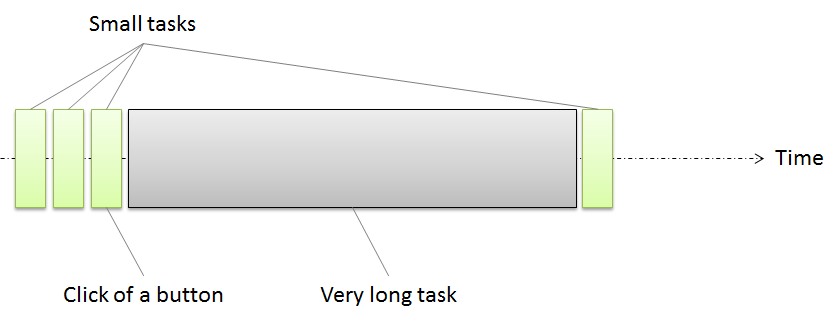
为了响应Swing,事件调度线程应该只用于短事件。而长事件应该在SwingWorkers上执行。
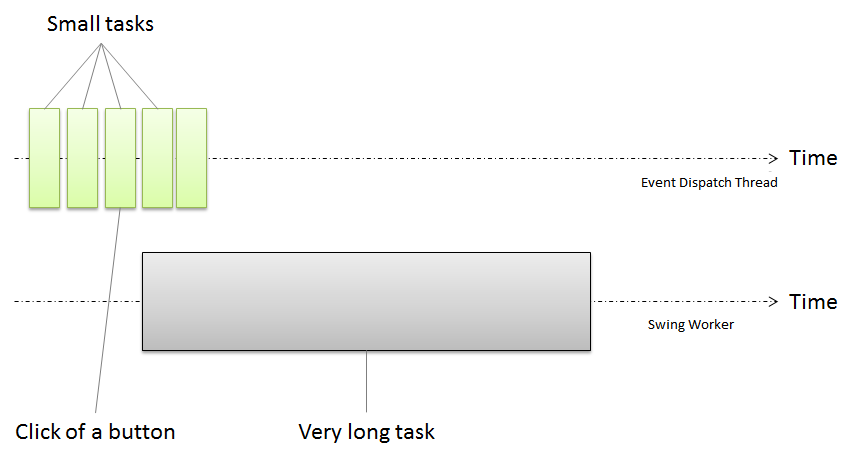
想象一下有很多短期事件。
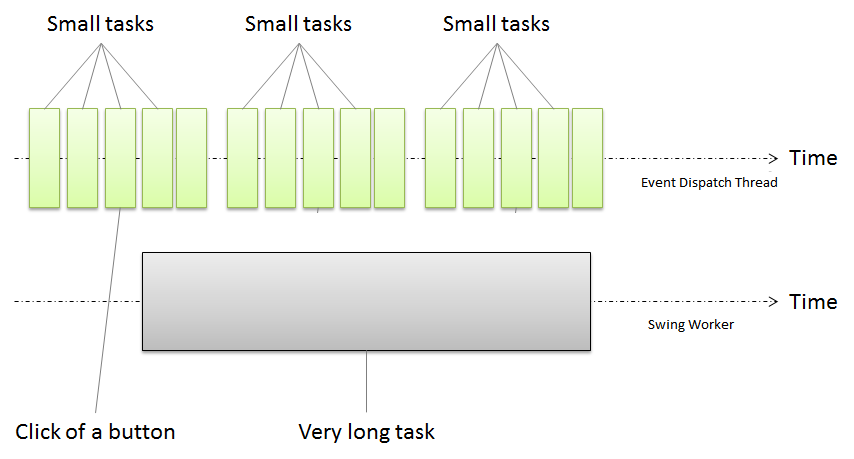
这些事件应该在事件调度线程中执行,并且在事件调度线程队列中存在的其他事件之前,您需要执行一个特殊的事件。但是,默认情况下,事件将排队到队列的末尾,甚至InvokeLater也会这样做。
那么,是否有任何解决方案来将事件排到事件调度线程的开头?
回答 3
Stack Overflow用户
发布于 2016-06-19 23:47:18
尽管替换EventQueue是一种正确的方法,但它并不是真正必要的,因为内置EventQueue已经支持优先排序。唯一的问题是它只支持内部API的使用,所以我们只需要了解它是如何工作的;
//from EventQueue.java...

private static final int LOW_PRIORITY = 0;
private static final int NORM_PRIORITY = 1;
private static final int HIGH_PRIORITY = 2;
private static final int ULTIMATE_PRIORITY = 3;

private static final int NUM_PRIORITIES = ULTIMATE_PRIORITY + 1;

/*
 * We maintain one Queue for each priority that the EventQueue supports.
 * That is, the EventQueue object is actually implemented as
 * NUM_PRIORITIES queues and all Events on a particular internal Queue
 * have identical priority. Events are pulled off the EventQueue starting
 * with the Queue of highest priority. We progress in decreasing order
 * across all Queues.
 */
private Queue[] queues = new Queue[NUM_PRIORITIES];

//...skipped some parts...

/**
 * Causes <code>runnable</code> to have its <code>run</code>
 * method called in the {@link #isDispatchThread dispatch thread} of
 * {@link Toolkit#getSystemEventQueue the system EventQueue}.
 * This will happen after all pending events are processed.
 *
 * @param runnable  the <code>Runnable</code> whose <code>run</code>
 *                  method should be executed
 *                  asynchronously in the
 *                  {@link #isDispatchThread event dispatch thread}
 *                  of {@link Toolkit#getSystemEventQueue the system EventQueue}
 * @see             #invokeAndWait
 * @see             Toolkit#getSystemEventQueue
 * @see             #isDispatchThread
 * @since           1.2
 */
public static void invokeLater(Runnable runnable) {
    Toolkit.getEventQueue().postEvent(
        new InvocationEvent(Toolkit.getDefaultToolkit(), runnable));
}

/**
 * Posts a 1.1-style event to the <code>EventQueue</code>.
 * If there is an existing event on the queue with the same ID
 * and event source, the source <code>Component</code>'s
 * <code>coalesceEvents</code> method will be called.
 *
 * @param theEvent an instance of <code>java.awt.AWTEvent</code>,
 *          or a subclass of it
 * @throws NullPointerException if <code>theEvent</code> is <code>null</code>
 */
public void postEvent(AWTEvent theEvent) {
    SunToolkit.flushPendingEvents(appContext);
    postEventPrivate(theEvent);
}

/**
 * Posts a 1.1-style event to the <code>EventQueue</code>.
 * If there is an existing event on the queue with the same ID
 * and event source, the source <code>Component</code>'s
 * <code>coalesceEvents</code> method will be called.
 *
 * @param theEvent an instance of <code>java.awt.AWTEvent</code>,
 *          or a subclass of it
 */
private final void postEventPrivate(AWTEvent theEvent) {
    theEvent.isPosted = true;
    pushPopLock.lock();
    try {
        if (nextQueue != null) {
            // Forward the event to the top of EventQueue stack
            nextQueue.postEventPrivate(theEvent);
            return;
        }
        if (dispatchThread == null) {
            if (theEvent.getSource() == AWTAutoShutdown.getInstance()) {
                return;
            } else {
                initDispatchThread();
            }
        }
        postEvent(theEvent, getPriority(theEvent));
    } finally {
        pushPopLock.unlock();
    }
}

private static int getPriority(AWTEvent theEvent) {
    if (theEvent instanceof PeerEvent) {
        PeerEvent peerEvent = (PeerEvent)theEvent;
        if ((peerEvent.getFlags() & PeerEvent.ULTIMATE_PRIORITY_EVENT) != 0) {
            return ULTIMATE_PRIORITY;
        }
        if ((peerEvent.getFlags() & PeerEvent.PRIORITY_EVENT) != 0) {
            return HIGH_PRIORITY;
        }
        if ((peerEvent.getFlags() & PeerEvent.LOW_PRIORITY_EVENT) != 0) {
            return LOW_PRIORITY;
        }
    }
    int id = theEvent.getID();
    if ((id >= PaintEvent.PAINT_FIRST) && (id <= PaintEvent.PAINT_LAST)) {
        return LOW_PRIORITY;
    }
    return NORM_PRIORITY;
}

/**
 * Posts the event to the internal Queue of specified priority,
 * coalescing as appropriate.
 *
 * @param theEvent an instance of <code>java.awt.AWTEvent</code>,
 *          or a subclass of it
 * @param priority  the desired priority of the event
 */
private void postEvent(AWTEvent theEvent, int priority) {
    if (coalesceEvent(theEvent, priority)) {
        return;
    }

    EventQueueItem newItem = new EventQueueItem(theEvent);

    cacheEQItem(newItem);

    boolean notifyID = (theEvent.getID() == this.waitForID);

    if (queues[priority].head == null) {
        boolean shouldNotify = noEvents();
        queues[priority].head = queues[priority].tail = newItem;

        if (shouldNotify) {
            if (theEvent.getSource() != AWTAutoShutdown.getInstance()) {
                AWTAutoShutdown.getInstance().notifyThreadBusy(dispatchThread);
            }
            pushPopCond.signalAll();
        } else if (notifyID) {
            pushPopCond.signalAll();
        }
    } else {
        // The event was not coalesced or has non-Component source.
        // Insert it at the end of the appropriate Queue.
        queues[priority].tail.next = newItem;
        queues[priority].tail = newItem;
        if (notifyID) {
            pushPopCond.signalAll();
        }
    }
}如您所见,EventQueue有4个不同的队列,LOW, NORM, HIGH and ULTIMATE、SwingUtilities.invokeLater(Runnable)或EventQueue.invokeLater(Runnable)将Runnable封装到InvocationEvent中并调用postEvent(AWTEvent)方法。这个方法在线程之间做了一些同步,并像这个postEvent(theEvent, getPriority(theEvent));一样调用了postEvent(theEvent, getPriority(theEvent));,有趣的部分是getPriority(AWTEvent)是如何工作的,它给每个事件以正常的优先级,除了一些PaintEvent和PeerEvent。
因此,您需要做的是将您的Runnable封装到PeerEvent中,使用ULTIMATE_PRIORTY,而不是像这样的InvocationEvent;
Toolkit.getDefaultToolkit().getSystemEventQueue()
   .postEvent(new PeerEvent(Toolkit.getDefaultToolkit(), () -> {


    //execute your high priority task here!
    System.out.println("I'm ultimate prioritized in EventQueue!");


}, PeerEvent.ULTIMATE_PRIORITY_EVENT));您可以检查EventQueue和PeerEvent的完整源代码。
Stack Overflow用户
发布于 2016-06-19 17:30:27
我最初的想法是
我不认为我们可以控制需要由事件调度线程来捕获的任务,但在某些方面,我们可以尝试设置如下所示的优先级
SwingUtilities.invokeAndWait(new Runnable() {
  public void run() {
     Thread.currentThread().setPriority(Thread.MAX_PRIORITY);
     // The task which need immediate attention.
}});
同样,也不能保证这将由EDT立即执行。
但是上面的代码是错误的。到调用run时,它已经在执行任务了。谢谢您的评论。
所以下面的代码应该会有帮助。
   EventQueue queue = Toolkit.getDefaultToolkit().getSystemEventQueue();
   Runnable runnable = new Runnable() {

         @Override
         public void run() {
            //My high priority task
         }
   };
   PeerEvent event = new PeerEvent(this, runnable, PeerEvent.ULTIMATE_PRIORITY_EVENT);
   queue.postEvent(event);
但有一点我们需要注意。
    private static final int NUM_PRIORITIES = ULTIMATE_PRIORITY + 1;

    /*
     * We maintain one Queue for each priority that the EventQueue supports.
     * That is, the EventQueue object is actually implemented as
     * NUM_PRIORITIES queues and all Events on a particular internal Queue
     * have identical priority. Events are pulled off the EventQueue starting
     * with the Queue of highest priority. We progress in decreasing order
     * across all Queues.
     */
    private Queue[] queues = new Queue[NUM_PRIORITIES];

    public EventQueue() {
        for (int i = 0; i < NUM_PRIORITIES; i++) {
            queues[i] = new Queue();
        }
    ....
}因此,如果我们设置了太多的ULTIMATE_PRIORITY任务,则无法保证将立即执行最新的任务。
Stack Overflow用户
发布于 2016-06-19 19:44:25
您可以创建和使用您自己的事件队列,以您想要的方式插入新事件。请参阅下面如何设置自定义事件队列的代码片段:
public class QueueTest {
    public static void main(String[] args) throws InterruptedException, InvocationTargetException {
        EventQueue eventQueue = Toolkit.getDefaultToolkit().getSystemEventQueue();
        eventQueue.push(new MyEventQueue());

        EventQueue.invokeAndWait(new Runnable() {
            public void run() {
                System.out.println("Run");
            }
        });
    }

    private static class MyEventQueue extends EventQueue {
        public void postEvent(AWTEvent theEvent) {
            System.out.println("Event Posted");
            super.postEvent(theEvent);
        }
    }
}
然后,您的自定义事件队列可以向具有最高优先级的队列发送您希望预先添加的特定事件。这可能不能确保它是要处理的下一个事件,但可能最适合现有的设计。
https://stackoverflow.com/questions/37877195
复制相似问题
腾讯云开发者

Copyright © 2013 - 2026 Tencent Cloud. All Rights Reserved. 腾讯云 版权所有
深圳市腾讯计算机系统有限公司 ICP备案/许可证号:粤B2-20090059  粤公网安备44030502008569号
腾讯云计算(北京)有限责任公司 京ICP证150476号 | 京ICP备11018762号