
画布;如何追溯删除形状
画布;如何追溯删除形状
提问于 2016-06-20 00:42:22
因此,我在自定义的onDraw类中使用View类在RelativeLayout + TableLayout上绘制形状,这一切都很好,我还使用另一个类来绘制从A点到B点等的线条,如下所示:
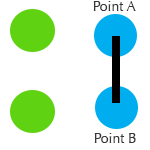
我的目标:
如果我将手指从A点(objectA)拖动到B点(ObjectB),如何从画布中删除这2视图对象?我添加了一个方法:
objectA.delete();
objectB.delete();当我通过MotionEvent拖动手指时,它应该同时删除A和B,但是它只删除其中一个而不是另一个,所以我认为它不是追溯性的吗?
代码如下:
switch (event.getAction()) {
case MotionEvent.ACTION_DOWN:
   /// get the child that corresponds to the first touch
    DotView objectA = getChildForTouch((TableLayout) v, x, y);

    return true;
 case MotionEvent.ACTION_MOVE:

 ///used the x - y to get the object for every other  shape the user`S finger passes over.
 DotView objectB = getChildForTouch((TableLayout) v, x, y);


   /// just update positions
   line.setCoords(mStartX, mStartY, (int) x, (int) y);

 objectA.delete(); ///Delete first shape
 objectB.delete(); ///Delete second shape

break;

case MotionEvent.ACTION_UP:
    ///Gets the last shape where the user released their fingers
    endView = getChildForTouch((TableLayout) v, x, y);
break;
DotView extends View 类:中的删除方法
private static class DotView extends View {

        private static final int DEFAULT_SIZE = 100;
        private Paint mPaint = new Paint();
        private Rect mBorderRect = new Rect();
        private Paint mCirclePaint = new Paint();
        private int mRadius = DEFAULT_SIZE / 4;

        public DotView(Context context) {
            super(context);
            mPaint.setStrokeWidth(2.0f);
            mPaint.setStyle(Style.STROKE);
            mPaint.setColor(Color.RED);
            mCirclePaint.setColor(Color.CYAN);
        }

        @Override
        protected void onDraw(Canvas canvas) {
            canvas.drawColor(Color.parseColor("#0099cc"));
            mBorderRect.left = 0;
            mBorderRect.top = 0;
            mBorderRect.right = getMeasuredWidth();
            mBorderRect.bottom = getMeasuredHeight();
            canvas.drawRect(mBorderRect, mPaint);
            canvas.drawCircle(getMeasuredWidth() / 2, getMeasuredHeight() / 2,
                    mRadius, mCirclePaint);
        }


        public void delete(){
        mPaint.setColor(Color.TRANSPARENT);
        }

    }
只是一些简单的假删除圆圈
谢谢各位..。如果需要,可以提供更多的代码。
编辑:,如果我能以任何其他方式完成这个任务,请随意分享。(在网格上画圆圈,删除我用手指画线的那些)
回答 1
Stack Overflow用户
回答已采纳
发布于 2016-06-20 14:28:20
首先,尝试将您的delete()方法更改为:
public void delete(){
    mPaint.setColor(Color.TRANSPARENT);
    invalidate();
}您需要让您的View知道您希望它重新绘制自己(这就是为什么invalidate()调用)。
页面原文内容由Stack Overflow提供。腾讯云小微IT领域专用引擎提供翻译支持
原文链接:
https://stackoverflow.com/questions/37913305
复制相关文章
相似问题
腾讯云开发者

Copyright © 2013 - 2026 Tencent Cloud. All Rights Reserved. 腾讯云 版权所有
深圳市腾讯计算机系统有限公司 ICP备案/许可证号:粤B2-20090059  粤公网安备44030502008569号
腾讯云计算(北京)有限责任公司 京ICP证150476号 | 京ICP备11018762号