
使用限制内容安全策略(CSP)使角工作
我无法使基本Angular2 (最终)应用程序使用以下限制性CSP。
default-src 'none';
script-src 'self';
style-src 'self';
font-src 'self';
img-src 'self' data:;
connect-src 'self'在lang.js中有一个不安全级别的错误,在zone.js中有两个。你能提供一个解决方案吗?
用角CLI复制的步骤
我创建了一个GitHub存储库。您还可以按照下面的说明操作。
使用Webpack 6.0.8的最后一个角CLI和下面的说明创建的新应用程序。
ng new csp-test在index.html中插入定义以下限制性内容安全策略的元标记。
<meta
  http-equiv="Content-Security-Policy"
  content="default-src 'none';script-src 'self';style-src 'self';font-src 'self';img-src 'self' data:;connect-src 'self'">
然后送达应用程序。
ng serve访问http://localhost:4200/时,该页面不会加载,因为脚本被CSP阻塞。
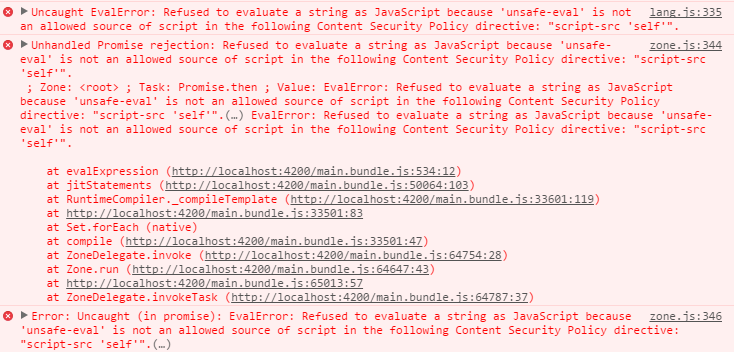
错误
lang.js
lang.js:335 Uncaught EvalError: Refused to evaluate a string as JavaScript because 'unsafe-eval' is not an allowed source of script in the following Content Security Policy directive: "script-src 'self'".用源代码。
335: return new (Function.bind.apply(Function, [void 0].concat(fnArgNames.concat(fnBody))))().apply(void 0, fnArgValues);zone.js
zone.js:344 Unhandled Promise rejection: Refused to evaluate a string as JavaScript because 'unsafe-eval' is not an allowed source of script in the following Content Security Policy directive: "script-src 'self'".
 ; Zone: <root> ; Task: Promise.then ; Value: EvalError: Refused to evaluate a string as JavaScript because 'unsafe-eval' is not an allowed source of script in the following Content Security Policy directive: "script-src 'self'".

zone.js:346 Error: Uncaught (in promise): EvalError: Refused to evaluate a string as JavaScript because 'unsafe-eval' is not an allowed source of script in the following Content Security Policy directive: "script-src 'self'".(…)
用源代码。
343: if (rejection) {
344:     console.error('Unhandled Promise rejection:', rejection instanceof Error ? rejection.message : rejection, '; Zone:', e.zone.name, '; Task:', e.task && e.task.source, '; Value:', rejection, rejection instanceof Error ? rejection.stack : undefined);
345: }
346: console.error(e);回答 4
Stack Overflow用户
发布于 2016-10-10 19:34:11
使用提前编译解决了这个问题。以下命令可用于构建使用限制性CSP的应用程序。
ng build --prod要在本地测试它,可以使用
ng serve --prodStack Overflow用户
发布于 2019-08-07 14:27:59
编辑的@角/cli>=8.2的答案
在这个Github线程中,可以使用angular.json中的index属性来控制应用程序的HTML的生成:
build: {
  ...
  "configurations": {
    "production": {
      "index": {
        "input": "src/index.production.html",
         "output": "index.html"
       },
      ...
    }
  }
}
原始答案
我已经找到了一种在我的生产环境中使用限制性CSP的方法,同时仍然能够使用JTI编译器进行开发。
- 向
index.production.html文件夹中添加第二个文件:src。 - 将
index.html的内容复制到该文件中,并添加限制性CSP头。
<meta http-equiv="Content-Security-Policy"
content="default-src 'none';
  frame-src 'self';
  script-src 'self';
  style-src 'self' 'unsafe-inline';
  font-src 'self';
  img-src 'self' data:;
connect-src 'self'">- 然后,将以下内容添加到
angular.json中:
build: {
  ...
  "configurations": {
    "production": {
      "fileReplacements": [
        {
          "replace": "src/index.html",
          "with": "src/index.production.html"
        }
      ],
      ...
    }
  }
}这确保了当您运行生产构建时,它将使用带有限制的index.production.html,并且当您在本地运行它时,您可以使用JTI编译器。
Stack Overflow用户
发布于 2021-02-05 01:16:09
这个问题发生在部署在一个服务器中的WildFly 9中。这个错误在WildFly服务器配置中,在standalone.xml中设置的响应头中,而不是像我想的那样在index.html中。
standalone.xml
<filters>
    <response-header name="server-header" header-name="Server" header-value="JBoss-EAP/7"/>
    <response-header name="x-powered-by-header" header-name="X-Powered-By" header-value="Undertow/1"/>
    >>> Here >>> <response-header name="Content-Security-Policy" header-name="Content-Security-Policy" header-value="default-src 'self'; style-src 'self' 'unsafe-inline'"/>
    <response-header name="x-frame-options" header-name="X-Frame-Options" header-value="SAMEORIGIN"/>
    <response-header name="x-xss-protection" header-name="X-XSS-Protection" header-value="1; mode=block"/>
    <response-header name="x-content-type-options" header-name="X-Content-Type-Options" header-value="nosniff"/>
    <response-header name="strict-transport-security" header-name="Strict-Transport-Security" header-value="max-age=31536000; includeSubDomains;"/>
    <response-header name="my-custom-header" header-name="my-custom-header" header-value="my-custom-value"/>
</filters>注:重新启动WildFly Server
./jboss-cli.sh --connect command=:reloadjboss-cli位于WildFly服务器的bin文件夹中
https://stackoverflow.com/questions/38734708
复制相似问题
腾讯云开发者

Copyright © 2013 - 2026 Tencent Cloud. All Rights Reserved. 腾讯云 版权所有
深圳市腾讯计算机系统有限公司 ICP备案/许可证号:粤B2-20090059  粤公网安备44030502008569号
腾讯云计算(北京)有限责任公司 京ICP证150476号 | 京ICP备11018762号