
使用字符串数组生成表视图
我有一个CSV文件,我想要导入到一个表视图,它看起来如下。
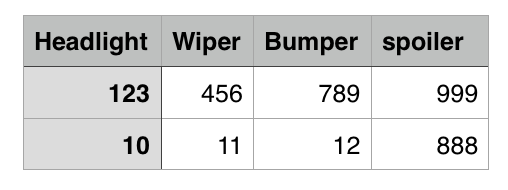
我希望Header、、Headlight、、、Wiper、、、保险杠、和扰流板都是区段的文本和列在每一节下面的列的值。
因此,TableView应该是这样的:
前照灯
123
10
雨刮器
456
11
保险杠
789
12
拼写器
999
888
到目前为止,我的CSV导入程序正在返回一个字符串数组[ String ]。
我的代码如下所示
class ViewController: UIViewController, UITableViewDataSource, UITableViewDelegate {

@IBOutlet weak var tableView: UITableView!

@IBAction func buttonPressed(_ sender: Any) {
    print(bins)
}

var bins = [[String]]()

override func viewDidLoad() {
    super.viewDidLoad()

    tableView.delegate = self
    tableView.dataSource = self

    importCsv()
}

override func didReceiveMemoryWarning() {
    super.didReceiveMemoryWarning()
    // Dispose of any resources that can be recreated.
}

//MARK: -Table View Delegate & DataSource


func numberOfSections(in tableView: UITableView) -> Int {
    return self.bins.count > 0 ? self.bins[0].count : 0
}


func tableView(_ tableView: UITableView, numberOfRowsInSection section: Int) -> Int {
    return self.bins.count
}


func tableView(_ tableView: UITableView, cellForRowAt indexPath: IndexPath) -> UITableViewCell {
    let cell = tableView.dequeueReusableCell(withIdentifier: "BinCell")!


    let bin = self.bins[indexPath.row]
    cell.textLabel?.text = bin[0]
    return cell
}

func importCsv() -> Void {
    let path =  "/Users/philipchan/Downloads/test.csv"
    let defaultImporter = CSVImporter<[String]>(path: path)

    defaultImporter.startImportingRecords{ $0 }.onFinish { importedRecords in
        self.bins = importedRecords
        print(self.bins)
        self.tableView.reloadData()
    }
}
}
这是我要返回的2d数组,这是输出输出的结果。
[["Headlight", "Wiper", "Bumper", "spoiler"], ["123", "456", "789", "999"], ["10", "11", "12", "888"]]在表视图中呈现这个2D数组的正确方法是什么?
回答 1
Stack Overflow用户
发布于 2016-11-04 19:38:00
表视图不显示2D数据。它们显示一个一维列表,这些列表可以或者不能被分成几个部分。
如果是我,而且我只需要显示4列数据,我可能会创建每个单元格中都有4个标签的单元格,以及一个显示列标题的标题,就像在文章开头显示的表一样。这似乎是显示数据的最清晰的方式。
总之,关于你的问题:
你的数据是一种螺旋式的格式。
它是按行排列的,然后按每一行数组中的部分排列。更令人困惑的是,您的章节标题位于数组的第一位置。
通常,您需要的数据是外部数组为节,然后是包含给定节中每一行的数据的内部数组。这样,您就可以使每个节的行数不同。
您可能应该“剥离”部分标题,然后使用数组的其余部分提供表视图的数据源方法。就像这样:
var sectionTitles: [String]!
var tableData: [[String]]!

/**
 This is the input data for our table view. The section titles are in the first array.
 Use a DidSet method so that if the input "bins" variable changes, we format the data
 And reload the table
 */
var bins: [[String]]? {

  //If the bins array changed, parse it's data.
  didSet {
    if let bins = bins {

      //Peel off the section titles into a separate array
      sectionTitles = bins[0]

      //Remove the section titles from the tableData array
      tableData = Array(bins.dropFirst(1))

      //Tell the table view to reload itself.
      tableView.reloadData()
    }
  }
}

override func viewDidLoad() {
  super.viewDidLoad()

  bins = [
    ["Headlight", "Wiper", "Bumper", "Spoiler"],
    ["123", "456", "789", "999"],
    ["10", "11", "12", "888"]
  ]
}

override func numberOfSections(in tableView: UITableView) -> Int {
  return sectionTitles?.count ?? 0
}

override func tableView(_ tableView: UITableView, numberOfRowsInSection section: Int) -> Int {
  return tableData.count
}

override func tableView(_ tableView: UITableView, cellForRowAt indexPath: IndexPath) -> UITableViewCell {
  let cell = tableView.dequeueReusableCell(withIdentifier: "cell")
  let row = indexPath.row
  let section = indexPath.section
  cell?.textLabel?.text = tableData[row][section]
  return cell!
}

override func tableView(_ tableView: UITableView,
                        titleForHeaderInSection section: Int) -> String {
  return sectionTitles[section]
}
编辑:
上面的代码可以工作,但是按行存储数据,以及在每一行中按节存储数据都是错误的。表视图设计为有任意数量的节,然后每个节可以在该节中有不同的行数。当您将数据存储为每一行中的行和节数据数组时,您无法做到这一点。相反,您可以有给定的行数,然后在每一行中有一个可变的节数,这就是而不是表视图的工作方式。
考虑到您正在从CSV文件中读取数据,您可能对输入格式没有太多选择,但您当然可以对其进行重构,以便按节组织,然后在每一节中按行排列。以下是与上述代码相同的代码,但以一种更有意义的方式对数据进行重组:
var sectionTitles: [String]!
var tableData: [[String]]!

/**
 This is the input data for our table view. The section titles are in the first array.
 Use a DidSet method so that if the input "bins" variable changes, we format the data
 And reload the table
 */
var bins: [[String]]? {

  //If the bins array changed, parse it's data.
  didSet {
    if let bins = bins {

      //Peel off the section titles into a separate array
      sectionTitles = bins[0]

      //Remove the section titles from the tableData array
      let inputData  = Array(bins.dropFirst(1))

      //The code below restructures the arrays to be "section major". It assumes the arrays are not
      //"jagged" and will crash if they ARE jagged.

      //Create a new array of arrays for the output
      var output = [[String]]()
      let rows = inputData.count
      let sections = inputData.first?.count ?? 0
      for section in 0..<sections {

        //Create an array for this section
        var aSection = [String]()
        for row in 0..<rows {
          //populate this section with an entry from each row
          aSection.append(inputData[row][section])
        }
        //Add the finished section to the output array
        output.append(aSection)
      }

      tableData = output
      //Tell the table view to reload itself.
      tableView.reloadData()
    }
  }
}

override func viewDidLoad() {
  super.viewDidLoad()

  bins = [
    ["Headlight", "Wiper", "Bumper", "Spoiler"],
    ["123", "456", "789", "999"],
    ["10", "11", "12", "888"]
  ]
}

override func numberOfSections(in tableView: UITableView) -> Int {
  return sectionTitles?.count ?? 0
}

override func tableView(_ tableView: UITableView,
                        numberOfRowsInSection section: Int) -> Int {
  guard tableData.count > section else {
    return 0
  }
  return tableData[section].count
}

override func tableView(_ tableView: UITableView, cellForRowAt indexPath: IndexPath) -> UITableViewCell {
  let cell = tableView.dequeueReusableCell(withIdentifier: "cell")
  let row = indexPath.row
  let section = indexPath.section
  cell?.textLabel?.text = tableData[section][row]
  return cell!
}

override func tableView(_ tableView: UITableView,
                        titleForHeaderInSection section: Int) -> String {
  return sectionTitles[section]
}
编辑2:
在重新阅读了我上面的答案后,我建议对这个方法进行更新.拥有一个节标题数组,然后是一个单独的二维节/行表数据数组,看起来很脆弱。(区段标题的计数可能与二维数组中的区段计数不同。)
相反,我建议为每个部分创建一个结构(称为SectionData),该结构将包含一个节标题和该节的行数据数组。然后我将创建一个SectionData数组。
这样,您就不必维护两个单独的数组,并保持它们的项计数保持同步。
struct SectionData: {
   var sectionTitle: String
   var rowData: [RowData]
}

struct RowData {
    var rowString: String
    var rowValue: Int // Some value that you display for each row
    // More row data could go here
}

var sections = [SectionData]()https://stackoverflow.com/questions/40429955
复制相似问题
腾讯云开发者

Copyright © 2013 - 2026 Tencent Cloud. All Rights Reserved. 腾讯云 版权所有
深圳市腾讯计算机系统有限公司 ICP备案/许可证号:粤B2-20090059  粤公网安备44030502008569号
腾讯云计算(北京)有限责任公司 京ICP证150476号 | 京ICP备11018762号