
安卓ImageView - 16:9
我需要将位图设置为ImageView,以保持16:9的比例。你有什么建议吗?主要解决方案可能在自定义onMeasure的重写方法ImageView中,但是如何解决呢?
回答 4
Stack Overflow用户
发布于 2016-11-08 19:13:26
编辑01/03/2019:经过这么长时间,我强烈推荐使用@Eugene下面介绍的ConstraintLayout。我个人永远不会使用我的图像视图,通过重写onMeasure来实现数学。
编辑03/29/2018:我下面的答案可能很简单,但可能是太多的原始答案。如果你想利用Google的ConstraintLayout已经给出的内容,请跟随这个答案或向下滚动,查看@Eugene的答案。
旧答案:
public class CustomImageView extends ImageView {

    // some other necessary things

    @Override
    protected void onMeasure(int widthMeasureSpec, int heightMeasureSpec) {
        super.onMeasure(widthMeasureSpec, heightMeasureSpec);

        int width = getMeasuredWidth();

        //force a 16:9 aspect ratio
        int height = Math.round(width * .5625f);
        setMeasuredDimension(width, height);
    }
}
然后在您的xml中
<path.to.package.CustomImageView
    android:layout_width="wrap_content"
    android:layout_height="wrap_content"
android:src="@drawable/img"/>Stack Overflow用户
发布于 2017-08-22 15:58:25
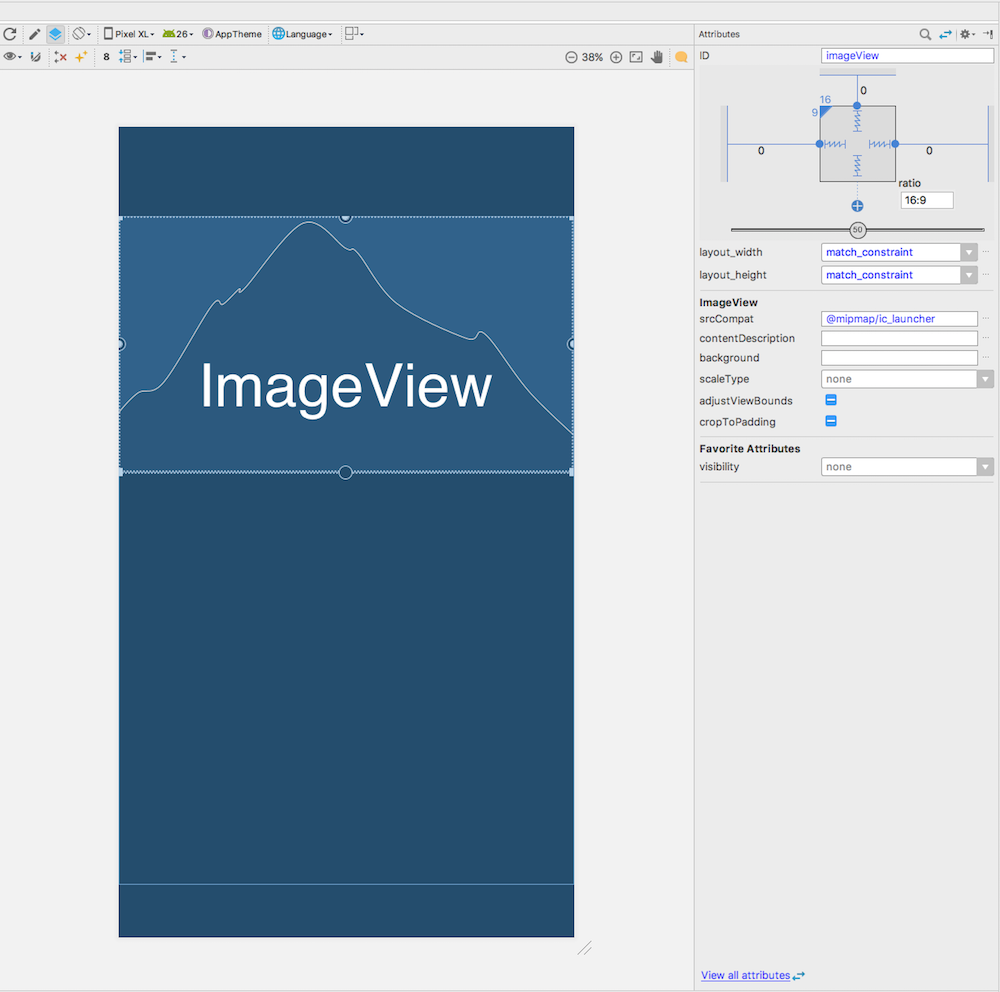
由于PercentFrameLayout和PercentRelativeLayout在API级别26.0.0中被废弃,我建议您考虑使用ConstraintLayout为ImageView保持16:9的比率。ConstraintLayout是为Android平台构建响应性UI的强大工具,您可以在这里找到更多细节使用ConstraintLayout构建响应用户界面。
下面是如何将ImageView构建到ConstraintLayout中以保持16:9比例的示例:
<android.support.constraint.ConstraintLayout
    xmlns:android="http://schemas.android.com/apk/res/android"
    xmlns:app="http://schemas.android.com/apk/res-auto"
    android:layout_width="match_parent"
    android:layout_height="match_parent">

    <ImageView
        android:id="@+id/imageView"
        android:layout_width="0dp"
        android:layout_height="0dp"
        android:layout_marginEnd="0dp"
        android:layout_marginStart="0dp"
        android:layout_marginTop="0dp"
        app:srcCompat="@mipmap/ic_launcher"
        app:layout_constraintDimensionRatio="H,16:9"
        app:layout_constraintStart_toStartOf="parent"
        app:layout_constraintEnd_toEndOf="parent"
        app:layout_constraintTop_toTopOf="parent" />

</android.support.constraint.ConstraintLayout>不要忘记将constraint-layout依赖项添加到模块的build.gradle文件中
implementation "com.android.support.constraint:constraint-layout:1.0.2"或者,不要编辑XML文件,而是直接在布局编辑器中编辑布局:
Stack Overflow用户
发布于 2016-11-08 19:19:35
编辑: Google已经正式反对支持库%启动API 26,您应该尽快远离它.
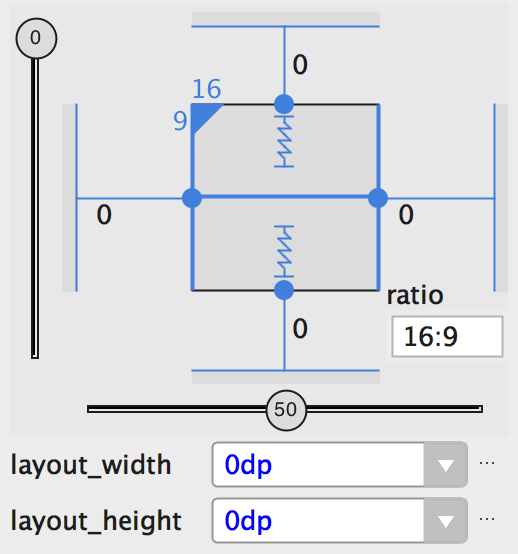
如果将视图大小设置为“匹配约束”(0dp),则可以将视图大小设置为16:9。要启用比率,请单击Toggle高宽比约束(图10中的标注1),然后在显示的输入中输入宽度:高度比。 如果宽度和高度都被设置为匹配约束,则可以单击Toggle高宽比约束来选择基于另一个维度比率的维度。视图检查器通过将相应的边缘与实线连接来指示将哪个设置为比率。 例如,如果将两边设置为“匹配约束”,则单击“切换纵横比约束”两次,将宽度设置为高度的比率。现在,整个大小取决于视图的高度(可以以任何方式定义),如下图所示:
更多信息,请参阅: https://developer.android.com/training/constraint-layout/index.html#adjust-the-view-size
支持库中有一个名为PercentFrameLayout和PercentRelativeLayout的东西。
<android.support.percent.PercentFrameLayout
  android:layout_width="match_parent"
  android:layout_height="wrap_content">
  <ImageView
    app:layout_widthPercent="100%"
    app:layout_aspectRatio="178%"
    android:scaleType="centerCrop"
    android:src="@drawable/header_background"/>
  <!-- The rest of your layout -->
</android.support.percent.PercentRelativeLayout>如果仔细查看上面的布局,您将看到所讨论的ImageView (需要在16:9修正)被包装在一个PercentFrameLayout上,并且在ImageView上设置了两个属性,这是您以前可能没有看到的:
app:layout_widthPercent="100%"
app:layout_aspectRatio="178%"因此,(1)您需要定义一个维度(宽度或高度)作为我们的ImageView的主导维度。在这种情况下,ImageView将垂直扩展到它的最大宽度(如android:layout_width="match_parent")和(2),您需要在百分比(因此是库的名称)中设置高宽比,在本例中为178% (16/9 = 1.77777777778或更多,简单地说是1.78:1或178%)。
阅读有关百分比支持库这里的更多信息。
https://stackoverflow.com/questions/40494623
复制相似问题
腾讯云开发者

Copyright © 2013 - 2026 Tencent Cloud. All Rights Reserved. 腾讯云 版权所有
深圳市腾讯计算机系统有限公司 ICP备案/许可证号:粤B2-20090059  粤公网安备44030502008569号
腾讯云计算(北京)有限责任公司 京ICP证150476号 | 京ICP备11018762号