
如何在ToolTip中对齐控件的右边和C#消息
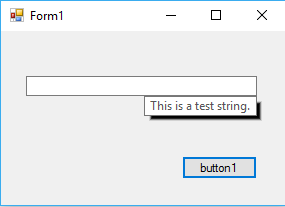
我希望在ToolTip下面显示一个TextBox消息,但也希望它们对齐。
我能够将ToolTip消息定位在文本框的右侧,因此我尝试移动消息长度所留下的消息。
因此,我尝试使用TextRenderer.MeasureText()获取字符串长度,但是位置有点偏离,如下所示。
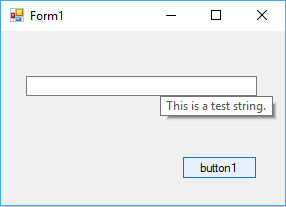
private void button1_Click(object sender, EventArgs e)
{
   ToolTip myToolTip = new ToolTip();

   string test = "This is a test string.";
   int textWidth = TextRenderer.MeasureText(test, SystemFonts.DefaultFont, textBox1.Size, TextFormatFlags.LeftAndRightPadding).Width;
   int toolTipTextPosition_X = textBox1.Size.Width - textWidth;

   myToolTip.Show(test, textBox1, toolTipTextPosition_X, textBox1.Size.Height);
}
我尝试在MeasureText()函数中使用不同的标志,但是没有帮助,而且由于ToolTip消息有一个填充,所以我选择了TextFormatFlags.LeftAndRightPadding。
明确地说,这就是我想要达到的目标:
回答 2
Stack Overflow用户
发布于 2016-12-24 16:58:20
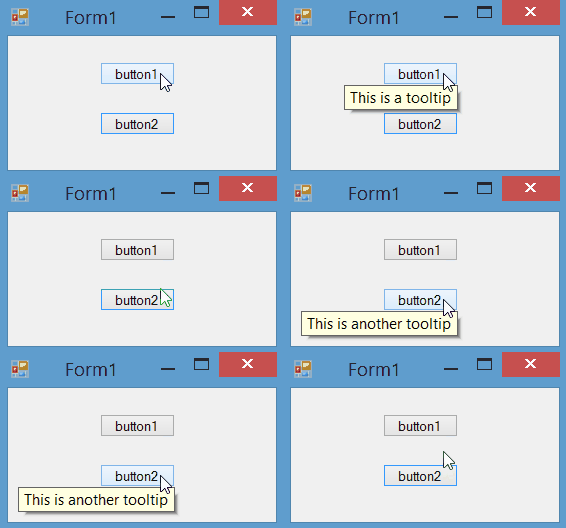
可以将OwnerDraw属性的ToolTip设置为true。然后,您可以在Draw事件中控制工具提示的外观和位置。在下面的示例中,我找到了工具提示句柄,并使用MoveWindow Windows函数将其移动到所需的位置:
[System.Runtime.InteropServices.DllImport("User32.dll")]
static extern bool MoveWindow(IntPtr h, int x, int y, int width, int height, bool redraw);
private void toolTip1_Draw(object sender, DrawToolTipEventArgs e)
{
    e.DrawBackground();
    e.DrawBorder();
    e.DrawText();
    var t = (ToolTip)sender;
    var h = t.GetType().GetProperty("Handle",
      System.Reflection.BindingFlags.NonPublic | System.Reflection.BindingFlags.Instance);
    var handle = (IntPtr)h.GetValue(t);
    var c = e.AssociatedControl;
    var location = c.Parent.PointToScreen(new Point(c.Right - e.Bounds.Width, c.Bottom));
    MoveWindow(handle, location.X, location.Y, e.Bounds.Width, e.Bounds.Height, false);
}
Stack Overflow用户
发布于 2016-12-24 17:01:29
ToolTip字体比SystemFonts.DefaultFont字体大,所以测量不正确。我不知道ToolTip字体的确切变量是什么,但其他许多SystemFonts被配置为Segoe /size 9,这是我的PC中的工具提示字体。此外,您还必须为填充添加6px。
private void button1_Click(object sender, EventArgs e)
{
    ToolTip myToolTip = new ToolTip();

    string test = "This is a test string.";
    int textWidth = TextRenderer.MeasureText(test, SystemFonts.CaptionFont, textBox1.Size, TextFormatFlags.LeftAndRightPadding).Width;
    textWidth += 6;
    int toolTipTextPosition_X = textBox1.Size.Width - textWidth;

    myToolTip.Show(test, textBox1, toolTipTextPosition_X, textBox1.Size.Height);
}
为了实现完美的控制,您可以使用Tooltip.OwnerDraw和事件Tooltip.Draw自行绘制工具提示,选择字体、填充和外观。
https://stackoverflow.com/questions/41314678
复制相似问题
腾讯云开发者

Copyright © 2013 - 2026 Tencent Cloud. All Rights Reserved. 腾讯云 版权所有
深圳市腾讯计算机系统有限公司 ICP备案/许可证号:粤B2-20090059  粤公网安备44030502008569号
腾讯云计算(北京)有限责任公司 京ICP证150476号 | 京ICP备11018762号