
WlanHostedNetworkStartUsing或windows 10内置移动热点的工作方式
我正在编写一个程序来创建热点。我使用WlanHostedNetworkStartUsing,但它返回ERROR_INVALID_STATE。然而,当我调用WlanHostedNetworkInitSettings时,它会返回琥珀色。根据记录片 (备注部分的最后一段),应该在“控制面板\网络”和“Internet\网络和共享中心”下创建一个虚拟无线连接,但它没有。
我搜索了一下发现了这个:
当我运行netsh wlan show drivers时,它表示:
Driver                    : Intel(R) Dual Band Wireless-AC 3165
Vendor                    : Intel Corporation
Provider                  : Intel
Date                      : 07-Sep-16
Version                   : 19.20.0.6
INF file                  : ????
Type                      : Native Wi-Fi Driver
Radio types supported     : 802.11b 802.11g 802.11n 802.11a 802.11ac
/ ...
Hosted network supported  : No  <--- Here
/ ...
所以它说我的wifi适配器根本不共享wifi (我有来自HP站点的最后一个驱动程序)。
但是当我尝试用Windows10内置的工具创建hotspot时,它可以工作。
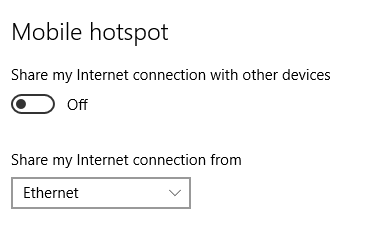
问题是: windows工具如何做到这一点,以及如何在我的应用程序中使用这种机制?
回答 3
Stack Overflow用户
发布于 2018-06-06 03:51:06
原06/06/2018年评论(见更新) 微软不赞成无线局域网的HostedNetwork功能,它不适用于Win10驱动程序。要在Win10中使用旧模式,您必须找到并安装从2015年开始的驱动程序(8.1或更早版本,取决于供应商)。 Win10驱动模型改变了HostedNetwork的基于WiFi直接的机制,并从应用程序开发人员手中夺取了控制权,并将该特性转移到内核中。如果您仔细研究一下,有一些示例可以展示如何使用现代的com (RT) UWP应用程序库来配置WiFi直接HostedNetwork。这是微软没有解释过的一种皮塔,在网络上评论这一点的大多数人都不理解它,它看上去主要是微软的两步失败,它的产品功能被削减,使得船期安排和团队之间的重新组织改变了WiFi和热点的所有权和计划。WiFi直接支持--理论上--在设备之间建立更简单的配对和身份验证模型。但是目前的实现涉及蓝牙,因此,除了支持有限的移动设备WiFi 2.0场景之外,它还是值得怀疑的。如果您正在使用无头设备或IoT设备场景,则此操作会中断。 我在这方面做了很多工作。如果您在WiFi硬件中有选择,我强烈推荐使用英特尔驱动程序的硬件芯片组(它们是可靠的)。 如果您的场景允许UX交互,您可能会发现这个App应用程序很有帮助。http://www.topuwp.com/windowsapps/wifi-direct-access-point/598084.html
====================
02/27/2020更新该故事.
当Hosted network supported : No在您的适配器上无法使用遗留托管网络支持时,因为您在Windows10中有WiFi Direct,等等。在这种情况下,您会想知道并使用对WiFi Direct支持的部分进行很少评论的内容:
命令行到HotSpot设置:start ms-settings:network-mobilehotspot
讨论PowerShell编程访问WinRT HotSpot APIs的文章。
通过cmd/批处理/powershell启用Win10内置热点
关键词:“虚拟Wi”、SoftAP、AdHoc IBSS、MobileHotSpot、netsh wlan HostedNetwork
====================
如果没有工作的C++/WinRT代码示例,这将是不完整的,如下所示:
#include <winrt/Windows.Networking.Connectivity.h>
#include <winrt/Windows.Networking.NetworkOperators.h>
#include <winrt/Windows.Devices.WiFiDirect.h>
#include <winrt/Windows.Security.Credentials.h>
namespace winrt { // /ZW embed in :<winrt> when `Windows` is ambiguously defined
  static void af_winrt_wifi_hotspot_test() {
    // start ms-settings:network-mobilehotspot
    init_apartment(); // apartment_type::multi_threaded
    if (false /* play as you wish to test this all in simple c++ console app, I used clang */) {
      auto publisher = Windows::Devices::WiFiDirect::WiFiDirectAdvertisementPublisher();
      auto advertisement = publisher.Advertisement();
      advertisement.ListenStateDiscoverability(Windows::Devices::WiFiDirect::WiFiDirectAdvertisementListenStateDiscoverability::Intensive);
      advertisement.IsAutonomousGroupOwnerEnabled(true);
      auto legacySettings = advertisement.LegacySettings();
      legacySettings.IsEnabled(true);
      legacySettings.Ssid(L"your-hotspot-name");
      auto credential = Windows::Security::Credentials::PasswordCredential(); credential.Password(L"the-password!");
      legacySettings.Passphrase(credential);
      publisher.Start();
    }
    else {
      auto connectionProfile{ Windows::Networking::Connectivity::NetworkInformation::GetInternetConnectionProfile() };
      auto tetheringManager = Windows::Networking::NetworkOperators::NetworkOperatorTetheringManager::CreateFromConnectionProfile(connectionProfile);
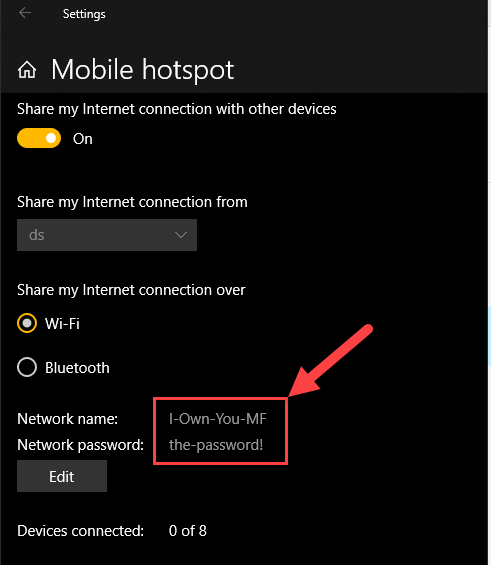
      auto credential = Windows::Security::Credentials::PasswordCredential(); credential.Password(L"the-password!");
      auto conf = Windows::Networking::NetworkOperators::NetworkOperatorTetheringAccessPointConfiguration();
      conf.Ssid(L"I-Own-You"); conf.Passphrase(credential.Password());
      auto oldConf = tetheringManager.GetCurrentAccessPointConfiguration();
      auto oldSsid = oldConf.Ssid(); auto oldPwd = oldConf.Passphrase();
      tetheringManager.ConfigureAccessPointAsync(conf); // Sets new ssid/pwd here
      switch (tetheringManager.TetheringOperationalState()) {
      case Windows::Networking::NetworkOperators::TetheringOperationalState::Off: {
        auto ioAsync = tetheringManager.StartTetheringAsync();
        auto fResult = ioAsync.get();
        }
        break;
      case Windows::Networking::NetworkOperators::TetheringOperationalState::On: {
        // auto ioAsync = tetheringManager.StopTetheringAsync();
        // auto fResult = ioAsync.get();
        }
        break;
      case Windows::Networking::NetworkOperators::TetheringOperationalState::InTransition:
      default:
        break;
      }
    }
    clear_factory_cache();
    uninit_apartment();
  }
}在这里查找与WiFiDirectAdvertisementPublisher相关的较早的Microsoft示例
- WiFiDirectLegacyAPDemo_v1.0.zip on C++ Microsoft
- C# Microsoft IoT示例OnboardingAccessPoint.cs on GitHub页面
- 移动宽带网络,使用IMbnConnectionProfileManager::CreateConnectionProfile
- Wi网络,使用WlanSetProfile功能
- 移动热点 XML
WFD_GROUP_OWNER_PROFILE配置文件位于dir-path:C:\ProgramData\Microsoft\Wlansvc\Profiles\Interfaces\中。
网络上有这么多文章,WiFi-Direct造成了如此多的混乱。
我花了整整两天才弄清楚这一切。就我的时间而言,这很重要。
微软(我曾经是架构师)没有理由不创建一个关于这个非常受欢迎的话题的博客。更别提让netsh和Ad Wifi compat支持了,而不是让如此神秘和令人困惑的用于开发人员、终端用户和开发人员。
--享受大卫
上面的代码非常简洁,并公开了所有场景的工作c++/WinRT代码。
现在我已经在EdgeS中捆绑了这个包: EdgeShell/EdgeScript/afm-scm工具集
]5

Stack Overflow用户
发布于 2017-03-01 00:40:06
以管理的形式打开命令提示符,并尝试以下命令:
netsh wlan set hostednetwork mode=allow ssid=“OSToto Hotspot” key=“12345678”ssid是网络的名称,密钥是密码。您可以将它们命名为上面的命令。
然后跑:
netsh wlan start hostednetwork休息之前,再说什么,我想通过你的源代码。
Stack Overflow用户
发布于 2018-01-09 01:02:59
您的计算机不支持托管网络。
正因为如此,这不管用。
https://stackoverflow.com/questions/41829382
复制相似问题
腾讯云开发者

Copyright © 2013 - 2026 Tencent Cloud. All Rights Reserved. 腾讯云 版权所有
深圳市腾讯计算机系统有限公司 ICP备案/许可证号:粤B2-20090059  粤公网安备44030502008569号
腾讯云计算(北京)有限责任公司 京ICP证150476号 | 京ICP备11018762号