
如何创建像facebook Messenger这样的聊天气泡
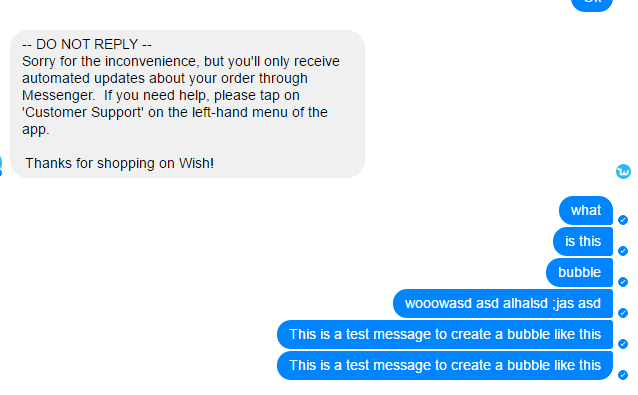
我该如何创建这样的聊天泡泡。更具体地说,如何将一种类型的用户的两条或更多的连续消息分组为一个整体。例如,对于发送方--第一条消息的右下边框为0,中间消息的右上边框为0,底部为0边框半径,最后一条消息的右上边框半径为0。我是否必须使用javascript,还是可以使用css完成。
HTML结构
<ul>
 <li class="him">By Other User</li>
 <li class="me">By this User, first message</li>
 <li class="me">By this User, secondmessage</li>
 <li class="me">By this User, third message</li>
 <li class="me">By this User, fourth message</li>
</ul>
我应该使用什么样的css类/样式?
回答 4
Stack Overflow用户
发布于 2017-02-15 18:24:48
这是一个相当基本的例子,但它应该解释所有的基础,你需要。
大多数解决方案都在+ 邻接同胞选择器中。在本例中,它用于将不同的边框半径应用于来自同一人的行中的多条消息。
ul{
  list-style: none;
  margin: 0;
  padding: 0;
}

ul li{
  display:inline-block;
  clear: both;
  padding: 20px;
  border-radius: 30px;
  margin-bottom: 2px;
  font-family: Helvetica, Arial, sans-serif;
}

.him{
  background: #eee;
  float: left;
}

.me{
  float: right;
  background: #0084ff;
  color: #fff;
}

.him + .me{
  border-bottom-right-radius: 5px;
}

.me + .me{
  border-top-right-radius: 5px;
  border-bottom-right-radius: 5px;
}

.me:last-of-type {
  border-bottom-right-radius: 30px;
}<ul>
<li class="him">By Other User</li>
<li class="me">By this User, first message</li>
<li class="me">By this User, secondmessage</li>
<li class="me">By this User, third message</li>
<li class="me">By this User, fourth message</li>
</ul>
Stack Overflow用户
发布于 2017-02-15 18:47:12
在创建文本泡泡时,我建议遵循本文的帮助:https://www.templatemonster.com/blog/chat-bubbles-css-ui-tutorial/
对于开始和结束气泡,使用JQuery根据其父容器识别和更改它们的CSS属性。如果您想要发送的图像,您将需要将它们包装在li中,并在相对对象( li)中向右执行浮动或绝对位置操作。
<ul class="ulContainer">
  <li>test1</li>
  <li>test1</li>
  <li>test1</li>
</ul>
Css:
.ulContainer li{
  width:200px;
  height:20px;
  background-color:#9abff9;
  list-style-type:none;
  margin:10px 0 10px 0;
  padding: 3px 3px 3px 5px;
  border-radius: 10px 2px 2px 10px;
}
使用下面的脚本更改第一个和最后一个li:
$('.ulContainer li:first').css('border-top-right-radius','10px');
$('.ulContainer li:last').css('border-bottom-right-radius','10px');这是JSFiddle:https://jsfiddle.net/s60dgfw2/
基于您的评论的更新:
我相信这是你在不使用JQuery的情况下最接近你想要达到的目标。您需要高级选择器,您只能通过.each()语句通过JQuery进行分组。或者向列表中添加多个css类。
有关如何使用多个CSS类执行此操作,请参见LGSon的反应。
或见下文:
https://jsfiddle.net/5dcto0td/
.fancyContainer{
  border: 1px solid #555;
  position:relative;
  width:300px;
  padding:5px;
  overflow:hidden;
}
.chatBox {
  width: 300px;
  list-style: none;
  margin: 0 0 0 -40px;
  position:0;
}

.chatBox li {
  margin: 5px 0 5px 0;
  padding: 3px 5px 3px 5px;
}

/*Set up initial chat element for .me*/
.chatBox .me {
  min-height: 20px;
  float:right;
  clear: both;
  background-color: #34a1ef;
  border-radius: 10px 2px 2px 10px;
}

/*Set up initial chat element for .him*/
.chatBox .him {
  min-height: 20px;
  float:left;
  clear: both;
  background-color: #ddd;
  border-radius: 2px 10px 10px 2px;
}
/*Set up grouped radius*/
.him + .me {
  border-top-right-radius:10px;
}
.me + .him {
  border-top-left-radius:10px;
}
.me + .me {
  border-bottom-right-radius:2px;
}
.him + .him {
  border-bottom-left-radius:2px;
}


/*Set up First and Last radius for .me*/
.chatBox > .me:first-child {
  border-top-right-radius:10px;
}
.chatBox > .me:last-child{
  border-bottom-right-radius:10px;
}

/*Set up First and Last radius for .him*/
.chatBox > .him:first-child{
  border-top-left-radius:10px;
}
.chatBox > .him:last-child{
  border-bottom-left-radius:10px;
}<script src="https://ajax.googleapis.com/ajax/libs/jquery/2.1.1/jquery.min.js"></script>
<div class="fancyContainer">
<ul class="chatBox">
<li class="him">Hello... This is a chatbox.</li>
<li class="me">Well well. I guess this is a chatbox.</li>
<li class="me">I'll have to talk about this some other time.</li>
<li class="me">No wait. I might change my mind</li>
<li class="him">Nonesense good sir! We'll have this talk right now and here.</li>
<li class="him">I Like...</li>
<li class="him">popsicles.</li>
<li class="me">I can't believe you've done this to me!</li>
</ul>
</div>
Stack Overflow用户
发布于 2017-02-15 18:59:31
您将需要一个开始和一个结束类,就像这样
li {
  border: 1px solid black;
  list-style-type: none;
  margin: 2px 0;
  padding: 2px 5px;
}
.him {
  float: left;
  border-radius: 0 10px 10px 0;
  clear: both;
}
.me {
  float: right;
  border-radius: 10px 0 0 10px;
  clear: both;
}
.him.start {
  border-top-left-radius: 10px;
}
.him.end {
  border-bottom-left-radius: 10px;
}
.me.start {
  border-top-right-radius: 10px;
}
.me.end {
  border-bottom-right-radius: 10px;
}<ul>
<li class="him start">By Other User</li>
<li class="him">By Other User</li>
<li class="him end">By Other User</li>
<li class="me start">By this User, first message</li>
<li class="me">By this User, secondmessage</li>
<li class="me">By this User, third message</li>
<li class="me end">By this User, fourth message</li>
<li class="him start">By Other User</li>
<li class="him">By Other User</li>
<li class="him end">By Other User</li>
<li class="me start">By this User, first message</li>
<li class="me">By this User, secondmessage</li>
<li class="me">By this User, third message</li>
<li class="me end">By this User, fourth message</li>
</ul>
https://stackoverflow.com/questions/42256877
复制相似问题
腾讯云开发者

Copyright © 2013 - 2026 Tencent Cloud. All Rights Reserved. 腾讯云 版权所有
深圳市腾讯计算机系统有限公司 ICP备案/许可证号:粤B2-20090059  粤公网安备44030502008569号
腾讯云计算(北京)有限责任公司 京ICP证150476号 | 京ICP备11018762号