
如何保存发光图形的png图像,使其与屏幕上的尺寸相匹配?
我绘制了一个闪亮的图像,并创建了一个保存按钮,将图像保存为.png文件。
server <- function(input, output) {

  output$plot <- renderPlot({
    plot(1:500,rep(1:5,100))
  })

  plotInput <- function(){
    plot(1:500,rep(1:5,100))
  }

  output$savePlot <- downloadHandler(
    filename = "file.png",
    content = function(file) {
      png(file)
      plotInput()
      dev.off()
    }
  )
}
当我在笔记本电脑屏幕上的闪亮应用程序(1366x768分辨率)中看到这张图片时,画面就会延伸开来(也就是说,它的长度超过了它的宽度)。注:这是我想要的。
- 注意:我使用的是
fluidRow,因此图像的大小取决于所查看的屏幕的大小。
当我保存绘图时,输出文件不再像在应用程序本身中查看时那样水平地长,而是保存为正方形。
现在,我知道可以使用width、height和units函数中的units参数修改输出图像的大小。
然而,我不知道我的开放图像在我的闪亮的应用程序的大小。
所以我的问题是:
是否有一种方法可以在一个闪亮的应用程序中保存图像,使其自动具有与屏幕上查看时相同的“维度”?
注意:我意识到,当我将应用程序移动到一个新的显示器或设备时,图形的形状/尺寸会发生变化,所以我正在寻找一些方法来积极地确定图像的当前尺寸。
下面是我在笔记本电脑屏幕上闪亮的应用程序中的情节:
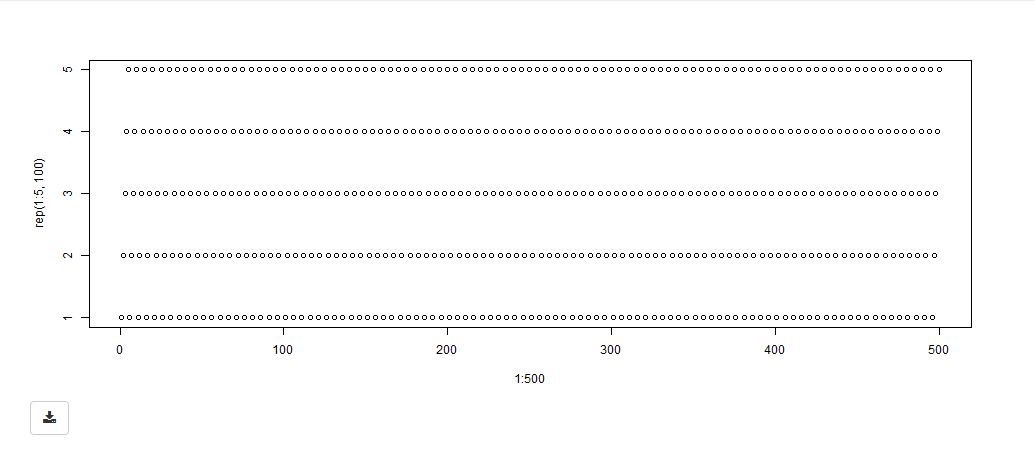
同样,我希望解决方案在屏幕上显示时自动确定当前图形的维度,并将这些维度应用到保存的png输出图像中。
回答 2
Stack Overflow用户
发布于 2017-08-11 20:03:18
在UI中添加以下javascript:
 tags$script("$(document).on('shiny:connected', function(event) {
var myWidth = $(window).width();
Shiny.onInputChange('shiny_width',myWidth)

});"),

  tags$script("$(document).on('shiny:connected', function(event) {
var myHeight = $(window).height();
Shiny.onInputChange('shiny_height',myHeight)

});")然后,按照以下方式更改downloadHandler代码:
  output$savePlot <- downloadHandler(
    filename = "file.png",
    content = function(file) {
      png(file,
          width = input$shiny_width,
          height = input$shiny_height)
      plotInput()
      dev.off()
    }
)Stack Overflow用户
发布于 2020-10-13 16:01:56
可以使用图像URI保存图像。在本例中,图像与您在闪亮中看到的图像完全相同。另外,您也不需要在downloadHandler中重新绘制。请看我在这个帖子中的答案,以获得详细信息:link
在这里重新发布示例代码:
library(shiny)
library(magick)
library(shinyjs)

ui <- fluidPage(
  useShinyjs(),
  #visibale action button - this button simulates click on hidden download button
  actionButton("save_myPlot", "Download", icon = icon("download")),
  #hidden download button
  downloadButton("save_myPlot_hidden", style = "visibility: hidden;"),
  # plot
  plotOutput("myPlot")
)

server <- function(input, output, session) {

  #get the plot image URI and simulate click on download button
  observeEvent(input$save_myPlot, {
    shinyjs::runjs(
      "
       var p_src = document.getElementById('myPlot').childNodes[0].src;
       Shiny.setInputValue('plot_src', p_src);
       document.getElementById('save_myPlot_hidden').click();
      "
    )
  })

  # downaload handler - save the image
  output$save_myPlot_hidden <- downloadHandler(
    filename = function() {
      paste0("plot_", Sys.Date(), ".png") },
    content = function(file) {
      # get image code from URI
      plot_src <- gsub("^data.*base64,", "", input$plot_src)
      # decode the image code into the image
      plot_image <- image_read(base64_decode(plot_src))
      # save the image
      image_write(plot_image, file)
    })

  # plot
  output$myPlot <- renderPlot(
    plot(rnorm(5), rnorm(5))
  )
}

shinyApp(ui = ui, server = server)https://stackoverflow.com/questions/45642283
复制相似问题
腾讯云开发者

Copyright © 2013 - 2026 Tencent Cloud. All Rights Reserved. 腾讯云 版权所有
深圳市腾讯计算机系统有限公司 ICP备案/许可证号:粤B2-20090059  粤公网安备44030502008569号
腾讯云计算(北京)有限责任公司 京ICP证150476号 | 京ICP备11018762号