
Xamarin.Forms:软键盘重叠页面底部的最后一个条目(滚动时)
Xamarin.Forms 2.5.0.91635
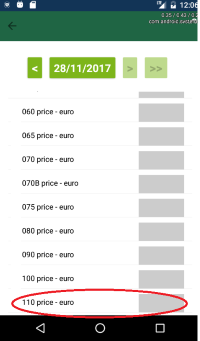
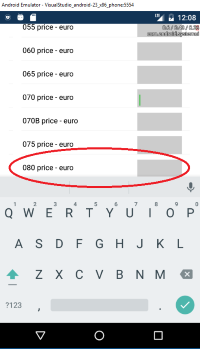
我有一个页面,它有一个列表视图,其中包含一个输入条目和一个标签。我的问题是,在Android中,点击第一个或第二个条目,键盘就会出现。我希望它向下滚动页面以选择最后一个条目,但我无法看到(或聚焦)最后一个条目,因为它与软键盘重叠。当软键盘启用/可见时,我无法滚动到最后一个条目,因为软键盘隐藏了最后一个entr(ies)。我可以滚动到最后一项时,我隐藏/禁用软键盘,但我不想这样!
我在网上搜索,尝试了很多次,但都没有效果。
未能奏效的解决方案:https://gist.github.com/jimmgarrido/e36033b26f01e8da091fd321d41d991a xamarinformscorner.blogspot.nl/2016/06/soft-keyboard-hiding-entries-fields-in.html https://forums.xamarin.com/discussion/62668/appcompat-does-not-resize-screen-with-keyboard
<ContentPage.Content>
        <ScrollView>
                <StackLayout x:Name="StackLayoutButtons" HorizontalOptions="Center" Orientation="Horizontal">
                    <Button x:Name="PreviousButton" WidthRequest="35" FontSize="23" FontAttributes="Bold" Clicked="PreviousButton_OnClicked"></Button>
                    <Button x:Name="DatePickerButton" FontSize="20" Clicked="DatePickerButton_OnClicked"></Button>
                    <DatePicker x:Name="DatePicker" Format="dddd d MMMM yyyy" VerticalOptions="Center" HorizontalOptions="FillAndExpand" IsVisible="False" IsEnabled="False"/>
                    <Button x:Name="NextButton" WidthRequest="35" FontSize="23" FontAttributes="Bold" Clicked="NextButton_OnClicked"></Button>
                    <Button x:Name="LastButton" WidthRequest="50" FontSize="23" FontAttributes="Bold" Clicked="LastButton_OnClicked"></Button>
                </StackLayout>

                <ListView x:Name="ListViewItemPage" ItemTapped="ListView_OnItemTapped">
                    <ListView.ItemTemplate>
                        <DataTemplate>
                            <ViewCell>
                                <RelativeLayout x:Name="RelativeLayout" >
                                    <Label x:Name="DescriptionLabel" Text="{Binding Description}"  RelativeLayout.YConstraint="{ConstraintExpression Type=RelativeToParent, Property=Y, Factor=0, Constant=15}" RelativeLayout.XConstraint="{ConstraintExpression Type=RelativeToParent, Property=X, Factor=0, Constant=15}" />
                                    <Entry x:Name="Entry" WidthRequest="85" Keyboard="Text" HorizontalTextAlignment="Start" FontSize="19" HorizontalOptions="Center" VerticalOptions="Center" Text="{Binding Value, Mode=TwoWay, Converter={StaticResource FloatValueConverter}}" Unfocused="ValueEntry_OnUnfocused"
                                           RelativeLayout.YConstraint="{ConstraintExpression Type=RelativeToParent, Property=Y, Factor=0, Constant=10}" RelativeLayout.XConstraint="{ConstraintExpression Type=RelativeToParent, Property=Width, Factor=1, Constant={StaticResource ConstantMultiPlatform}}" >
                                        <Entry.HeightRequest>
                                            <OnPlatform x:TypeArguments="x:Double">
                                                <On Platform="iOS" Value="28"></On>
                                                <On Platform="Android" Value="42"></On>
                                                <On Platform="UWP" Value="32"></On>
                                            </OnPlatform>
                                        </Entry.HeightRequest>
                                    </Entry>
                                </RelativeLayout>
                            </ViewCell>
                        </DataTemplate>
                    </ListView.ItemTemplate>
                </ListView>
            </StackLayout>
        </ScrollView>
    </ContentPage.Content>
也许这里有人有解决这个问题的解决方案/解决办法?
Stack Overflow用户
发布于 2019-01-28 14:38:08
我看到这是一个旧线程,但我也可以认为,在一个滚动视图中有一个listview。那曾经是个麻烦。尝试使用listview标题并将按钮放在那里。
https://stackoverflow.com/questions/47530634
复制相似问题
腾讯云开发者

Copyright © 2013 - 2026 Tencent Cloud. All Rights Reserved. 腾讯云 版权所有
深圳市腾讯计算机系统有限公司 ICP备案/许可证号:粤B2-20090059  粤公网安备44030502008569号
腾讯云计算(北京)有限责任公司 京ICP证150476号 | 京ICP备11018762号